
Sf Icd 465 Form PDF Details

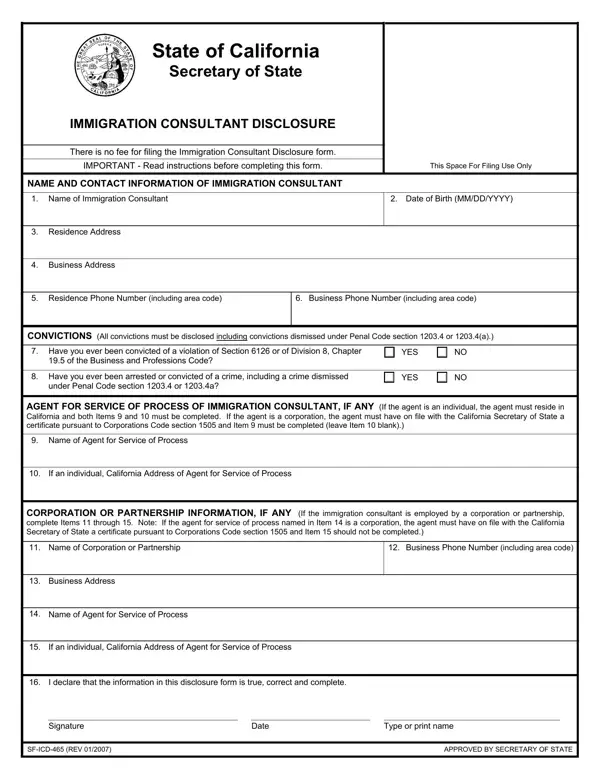
Navigating the requirements set by the State of California for immigration consultants can be a complex process, but the SF ICD 465 form, known as the Immigration Consultant Disclosure, is a critical part of this journey. Designed to enhance transparency and trust, this form must be filed with the Secretary of State before an individual begins working as an immigration consultant. It's a straightforward document that requires detailed information about the consultant's identity, criminal history, and professional affiliations. Further, it asks for the designation of an agent for service of process, ensuring there's always a clear, legal point of contact. The form also delves into any affiliations with corporations or partnerships, should they exist. A notable aspect of this process is that it bears no filing fee, unlike many other legal filings. Yet its completion is far from being a mere formality; it serves as a declaration of the consultant's commitment to comply with the state's regulations, crucial for protecting the interests of those seeking immigration assistance. To aid in this process, instructions are provided, breaking down each section of the form to ensure clarity and accuracy in its completion. This not only demonstrates the state's commitment to regulatory compliance but also its effort to make legal processes more accessible to professionals in the field of immigration consulting.

QuestionAnswer
Form NameSf Icd 465 Form
Form Length2 pages
Fillable?No
Fillable fields0
Avg. time to fill out30 sec
Other namesYYYY, gov, SF-ICD-465, legibly

How to Edit Sf Icd 465 Form Online for Free

You'll be able to fill out abbreviate without difficulty with our online editor for PDFs. The tool is constantly improved by our staff, acquiring useful features and becoming better. All it requires is a few simple steps:

Step 1: Click the "Get Form" button above. It's going to open up our editor so that you could begin filling in your form.

Step 2: With this online PDF editing tool, it's possible to do more than just fill out blank form fields. Try all of the functions and make your forms seem sublime with customized textual content added, or tweak the original content to excellence - all that backed up by the capability to insert your own images and sign the document off.

This form will require specific information; in order to ensure correctness, take the time to bear in mind the recommendations just below:

1. Fill out your abbreviate with a number of essential blank fields. Consider all of the necessary information and make sure absolutely nothing is omitted!

4a conclusion process explained (step 1)

2. Soon after filling in this step, head on to the next part and fill out the essential details in these fields - Name of Corporation or Partnership, Business Phone Number including, Business Address, Name of Agent for Service of, If an individual California, I declare that the information in, Signature, SFICD REV, Date, Type or print name, and APPROVED BY SECRETARY OF STATE.

4a completion process outlined (step 2)

Always be very careful while filling out If an individual California and I declare that the information in, because this is the section where a lot of people make errors.

3. This third section is relatively straightforward, For easier completion this form is, Statutory provisions are found in, Along with the form it is, Copy of valid and current photo, An identification card or drivers, x passport photo, Complete the Immigration, Items Enter the name birth date, business telephone numbers, Item, Item, Item, Check Yes or No if the immigration, Check Yes or No if the immigration, and Enter the name of the agent for - all these blanks will need to be completed here.

How you can fill in 4a step 3

Step 3: As soon as you have glanced through the details entered, press "Done" to finalize your form at FormsPal. Get hold of your abbreviate the instant you sign up for a 7-day free trial. Easily gain access to the pdf from your personal account, together with any modifications and changes being conveniently kept! FormsPal ensures your information confidentiality by using a protected method that in no way records or shares any personal information typed in. Feel safe knowing your files are kept protected when you work with our editor!