
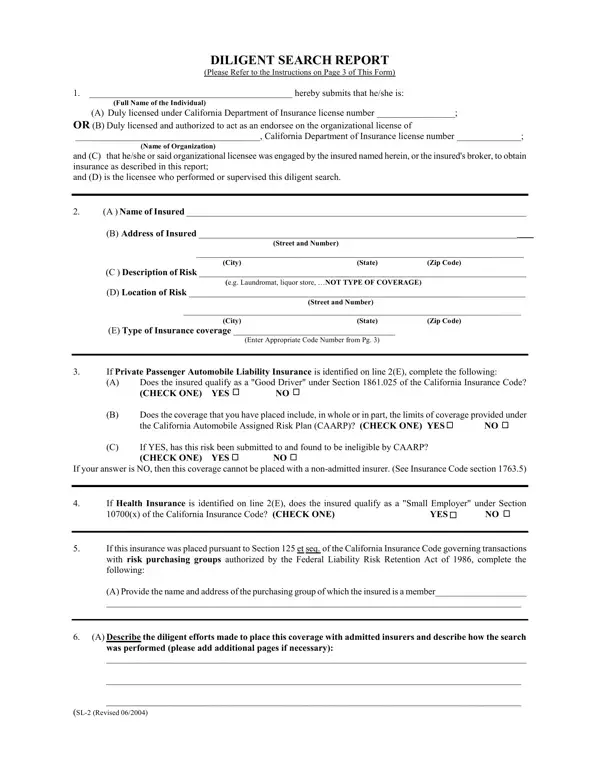

SL-2 Form at a glance
What it is: The SL-2 Form is the Diligent Search Report of The Surplus Line Association of California, in which you submit that you performed or supervised this diligent search.
A filled-in SL-2 Form example: a licensed agent-broker reports a vacant building
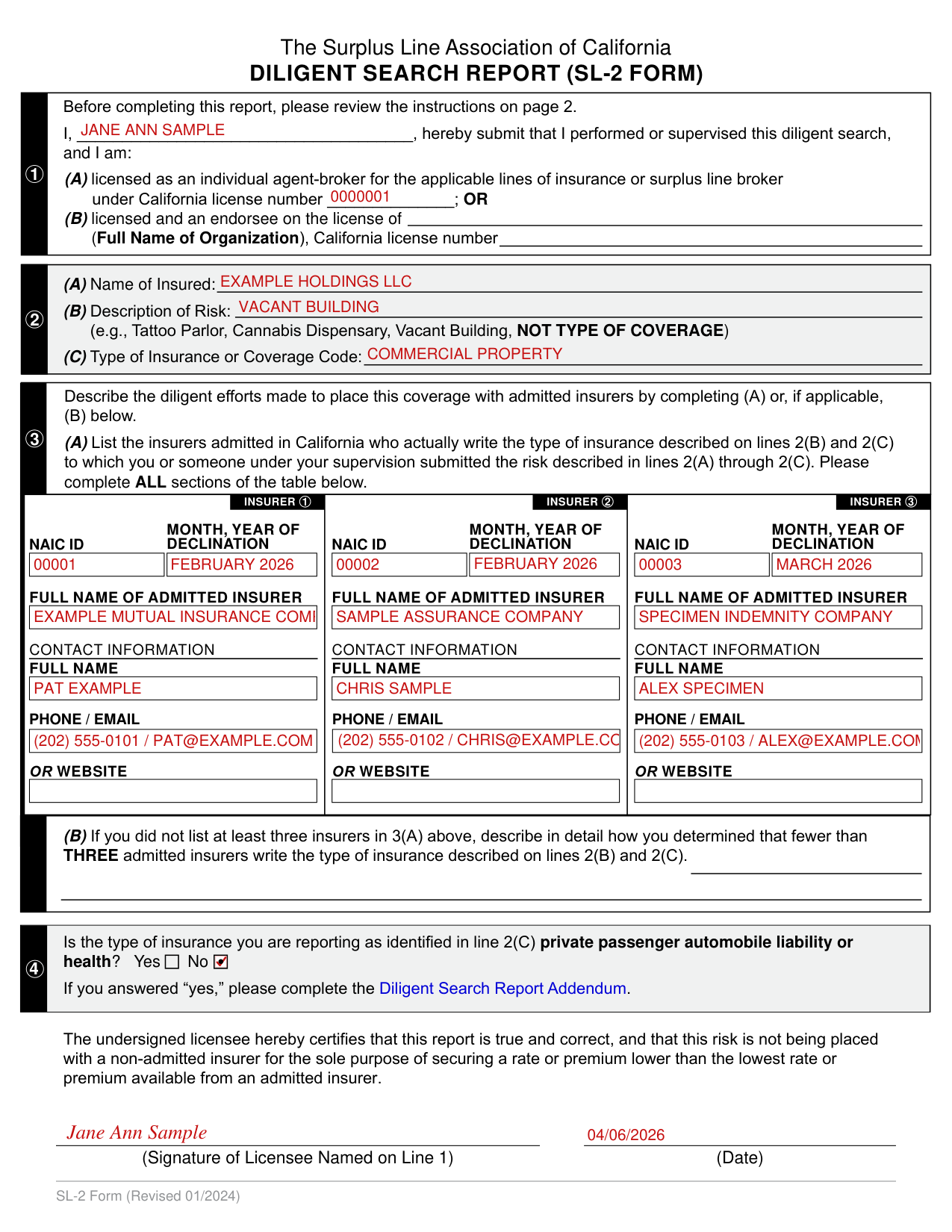
How to fill out SL-2 Form, box by box
Line 1, your name and your California license number

Fill in the blank after I.
If you are (A) licensed as an individual agent-broker for the applicable lines of insurance or surplus line broker, enter your California license number; OR, if you are (B) licensed and an endorsee on the license of (Full Name of Organization), enter the Full Name of Organization and its California license number.
Line 2, the Name of Insured, the Description of Risk and the Type of Insurance

Enter the Name of Insured.
Enter the Description of Risk, NOT TYPE OF COVERAGE (e.g., Tattoo Parlor, Cannabis Dispensary, Vacant Building).
Enter the Type of Insurance or Coverage Code.
Line 3(A), the insurers admitted in California
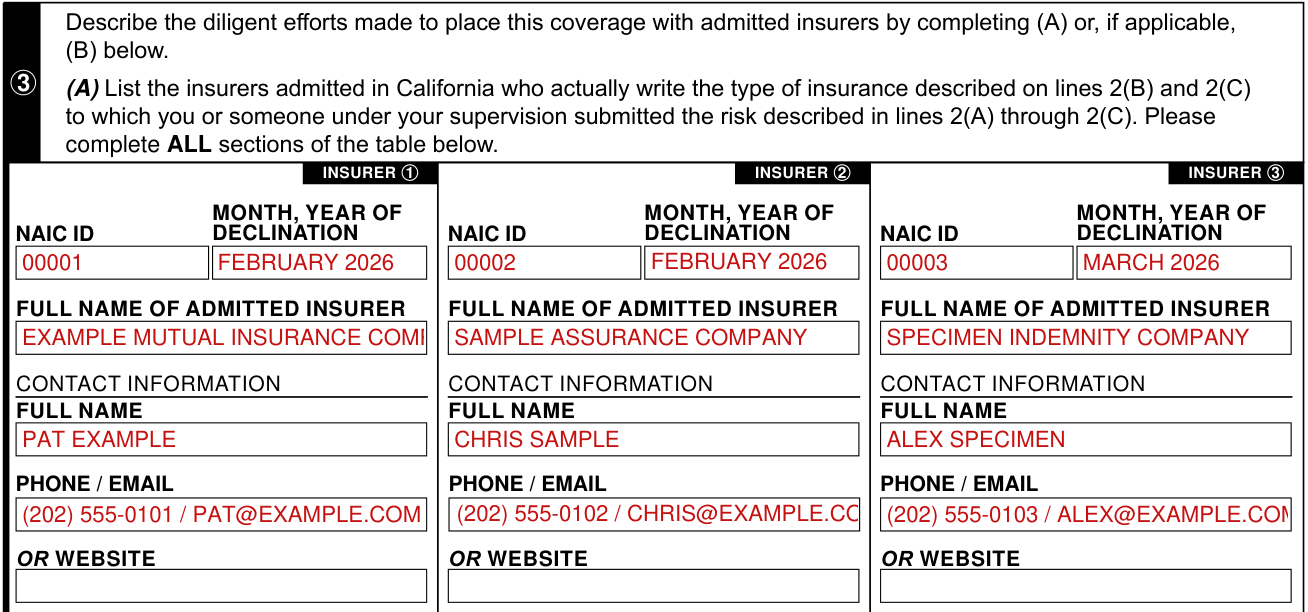
On line 3, describe the diligent efforts made to place this coverage with admitted insurers by completing (A) or, if applicable, (B).
In (A), list the insurers admitted in California who actually write the type of insurance described on lines 2(B) and 2(C) to which you or someone under your supervision submitted the risk described in lines 2(A) through 2(C), and complete ALL sections of the table.
For each of INSURER 1, INSURER 2 and INSURER 3, enter the NAIC ID, the MONTH, YEAR OF DECLINATION, the FULL NAME OF ADMITTED INSURER, a FULL NAME and the PHONE / EMAIL OR WEBSITE under CONTACT INFORMATION.
Line 3(B), fewer than three admitted insurers

If you did not list at least three insurers in 3(A), describe in detail how you determined that fewer than THREE admitted insurers write the type of insurance described on lines 2(B) and 2(C).
Line 4, private passenger automobile liability or health

Mark Yes or No: is the type of insurance you are reporting, as identified in line 2(C), private passenger automobile liability or health? If you answered “yes,” complete the Diligent Search Report Addendum.
Signature of Licensee Named on Line 1

The undersigned licensee certifies that this report is true and correct, and that this risk is not being placed with a non-admitted insurer for the sole purpose of securing a rate or premium lower than the lowest rate or premium available from an admitted insurer.
Sign on the line marked Signature of Licensee Named on Line 1, and enter the Date.
More rules for SL-2 Form
Before completing this report, review the instructions on page 2.
Common questions about SL-2 Form
What is an SL-2 form?
The SL-2 Form is the Diligent Search Report of The Surplus Line Association of California, in which you submit that you performed or supervised this diligent search.
Sources
[1] SL-2 Form (Revised 01/2024), Diligent Search Report, The Surplus Line Association of California (the Official source link on this page).