
Ssa 1372 Form PDF Details

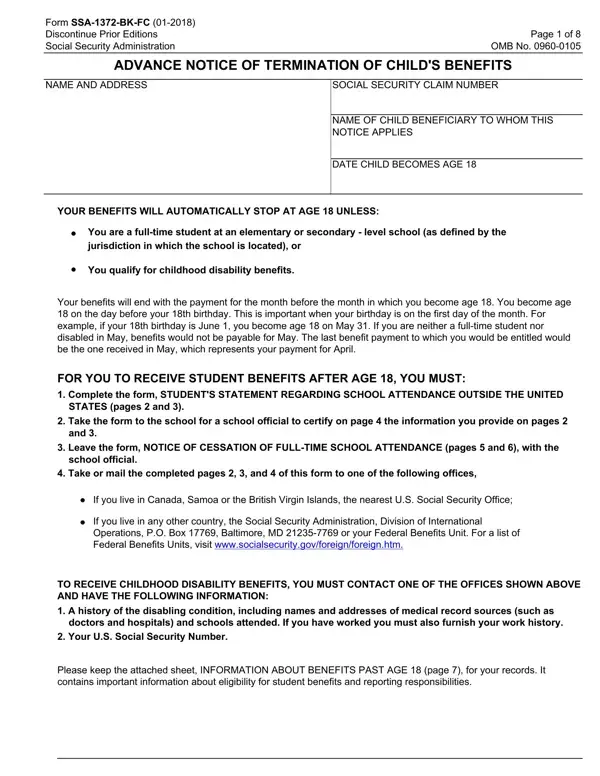
The Social Security Administration's Form SSA-1372-BK-FC plays a critical role in determining the continuation of benefits for children beneficiaries as they approach the age of majority. This document is essential for those who, upon turning 18, might still be eligible for benefits either as full-time students in an elementary or secondary-level school, or due to a qualifying disability. The form consists of several parts, designed to gather comprehensive information about the student's school attendance, plans for future schooling, any existing disabilities, marital status, and even work history outside the United States. For students studying outside the U.S., the completion and certification of this form by their educational institution are necessary to prevent the automatic cessation of their Social Security benefits. Moreover, it outlines the steps and documentation required to apply for childhood disability benefits, signifying the form’s crucial role in ensuring ongoing support for eligible beneficiaries. The SSA-1372 form also includes provisions for students and school officials to notify the Social Security Administration of any change in the student's educational status, further emphasizing the importance of accurate and timely information in maintaining benefit eligibility.

QuestionAnswer
Form NameSsa 1372 Form
Form Length8 pages
Fillable?No
Fillable fields0
Avg. time to fill out2 min
Other namesssa 1372 bk, ssa 1372 pdf, form ssa 1372 bk fc, ssa 1372 printable form

How to Edit Ssa 1372 Form Online for Free

With the online editor for PDFs by FormsPal, you can easily fill in or change ssa 1372 right here and now. In order to make our editor better and easier to utilize, we continuously design new features, bearing in mind suggestions coming from our users. Here is what you'll need to do to get started:

Step 1: Click the "Get Form" button above. It is going to open our editor so you can start filling out your form.

Step 2: This editor gives you the opportunity to change PDF files in a variety of ways. Improve it by including any text, adjust original content, and add a signature - all close at hand!

As for the blanks of this particular form, this is what you want to do:

1. First, once filling in the ssa 1372, start out with the part that features the subsequent blanks:

ssa 1372 termination fill completion process explained (part 1)

2. Now that the last array of fields is complete, it's time to add the required particulars in If you live in any other country, Operations PO Box Baltimore MD, TO RECEIVE CHILDHOOD DISABILITY, A history of the disabling, doctors and hospitals and schools, Your US Social Security Number, and Please keep the attached sheet so you're able to move on further.

TO RECEIVE CHILDHOOD DISABILITY, A history of the disabling, and If you live in any other country inside ssa 1372 termination fill

As to TO RECEIVE CHILDHOOD DISABILITY and A history of the disabling, ensure that you get them right in this section. Both of these could be the most significant ones in the document.

3. This step is normally hassle-free - fill in all the fields in NAME AND ADDRESS, The information requested on this, SOCIAL SECURITY CLAIM NUMBER, Current School Year, To change or correct the address, a Are you now in fulltime, Yes, Note If you are completing this, b Print the following information, School Year Began Month Day Year, School Year Will End, Month Day Year, Name, Street Address, and City and State or Province in order to complete this process.

ssa 1372 termination fill conclusion process explained (stage 3)

4. The fourth paragraph comes with all of the following fields to look at: cShow the type of school, High School including gymnasium, Preparatory School including, Other Specify, d Show the number of hours you are, e Show the grade in which you are, each week, f Show your EXPECTED graduation, Month Year, g What months between now and your, For example months of summer, Last School Year, a Print the name and address of, and shown in question show Same and.

ssa 1372 termination fill conclusion process outlined (part 4)

5. As a final point, this last part is what you need to wrap up before finalizing the PDF. The fields at issue include the following: b Date the school year began Month, Date the school year ended Month, c Show the number of hours you, d Show the grade in which you were, attend each week, Next School Year, a Do you intend to be in fulltime, If No or Undecided go to question, Yes, and Undecided.

Writing segment 5 in ssa 1372 termination fill

Step 3: After going through the fields you've filled out, press "Done" and you're good to go! Go for a free trial subscription at FormsPal and obtain direct access to ssa 1372 - with all transformations preserved and accessible inside your FormsPal account page. FormsPal is committed to the confidentiality of our users; we ensure that all information handled by our editor is secure.