

Form ST-120 at a glance
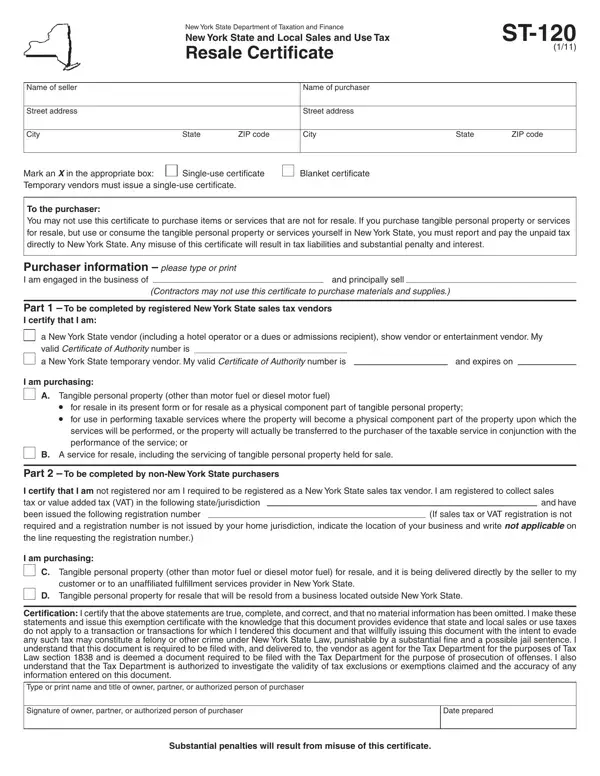
What it is: Form ST-120 is the New York State and Local Sales and Use Tax Resale Certificate of the Department of Taxation and Finance.
Who signs: Sign as the owner, partner, or authorized person of the purchaser, and enter the Date prepared.
This certificate is only for use by a purchaser who:
is registered as a New York State sales tax vendor and has a valid Certificate of Authority issued by the Tax Department and is making purchases of tangible personal property (other than motor fuel or diesel motor fuel) or services that will be resold or transferred to the purchaser's customers, or
is not required to be registered with the New York State Tax Department; is registered with another state, the District of Columbia, a province of Canada, or other country, or is located in a state, province, or country which does not require sellers to register for sales tax or VAT purposes; and is purchasing items for resale that will be either delivered by the seller to the purchaser's customer or to an unaffiliated fulfillment service provider located in New York State, or delivered to the purchaser in New York State, but resold from a business located outside the state.
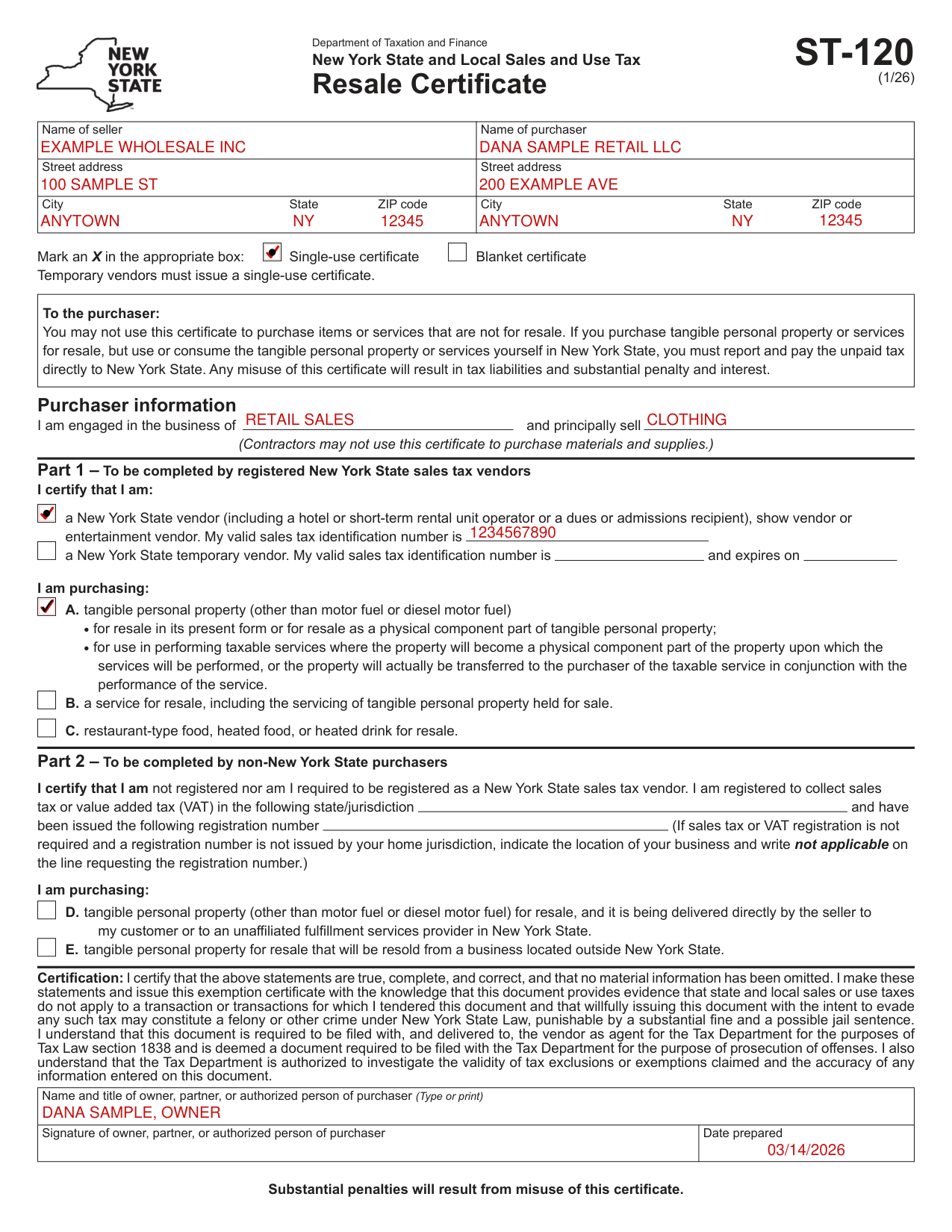
A filled-in Form ST-120 example: a vendor buys clothing for resale
How to fill out Form ST-120, box by box
Name of seller and name of purchaser

Enter the Name of seller and the Name of purchaser, each with Street address, City, State and ZIP code.
Enter all the information requested on the front of this form.
Single-use certificate or Blanket certificate

Mark an X in the appropriate box: Single-use certificate or Blanket certificate. Temporary vendors must issue a single-use certificate.
You may mark an X in the Blanket certificate box to cover all purchases of the same general type of property or service purchased for resale.
If you do not mark an X in the Blanket certificate box, the certificate will be deemed a Single-use certificate.
Temporary vendors may not issue a blanket certificate.
A temporary vendor is a vendor (other than a show or entertainment vendor), who, in no more than two consecutive quarters in any 12-month period, makes sales of tangible personal property or services that are subject to tax.
Purchaser information

Enter what you are engaged in the business of and principally sell. Contractors may not use this certificate to purchase materials and supplies.
Part 1, registered New York State sales tax vendors
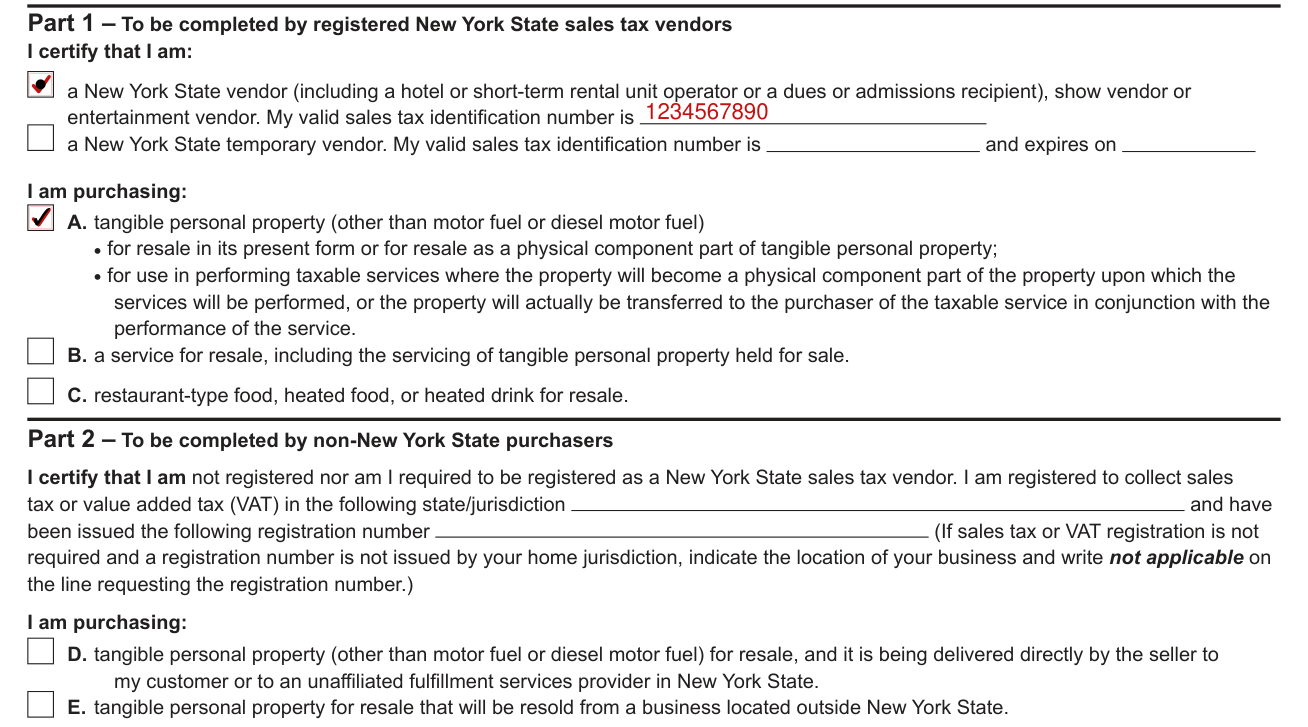
Part 1 - To be completed by registered New York State sales tax vendors. "I certify that I am:"
Mark one: a New York State vendor (including a hotel or short-term rental unit operator or a dues or admissions recipient), show vendor or entertainment vendor, with the line My valid sales tax identification number is; or a New York State temporary vendor, with the lines My valid sales tax identification number is and expires on.
Mark box A for tangible personal property (other than motor fuel or diesel motor fuel) for resale in its present form or for resale as a physical component part of tangible personal property, or for use in performing taxable services where the property will become a physical component part of the property upon which the services will be performed, or the property will actually be transferred to the purchaser of the taxable service in conjunction with the performance of the service. Mark box B for a service for resale, including the servicing of tangible personal property held for sale.
Mark box C for restaurant-type food, heated food, or heated drink for resale.
Part 2, non-New York State purchasers
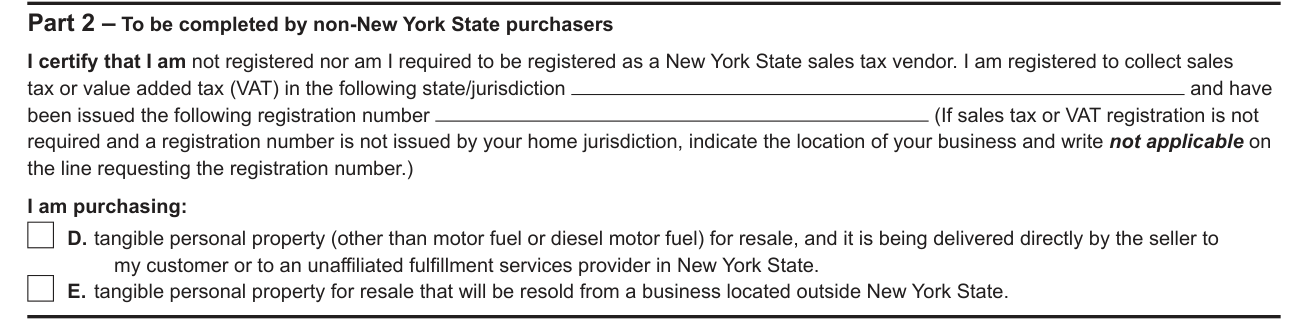
Part 2 - To be completed by non-New York State purchasers
"I certify that I am not registered nor am I required to be registered as a New York State sales tax vendor. I am registered to collect sales tax or value added tax (VAT) in the following state/jurisdiction and have been issued the following registration number (If sales tax or VAT registration is not required and a registration number is not issued by your home jurisdiction, indicate the location of your business and write not applicable on the line requesting the registration number.)"
D. tangible personal property (other than motor fuel or diesel motor fuel) for resale, and it is being delivered directly by the seller to my customer or to an unaffiliated fulfillment services provider in New York State. E. tangible personal property for resale that will be resold from a business located outside New York State.
Certification and signature

"I certify that the statements are true, complete, and correct, and that no material information has been omitted. I make these statements with the knowledge that this document provides evidence that state and local sales or use taxes do not apply to a transaction or transactions for which I tendered this document. I understand that this document is required to be filed with, and delivered to, the vendor as agent for the Tax Department for the purposes of Tax Law section 1838. Willfully issuing this document with the intent to evade any such tax may constitute a felony or other crime under New York State Law, punishable by a substantial fine and a possible jail sentence."
Enter the Name and title of the owner, partner, or authorized person of the purchaser (Type or print).
Sign as the owner, partner, or authorized person of the purchaser, and enter the Date prepared.
More rules for Form ST-120
You may not use this certificate to purchase items or services that are not for resale. If you purchase tangible personal property or services for resale, but use or consume the tangible personal property or services yourself in New York State, you must report and pay the unpaid tax directly to New York State.
The burden of proof that the tax was not required to be collected is upon the seller; the seller must keep this certificate for at least three years after the due date of the return to which it relates, or the date the return was filed, if later.
Common questions about Form ST-120
What is the ST-120 form used for in New York?
Form ST‑120, Resale Certificate, is a sales tax exemption certificate.
Is there a deadline?
To the Seller: you must get a properly completed exemption certificate from your customer no later than 90 days after the delivery of the property or the performance of the service; if you are a New York State registered vendor and accept an exemption document, you will be protected from liability for the tax, if the certificate is valid.
Is there a penalty?
Substantial penalties will result from misuse of this certificate. These include: A penalty equal to 100% of the tax due; A $50 penalty for each fraudulent exemption certificate issued (checked October 22, 2026); Criminal felony prosecution, punishable by a substantial fine and a possible jail sentence; and Revocation of your Certificate of Authority, if you are required to be registered as a vendor.
When is this form not the right one?
Contractors cannot use this certificate. They must either issue Form ST-120.1, Contractor Exempt Purchase Certificate, if the tangible personal property being purchased qualifies for exemption as specified by the certificate, or issue Form AU-297, Direct Payment Permit, or pay sales tax at the time of purchase. This certificate does not exempt prepaid sales tax on cigarettes. This certificate may not be used to purchase motor fuel or diesel motor fuel.
Sources
[1] Form ST-120 (1/26), New York State and Local Sales and Use Tax Resale Certificate, New York State Department of Taxation and Finance (the Official source link on this page).