Standard Form 1188 PDF Details

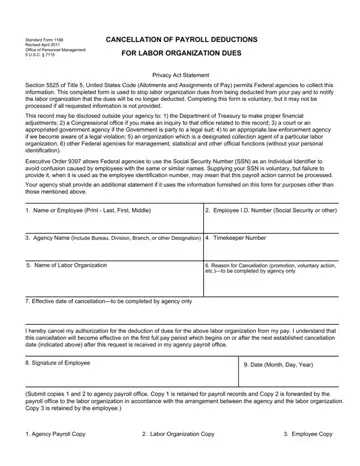
When individuals decide it's time to modify their financial obligations, especially those related to labor organization dues, the Standard Form 1188 plays a pivotal role. Revised in April 2011 by the Office of Personnel Management under the authorization of 5 U.S.C. § 7115, this form serves as a crucial document for federal employees wishing to cease payroll deductions for union dues. Its significance lies not only in facilitating this process but also in ensuring the employee's decision is communicated clearly to all parties involved. The form outlines necessary information including employee identification, agency details, and the specific labor organization involved, making the transition smooth. Additionally, it carries implications for privacy and personal data handling, governed by policies like the Privacy Act Statement and guidelines on the disclosure of such information. With sections designated for the reason and effective date of the cancellation, to be filled out by the agency, it ensures transparency and clarity in the procedure. The requirement to understand the implications of not providing a Social Security Number, under Executive Order 9397, for identification purposes is also highlighted. This document, therefore, underscores an employee’s autonomy while ensuring a structured and official channel for the cancellation of labor organization dues deductions, balancing voluntary action with procedural necessity.

QuestionAnswer
Form NameStandard Form 1188
Form Length1 pages
Fillable?No
Fillable fields0
Avg. time to fill out15 sec
Other namessf1188, Allotments, Timekeeper, 1188 form

How to Edit Standard Form 1188 Online for Free

The PDF editor makes managing forms convenient. It is rather effortless edit the [FORMNAME] document. Adhere to the following actions so that you can achieve this:

Step 1: Search for the button "Get Form Here" on this webpage and press it.

Step 2: Now you are able to modify form 1188. You've got a variety of options thanks to our multifunctional toolbar - you can add, delete, or alter the information, highlight its certain sections, as well as perform other commands.

For every single segment, fill out the information requested by the system.

stage 1 to completing sf1188

Step 3: Press the "Done" button. Then, you may transfer the PDF file - upload it to your electronic device or forward it by means of electronic mail.

Step 4: To prevent probable forthcoming concerns, it's recommended to obtain as much as two or three copies of any form.

Please rate Standard Form 1188

1 Votes
If you believe this page is infringing on your copyright, please familiarize yourself with and follow our DMCA notice and takedown process - click here to proceed .