
Std 610 Form PDF Details

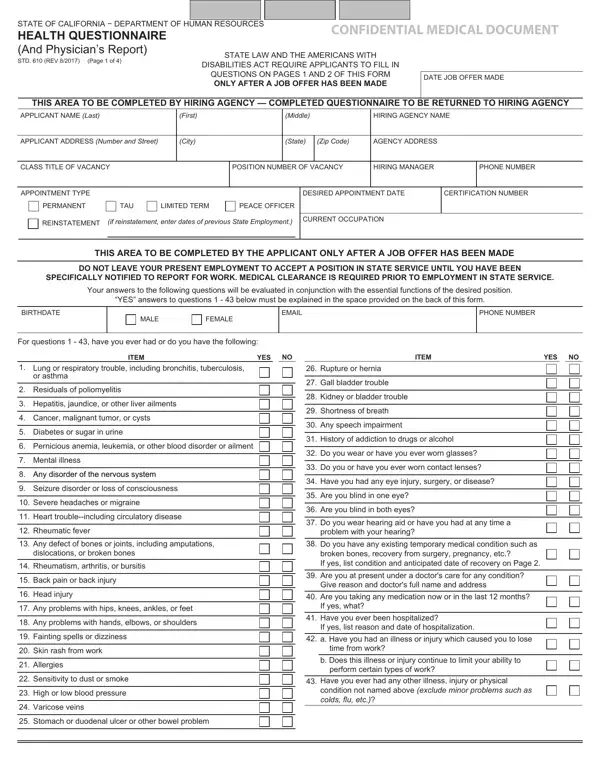
Navigating the labyrinth of employment prerequisites can often lead to encountering various forms and requirements, especially for those seeking positions within state service. Among these, the State of California - Department of Human Resources Confidential Medical Document, known as the Std 610 form, serves as a critical piece in ensuring the suitability of candidates for their roles, in alignment with state law and the Americans with Disabilities Act. This four-page document is intricately designed to collect comprehensive health-related information from applicants only after a job offer has been extended, emphasizing the state’s commitment to consider health conditions in relation to job responsibilities without breaching privacy or discrimination guidelines. The first half of the form demands candid responses from the applicant regarding a vast array of health questions, while the latter half is reserved for a detailed physician’s report. This not only facilitates a well-rounded evaluation of an applicant's medical fitness but also underlines the importance of safety and accommodation in the workplace. Through sections that require disclosure of conditions that could potentially affect job performance, to the physician’s objective remarks and a review by the California Department of Human Resources' medical officer, the Std 610 form embodies the procedural integrity and attentiveness required in the state’s hiring process. It ensures that the hiring agencies are well-informed of the medical readiness of their prospective employees, underscoring a proactive approach to workplace health and safety management.

QuestionAnswer
Form NameStd 610 Form
Form Length4 pages
Fillable?No
Fillable fields0
Avg. time to fill out1 min
Other namesstd610, how to get form std610 completed, std 610 form, ca questionnaire template

How to Edit Std 610 Form Online for Free

Should you would like to fill out the std 610 form, you don't need to download and install any sort of applications - simply make use of our PDF tool. To make our tool better and more convenient to use, we continuously develop new features, considering feedback from our users. This is what you would need to do to start:

Step 1: Open the PDF file inside our tool by pressing the "Get Form Button" in the top section of this page.

Step 2: With the help of our online PDF file editor, it is possible to accomplish more than merely complete blanks. Try all of the features and make your docs look faultless with custom text incorporated, or optimize the file's original input to excellence - all that backed up by the capability to insert any graphics and sign the PDF off.

As for the blanks of this particular PDF, here is what you need to know:

1. When filling out the the std 610 form, be sure to incorporate all necessary blank fields in the relevant section. It will help facilitate the work, which allows your information to be processed efficiently and accurately.

Completing segment 1 of california 610 get

2. Once this array of fields is done, you need to insert the needed details in ITEM, YES, ITEM, YES, Lung or respiratory trouble, Residuals of poliomyelitis, Hepatitis jaundice or other liver, Cancer malignant tumor or cysts, Diabetes or sugar in urine, Pernicious anemia leukemia or, Mental illness, Any disorder of the nervous system, Seizure disorder or loss of, Severe headaches or migraine, and Heart troubleincluding circulatory in order to progress further.

Tips to complete california 610 get portion 2

3. This next part is related to Any problems with hips knees, Any problems with hands elbows or, Fainting spells or dizziness, Skin rash from work, Allergies, Sensitivity to dust or smoke, High or low blood pressure, Varicose veins, Stomach or duodenal ulcer or other, Are you taking any medication now, Have you ever been hospitalized If, a Have you had an illness or, time from work, b Does this illness or injury, and perform certain types of work - type in each of these empty form fields.

b Does this illness or injury, Any problems with hips knees, and perform certain types of work inside california 610 get

4. Your next section will require your information in the following areas: APPLICANT NAME Last, First, Middle, HIRING AGENCY NAME, Please write your own account and, Include DATE OF ONSET YOUR PRESENT, Item, Explanation of YES Items, and Healthcare Provider and Contact. Ensure you provide all requested details to move further.

Part # 4 in filling out california 610 get

People who use this form often get some things wrong when filling out Healthcare Provider and Contact in this part. You should definitely revise what you type in here.

5. To finish your form, the particular area features several extra blank fields. Filling in CERTIFICATION I certify that I, APPLICANTS SIGNATURE, EXAMINING PHYSICIANS COMMENTS, DATE SIGNED, PHONE NUMBER, PHYSICIANS SIGNATURE MD or DO only, DATE SIGNED, DO NOT WRITE BELOW THIS LINE, REVIEWER, APPROVED, DISAPPROVED, SUBJECT TO PROPER PLACEMENT, CalHRs MEDICAL OFFICERS SIGNATURE, DATE SIGNED, and CalHRs MEDICAL OFFICERS NAME Typed will certainly wrap up the process and you can be done very fast!

Step number 5 for completing california 610 get

Step 3: After going through your filled out blanks, click "Done" and you are good to go! Sign up with FormsPal now and immediately get the std 610 form, prepared for download. Each and every edit made is handily preserved , enabling you to modify the form at a later point if needed. Here at FormsPal, we aim to make certain that all of your details are maintained private.