
Stop Work Form PDF Details

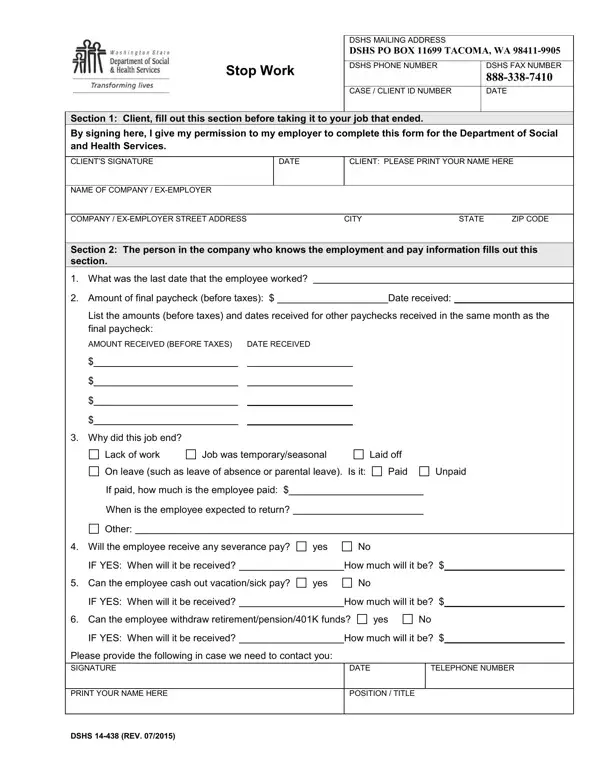
Navigating the complexities of employment and benefit adjustments necessitates careful documentation, as exemplified by the Stop Work form provided by the Department of Social and Health Services (DSHS). Employed as a crucial instrument, this form is designed for instances where an individual's employment status undergoes a change, requiring them to report this transition to DSHS. Primarily, it entails two distinct sections that need to be filled out by both the employee and the employer respectively. Initially, clients are required to complete the first part of the document with their personal information and express consent for their employer to fill in the remaining details. This encompasses the company name, address, and the client's identification data. Subsequently, the employer contributes by specifying the last working day, final paycheck amount, reasons for employment cessation, and any potential severance or benefits due to the employee. The comprehensiveness of this form ensures that all parties involved have a clear and transparent record of employment termination, facilitating a smoother transition in the adjustment of the client's benefits with DSHS. This meticulous approach aids in preventing discrepancies and ensures that the welfare of the client is maintained through accurate and timely communication between the employer, the employee, and DSHS.

QuestionAnswer
Form NameStop Work Form
Form Length1 pages
Fillable?No
Fillable fields0
Avg. time to fill out15 sec
Other namesdshs printable forms printable, wa stop work form, work form, washington dshs stop work form

How to Edit Stop Work Form Online for Free

By using the online PDF editor by FormsPal, you may fill in or change work form pdf right here and now. Our development team is ceaselessly endeavoring to expand the tool and insure that it is even faster for users with its many features. Make the most of today's revolutionary possibilities, and discover a trove of emerging experiences! Here's what you'd want to do to start:

Step 1: Hit the "Get Form" button above. It is going to open our editor so that you can begin completing your form.

Step 2: As soon as you open the editor, you will see the document all set to be filled out. In addition to filling in various fields, you may as well do some other actions with the file, particularly adding any textual content, changing the original textual content, inserting graphics, signing the form, and more.

It is straightforward to fill out the pdf with this practical tutorial! Here's what you need to do:

1. To start off, once completing the work form pdf, start with the page containing following blank fields:

Part no. 1 of completing wa stop work

2. Just after this section is done, go to type in the applicable information in these - Why did this job end, Lack of work, Job was temporaryseasonal, Laid off, On leave such as leave of absence, Paid, Unpaid, If paid how much is the employee, When is the employee expected to, Other, Will the employee receive any, yes, IF YES When will it be received, How much will it be, and Can the employee cash out.

Paid, On leave such as leave of absence, and How much will it be inside wa stop work

It's simple to make an error when filling in your Paid, hence ensure that you take a second look before you'll send it in.

3. The following segment is related to Can the employee withdraw, yes, IF YES When will it be received, How much will it be, Please provide the following in, PRINT YOUR NAME HERE, DSHS REV, DATE POSITION TITLE, and TELEPHONE NUMBER - type in these blanks.

IF YES When will it be received, DATE POSITION  TITLE, and Please provide the following in in wa stop work

Step 3: Ensure that your details are correct and then simply click "Done" to complete the task. Sign up with us right now and instantly obtain work form pdf, all set for download. All changes made by you are kept , making it possible to customize the document at a later stage as required. When using FormsPal, you're able to fill out forms without having to be concerned about data breaches or entries being shared. Our protected system ensures that your private details are stored safely.