Please rate Tdi 3P Form

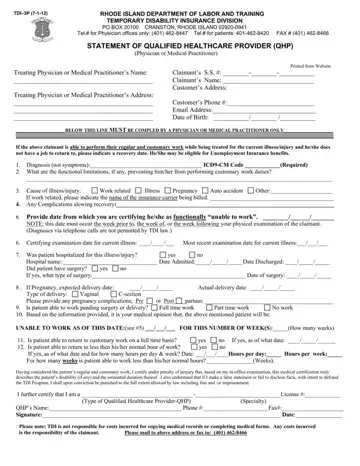
Rhode Island workers applying for Temporary Disability Insurance (TDI) use Form TDI-3P, Statement of Qualified Healthcare Provider, to have a doctor or other Qualified Healthcare Provider certify that a medical condition keeps them from performing their usual work. This form lets the TDI Division confirm medical eligibility and the expected length of disability.
Form TDI-3P documents the following:
✔️ The claimant’s identity, contact details, and date of birth.
✔️ A specific diagnosis with an ICD code and any complications that slow recovery.
✔️ Functional limits that prevent regular work, whether the case is work-related, pregnancy, accident, or other, and any hospitalizations or surgery.
✔️ The date the patient became unable to work, the number of weeks of disability, and when a full-time or partial return to work is medically expected.
✔️ The QHP’s professional type, specialty, license number, signature, and certification under penalty of perjury.
It supports TDI and Temporary Caregiver Insurance claims by giving the agency a clear medical basis for granting benefits. Today, most claimants start their TDI/TCI claims online, but the medical side is still completed on this TDI-3P form and then sent to the state by mail or fax.
| Question | Answer |
|---|---|
| Form Name | Tdi 3P Form |
| Form Length | 1 pages |
| Fillable? | Yes |
| Fillable fields | 44 |
| Avg. time to fill out | 10 min |
| Other names | tdi online, ri tdi medical certification form, tdi forms ri, rhode island tdi form |
Tdi 3P Form isn’t the one you’re looking for?
Please rate Tdi 3P Form
