
Texas Form 05 169 PDF Details

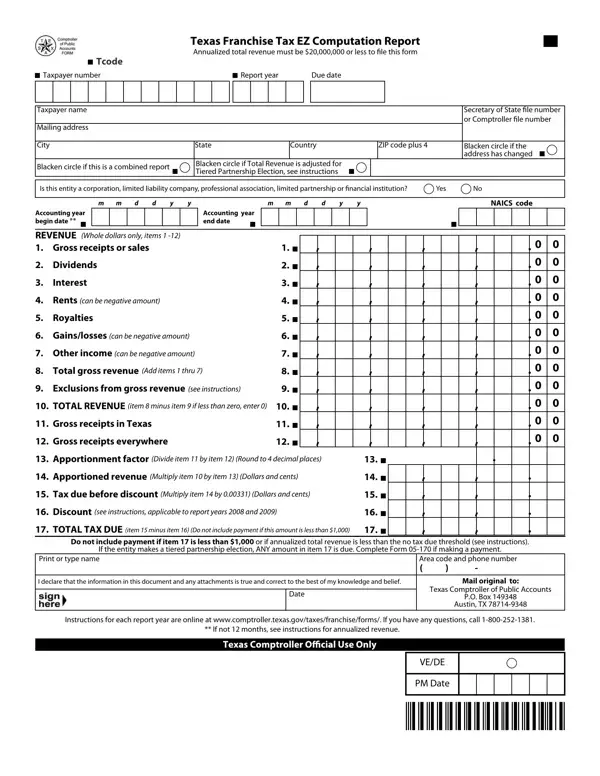
The Texas 05 169 form, officially known as the Texas Franchise Tax EZ Computation Report, serves a crucial role for businesses operating within the state. It is designed for entities that have annualized total revenue of $20 million or less, streamlining the process of calculating and reporting franchise taxes to the state. The form, under Tcode 13252, requires comprehensive financial details from businesses, including gross receipts or sales, dividends, interest, and other income types, with detailed instructions for adjustments like the Tiered Partnership Election. Additionally, it dictates specific annual due dates for submission, accommodating various accounting periods by asking for the beginning and end dates. Critical for both in-state and out-of-state businesses, the form also mandates the disclosure of gross receipts in Texas versus globally, using these figures to compute the apportioned revenue and ultimately the tax due. Notably, the form considers discounts for certain report years and expressly mentions the threshold below which tax payment is not required, emphasizing its user-friendly approach to smaller businesses. Tailored instructions guide entities through each section, ensuring compliance and accuracy in reporting, and setting a clear directive for entities seeking to fulfill their franchise tax obligations in Texas.

QuestionAnswer
Form NameTexas Form 05 169
Form Length1 pages
Fillable?No
Fillable fields0
Avg. time to fill out15 sec
Other names Fillable Online WebEx Open Forum Request Form Fax Email ...

How to Edit Texas Form 05 169 Online for Free

In case you desire to fill out Texas Form 05 169, you won't have to install any kind of programs - simply try our online PDF editor. To keep our editor on the forefront of efficiency, we work to adopt user-driven capabilities and enhancements on a regular basis. We are at all times looking for feedback - play a pivotal role in remolding PDF editing. With some basic steps, you can begin your PDF journey:

Step 1: First, access the pdf editor by pressing the "Get Form Button" in the top section of this page.

Step 2: Using our handy PDF editor, it's possible to accomplish more than just fill out blanks. Express yourself and make your forms appear great with custom text put in, or optimize the original input to perfection - all accompanied by an ability to incorporate any images and sign the document off.

This form requires particular info to be filled in, so you should definitely take some time to type in what's asked:

1. The Texas Form 05 169 requires particular details to be entered. Ensure that the next blank fields are completed:

Texas Form 05 169 writing process described (portion 1)

2. Right after this section is completed, go to type in the applicable details in all these - TOTAL REVENUE item minus item, Gross receipts in Texas, Gross receipts everywhere, Apportionment factor Divide item, Apportioned revenue Multiply item, Tax due before discount Multiply, Discount see instructions, TOTAL TAX DUE item minus item, Do not include payment if item is, If the entity makes a tiered, Print or type name, Area code and phone number, I declare that the information in, Mail original to, and Date.

The right way to fill in Texas Form 05 169 portion 2

Always be very mindful when filling out TOTAL TAX DUE item minus item and TOTAL REVENUE item minus item, since this is where a lot of people make a few mistakes.

Step 3: When you've reread the details in the blanks, press "Done" to finalize your FormsPal process. Find the Texas Form 05 169 after you subscribe to a free trial. Instantly use the pdf file from your FormsPal account page, together with any modifications and adjustments being automatically saved! At FormsPal.com, we do our utmost to be sure that your information is kept secure.