
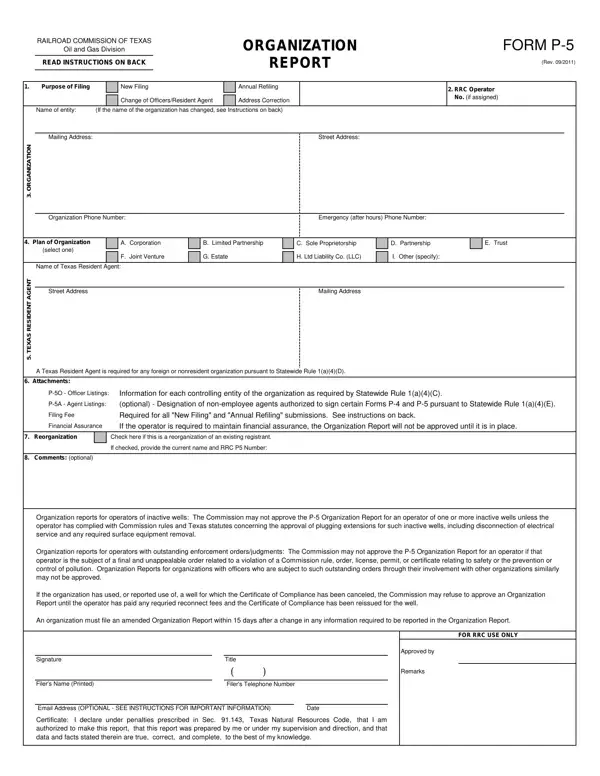
The Texas P-5 form is a comprehensive document administered by the Railroad Commission of Texas, pivotal for entities engaged in the oil and gas industry within the state. Serving as an Organization Report for the Oil and Gas Division, this form captures vital information about operators, including the purpose of filing, details about the organizational structure, and the designation of a Texas Resident Agent for foreign or non-resident entities. Accuracy and thoroughness in completing this form are paramount, given its role in ensuring compliance with the Commission's regulations concerning operational integrity, financial assurance requirements, and adherence to safety and pollution control standards. It's essential for entities to file an initial report before commencing operations and to refile annually, with prompt updates for any changes in the organization. Specific sections of the form address officer listings, optional designations of non-employee agents authorized to sign certain forms, and the necessary financial assurance to support operations. Furthermore, the form stipulates conditions under which an Organization Report might not be approved, such as outstanding enforcement orders or violations related to safety or pollution control, underscoring the Railroad Commission's commitment to maintaining high standards within Texas's oil and gas sector.
| Question | Answer |
|---|---|
| Form Name | Texas P 5 Form |
| Form Length | 4 pages |
| Fillable? | No |
| Fillable fields | 0 |
| Avg. time to fill out | 1 min |
| Other names | p5 permits, texas rrc p5, tx rrc p 5, railroad commission of texas p 5 |
Texas P 5 Form isn’t the one you’re looking for?