
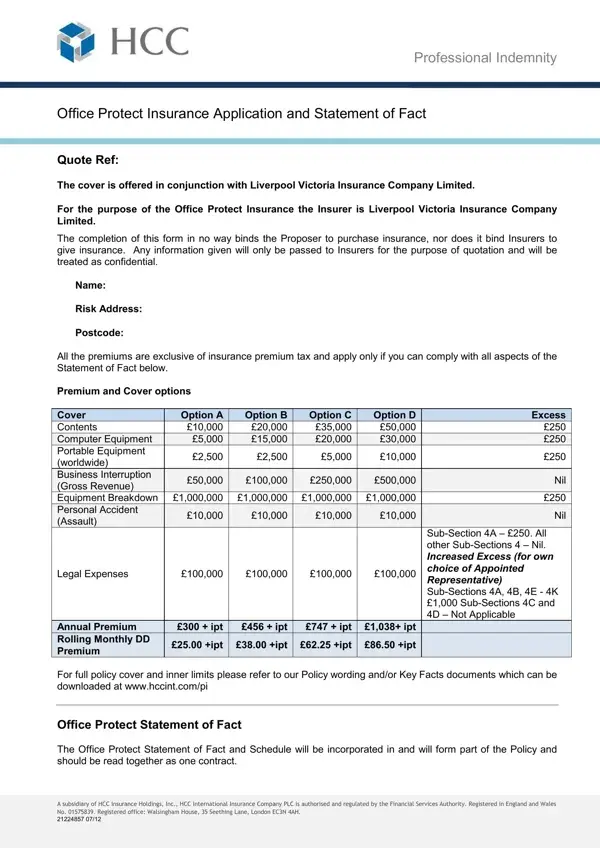
Travel agencies face a unique set of challenges and risks in the course of providing services to their clients. To mitigate these risks, obtaining the right insurance coverage is essential. The Travel Agency Quote Form serves as a crucial step in this process, specifically tailored for businesses seeking Professional Indemnity Office Protect Insurance in partnership with Liverpool Victoria Insurance Company Limited. This form not only facilitates the initial assessment for obtaining a quote but also ensures that the proposed insurance coverage aligns with the specific needs and risk profile of the travel agency. It meticulously gathers essential details such as the name, risk address, and the desired cover options among others, ensuring a thorough evaluation of the agency's requirements. With premiums and coverage options laid out clearly, from contents and computer equipment to business interruption and legal expenses, the form helps agencies select the most appropriate insurance solution. Importantly, the form emphasizes that completing it does not obligate the agency to purchase the insurance, nor does it guarantee coverage. The applicant is urged to confirm the accuracy of provided information, underscoring the importance of transparency to prevent potential issues with claims or policy validity. Additional clauses regarding premises, security measures, and a declaration intent on proceeding with a selected coverage option further tailor the insurance proposal to the unique operational aspects of a travel agency. This form embodies a comprehensive approach to initiating professional indemnity insurance coverage, carefully balancing the need for detailed information with the ease of application for travel agencies navigating the complexities of risk management.
| Question | Answer |
|---|---|
| Form Name | HCC Office Protect Insurance Application |
| Form Length | 5 pages |
| Fillable? | No |
| Fillable fields | 0 |
| Avg. time to fill out | 1 min 15 sec |
| Other names | travel quotation format, travel agency quotation letter, travels quotation format, travel quotation format in word |
Travel Agency Quote Template Form isn’t the one you’re looking for?