
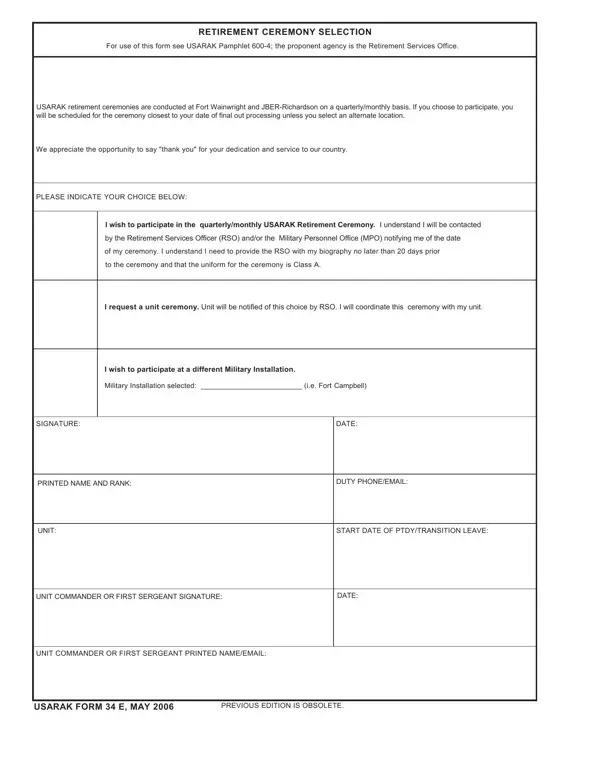
Usarak Form 34 E PDF Details

The USARAK 34 E form represents a critical component in the transition from military to civilian life for service members within the United States Army Alaska (USARAK). This document facilitates the selection process for retirement ceremonies, a pivotal moment that marks the culmination of a soldier's career and dedication to serving their country. Governed by the guidelines outlined in the USARAK Pamphlet 600-4, and managed by the Retirement Services Office, the form is a testament to the structured and respectful approach taken towards retirement within the military. It provides retiring personnel the opportunity to choose how they wish to be honored, whether at the standard quarterly or monthly ceremonies held at Fort Wainwright and Joint Base Elmendorf-Richardson (JBER)-Richardson, an alternate military installation, or through a unit-specific ceremony. The requirement for timely communication with the Retirement Services Officer, the necessity of a Class A uniform, and the need for a biographical submission underscore the ceremony’s importance and the military's attention to detail. With spaces for signatures from the retiring member, unit commander, or first sergeant, the form also emphasizes the collaborative nature of military service and the support structure that exists even as one transitions out.

QuestionAnswer
Form NameUsarak Form 34 E
Form Length1 pages
Fillable?No
Fillable fields0
Avg. time to fill out15 sec
Other namesbiography, RSO, MPO, PTDY

How to Edit Usarak Form 34 E Online for Free

Dealing with PDF documents online is actually super easy using our PDF tool. Anyone can fill out MPO here within minutes. The tool is consistently improved by us, getting new functions and turning out to be greater. Here's what you'd want to do to start:

Step 1: Just press the "Get Form Button" in the top section of this site to start up our pdf file editor. Here you will find everything that is required to fill out your document.

Step 2: As soon as you open the online editor, you'll see the form ready to be filled in. Besides filling out various blanks, you might also do several other things with the Document, such as writing your own text, changing the initial textual content, inserting images, affixing your signature to the form, and more.

This PDF doc will need some specific information; in order to ensure correctness, remember to adhere to the recommendations below:

1. The MPO needs specific information to be entered. Be sure that the subsequent blank fields are completed:

PTDY writing process detailed (step 1)

2. Soon after completing this step, head on to the next step and fill out all required particulars in all these fields - UNIT, START DATE OF PTDYTRANSITION LEAVE, UNIT COMMANDER OR FIRST SERGEANT, DATE, UNIT COMMANDER OR FIRST SERGEANT, USARAK FORM E MAY, and PREVIOUS EDITION IS OBSOLETE.

Ways to complete PTDY step 2

A lot of people frequently get some points incorrect while filling out PREVIOUS EDITION IS OBSOLETE in this part. Be sure you read again everything you enter here.

Step 3: Glance through the details you have inserted in the blank fields and then hit the "Done" button. Download your MPO once you subscribe to a 7-day free trial. Instantly get access to the pdf in your personal account page, along with any edits and changes being all kept! FormsPal is dedicated to the personal privacy of our users; we ensure that all personal information put into our editor is confidential.