
Usfws Form 3 177 PDF Details

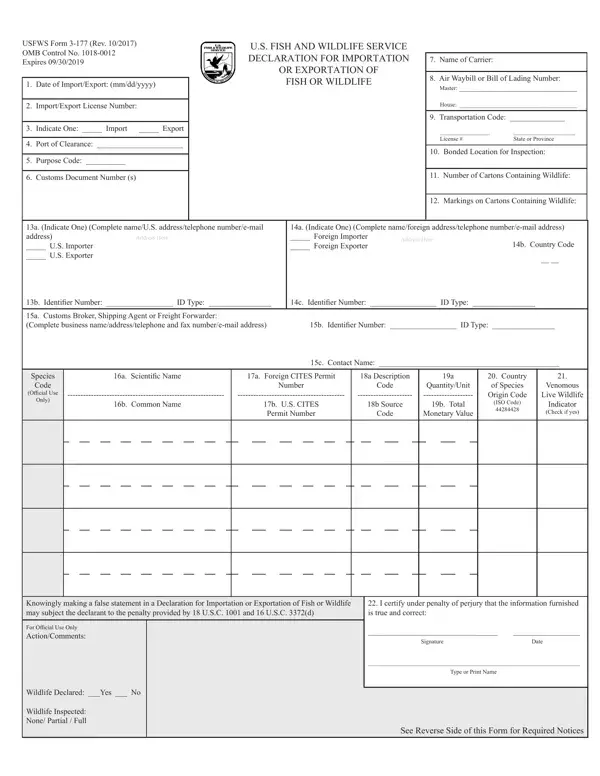
The Declaration for Importation or Exportation of Fish or Wildlife, known as the USFWS Form 3-177, serves as a critical document for individuals and entities engaged in the international trade of wildlife and wildlife products. Mandated by the U.S. Fish and Wildlife Service, this form is utilized to ensure compliance with both the Endangered Species Act (ESA) and the Convention on International Trade in Endangered Species of Wild Fauna and Flora (CITES). It collects detailed information about the wildlife being imported or exported, including species name, quantity, total monetary value, and the origin country of the species. The form also requires identification of the importer and exporter, contact details, transportation codes, and permit numbers, streamlining the process for monitoring and regulation. Significantly, it acts as a legal declaration and inaccurately completing the form may lead to severe penalties under federal law. This declaration aids in the enforcement of wildlife laws and regulations, serving as an essential tool for the management and protection of global wildlife resources. Moreover, the provided Privacy Act and Paperwork Reduction Act Statements outline the authority, purpose, and estimated burden associated with the form, emphasizing its voluntary nature but noting the necessity of its submission for lawful import or export activities.

QuestionAnswer
Form NameUsfws Form 3 177
Form Length3 pages
Fillable?No
Fillable fields0
Avg. time to fill out45 sec
Other namesfish and wildlife form 3 177, usfws declaration form 3 177, form 3177, 3 177 fish wildlife

How to Edit Usfws Form 3 177 Online for Free

3 177 fish can be completed in no time. Just make use of FormsPal PDF tool to perform the job right away. The tool is consistently updated by our staff, getting awesome functions and becoming even more convenient. Starting is easy! Everything you need to do is adhere to the following easy steps below:

Step 1: Click on the "Get Form" button above on this page to get into our editor.

Step 2: When you access the file editor, you will see the document all set to be completed. Other than filling out various blank fields, you can also do other things with the form, namely adding custom textual content, modifying the original text, adding images, affixing your signature to the form, and more.

To be able to finalize this PDF form, ensure that you provide the required information in each and every blank field:

1. For starters, when completing the 3 177 fish, start with the section with the following blank fields:

Step number 1 for completing usfws declaration form 3 177

2. When this part is filled out, go to type in the suitable information in these - b Common Name, b US CITES Permit Number, b Source, b Total, Code, Monetary Value, ISO Code, Indicator Check if yes, Knowingly making a false statement, I certify under penalty of, For Official Use Only, Wildlife Declared Yes No, Wildlife Inspected None Partial, Signature, and Date.

Wildlife Declared Yes  No, Code, and b Source of usfws declaration form 3 177

3. In this particular step, check out USFWS Form Rev OMB Control No, US FISH AND WILDLIFE SERVICE, Page of, Name of US Importer or Exporter, OR EXPORTATION OF, FISH OR WILDLIFE, CONTINUATION SHEET, Air Waybill or Bill of Lading, Species Code, Official Use, Only, a Scientific Name, a Foreign CITES Permit, a Description, and Number. All these need to be filled out with utmost precision.

How to complete usfws declaration form 3 177 stage 3

4. This next section requires some additional information. Ensure you complete all the necessary fields - Knowingly making a false statement, and I certify under penalty of - to proceed further in your process!

Filling out segment 4 in usfws declaration form 3 177

5. The pdf must be finalized by dealing with this segment. Here you can find an extensive set of blank fields that need specific details to allow your document usage to be complete: Knowingly making a false statement, I certify under penalty of, For Official Use Only, Signature Date, Type or Print Name, and See Reverse Side of this Form for.

Part number 5 in filling out usfws declaration form 3 177

As for See Reverse Side of this Form for and Signature Date, make certain you do everything properly in this section. The two of these could be the key fields in this page.

Step 3: After you have looked over the information in the blanks, just click "Done" to conclude your document creation. Acquire your 3 177 fish when you sign up for a 7-day free trial. Conveniently view the pdf form from your personal account, with any modifications and adjustments being all saved! Here at FormsPal, we aim to make sure all your information is stored private.