
Va Form 21 4170 PDF Details

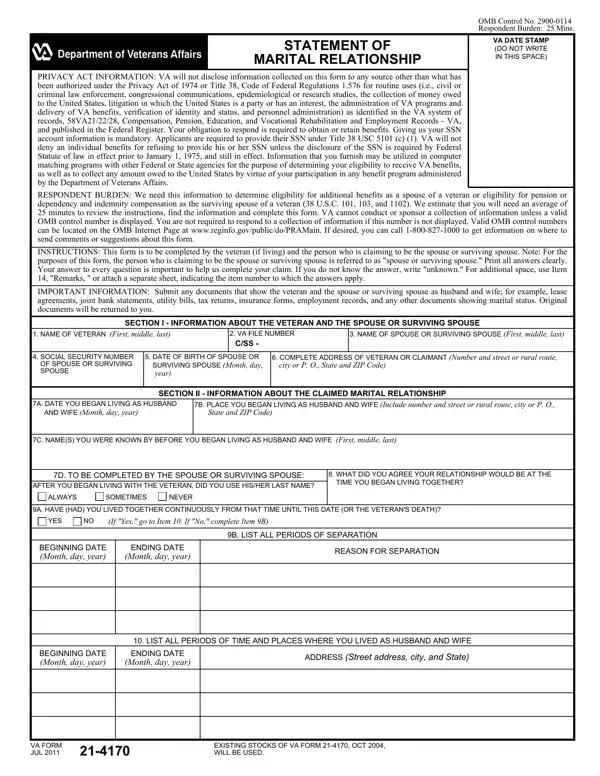
The VA Form 21-4170, known as the Statement of Marital Relationship, stands as a critical document within the United States Department of Veterans Affairs' array of forms, primarily serving spouses or surviving spouses of veterans. This form meticulously collects information to ascertain eligibility for additional benefits, thereby playing a significant role in the administration of various veterans' benefits, including pensions and dependency and indemnity compensation. Its detailed structure requires applicants to provide comprehensive personal and relationship information, including the history of the marital relationship, any children shared, and previous marital histories of both the veteran and the spouse or surviving spouse. The form operates under a strict privacy framework, adhering to the Privacy Act of 1974, ensuring that the information collected remains confidential, with disclosure only permissible under authorized circumstances. Applicants are reminded of the importance of accuracy, with the VA emphasizing the potential legal repercussions of willful misinformation. Navigating through the VA Form 21-4170, individuals are guided to submit relevant supportive documents to reinforce their claim, highlighting the critical synergy between authentic representation of one’s marital status and the successful acquisition of deserved benefits.

QuestionAnswer
Form NameVa Form 21 4170
Form Length2 pages
Fillable?No
Fillable fields0
Avg. time to fill out30 sec
Other namesva form 21 4170, va form 21 4170 fillable, 13G, don't use va form 21 4138

How to Edit Va Form 21 4170 Online for Free

Handling PDF documents online is certainly very easy with our PDF tool. Anyone can fill in JUL here painlessly. To make our editor better and more convenient to work with, we consistently work on new features, with our users' feedback in mind. With some easy steps, you'll be able to begin your PDF editing:

Step 1: First of all, access the tool by pressing the "Get Form Button" in the top section of this webpage.

Step 2: As you open the file editor, you will notice the document all set to be filled in. Apart from filling in different blanks, you may also perform many other actions with the file, namely writing any textual content, editing the original text, adding graphics, affixing your signature to the PDF, and a lot more.

This PDF doc needs some specific information; to guarantee accuracy, you should heed the following steps:

1. First of all, when completing the JUL, start out with the part containing subsequent fields:

Step no. 1 of filling out don't use va form 21 4138

2. Just after completing the previous section, go on to the subsequent step and enter the essential details in these blanks - BEGINNING DATE Month day year, Month day year, ADDRESS Street address city and, VA FORM JUL, and EXISTING STOCKS OF VA FORM OCT.

BEGINNING DATE Month day year, EXISTING STOCKS OF VA FORM  OCT, and Month day year inside don't use va form 21 4138

3. Completing A HAVE YOU HAD CHILDREN TOGETHER, YES, If Yes complete Item B If No go to, B FULL NAME OF CHILD First middle, C PLACE OF BIRTH CityState or, INSTRUCTIONS Furnish complete, SECTION IV INFORMATION ABOUT YOUR, IMPORTANT INFORMATION Attach a, A HAS HAD THE VETERAN EVER LIVED, YES, If Yes complete Items B through G, B DATE OF, MARRIAGE Month day, year, and C PLACE is essential for the next step, make sure to fill them out in their entirety. Don't miss any details!

A HAVE YOU HAD CHILDREN TOGETHER, year, and B DATE OF inside don't use va form 21 4138

People often make some errors while filling in A HAVE YOU HAD CHILDREN TOGETHER in this area. Make sure you reread whatever you type in here.

4. Now fill in this fourth portion! Here you'll get all of these MARRIAGE Month day, year, CityState or country, name, Month day, year, CityState or country, ENDED Death, divorce etc, REMARKS, I CERTIFY THAT the statements in, A SIGNATURE OF VETERAN, B DATE SIGNED, SECTION V CERTIFICATION, and A SIGNATURE OF CLAIMED SPOUSE OR blank fields to do.

don't use va form 21 4138 completion process detailed (portion 4)

5. Last of all, this final section is what you'll have to complete before finalizing the form. The blanks you're looking at include the next: A SIGNATURE OF WITNESS, B ADDRESS OF WITNESS Number and, PENALTY The law provides severe, and VA FORM JUL.

Stage # 5 for filling out don't use va form 21 4138

Step 3: As soon as you have reviewed the information in the fields, simply click "Done" to finalize your form. After creating afree trial account at FormsPal, you'll be able to download JUL or email it right away. The document will also be readily accessible through your personal account page with all your edits. Here at FormsPal, we aim to make certain that all of your information is maintained protected.