
Virginia Form W 2 PDF Details

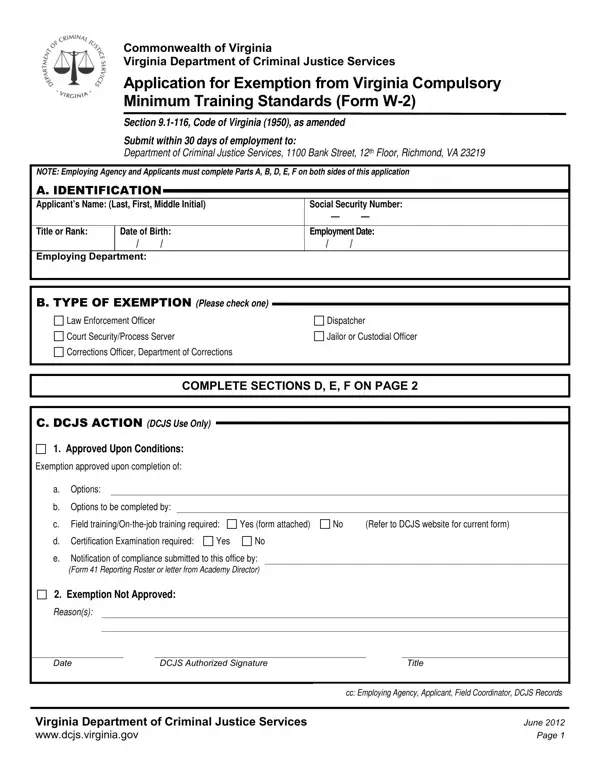
Navigating through the documentation required for exemptions from Virginia's Compulsory Minimum Training Standards can seem daunting, but understanding the Virginia W-2 form is a solid first step. This critical document, facilitated by the Virginia Department of Criminal Justice Services, serves as an application for individuals seeking exemption from the state-mandated training standards laid out in Section 9.1-116 of the Code of Virginia (1950), as updated. To be considered, applicants alongside their employing agency must accurately complete and submit Sections A, B, D, E, and F of this form within 30 days of the employment start date to the Department of Criminal Justice Services in Richmond, VA. This form encompasses various fields, including personal identification, type of exemption sought, previous criminal justice employment, and any basic criminal justice entry-level training courses completed. Additionally, it requires certifications by both the applicant and the employing agency administrator attesting to the accuracy of the information provided and compliance with certain standards, including sensitivity to cultural diversity. The form outlines a clear process for its submission and review, specifying conditions for approval or reasons for potential denial, and places a strong emphasis on verifying the applicant's employment and training status. Understanding each segment of this application is paramount for applicants aiming to navigate the exemption process smoothly and align with Virginia's standards for law enforcement and related fields.

QuestionAnswer
Form NameVirginia Form W 2
Form Length2 pages
Fillable?No
Fillable fields0
Avg. time to fill out30 sec
Other namesw2 w2 exemption fax form

How to Edit Virginia Form W 2 Online for Free

You are able to prepare Virginia Form W 2 instantly with our online tool for PDF editing. The tool is continually updated by our staff, getting cool functions and becoming even more convenient. All it requires is several basic steps:

Step 1: Click on the "Get Form" button above. It'll open our pdf editor so that you could start completing your form.

Step 2: With this online PDF editor, it is possible to accomplish more than simply fill in blanks. Edit away and make your docs look perfect with customized text incorporated, or optimize the file's original content to perfection - all backed up by an ability to insert your own graphics and sign the document off.

As for the blank fields of this particular form, this is what you need to know:

1. It is recommended to fill out the Virginia Form W 2 properly, therefore be attentive when filling out the areas that contain these particular blank fields:

The way to complete Virginia Form W 2 portion 1

2. Once your current task is complete, take the next step – fill out all of these fields - d Certification Examination, Yes, e Notification of compliance, Exemption Not Approved, Reasons, Date, DCJS Authorized Signature, Title, cc Employing Agency Applicant, Virginia Department of Criminal, and June Page with their corresponding information. Make sure to double check that everything has been entered correctly before continuing!

Title, Reasons, and June  Page inside Virginia Form W 2

3. Completing EMPLOYER, BEGIN DATE, END DATE, POSITION, E TRAINING, Please list all criminal justice, NAME OF BASIC COURSE, COMPLETION DATE, ACADEMY ATTENDED, F CERTIFICATION, I certify that the preceding, Date, Signature of Applicant, and I certify that the above is essential for the next step, make sure to fill them out in their entirety. Don't miss any details!

Part no. 3 in submitting Virginia Form W 2

4. The subsequent section requires your attention in the following areas: I certify that the above, Yes, A Form or Form as applicable has, Yes, Date, Signature of Agency Administrator, Name of contact person, Email address, Phone No, FAX No, G VERIFICATION DCJS Use Only, Employment and training status, Staff initials and date, DCJS Records, and Training Logged out and mailed. Ensure you provide all of the requested information to move onward.

Filling in section 4 of Virginia Form W 2

Those who work with this PDF often make errors while completing G VERIFICATION DCJS Use Only in this part. You need to go over whatever you enter right here.

Step 3: Once you have looked over the information you given, just click "Done" to complete your FormsPal process. After starting a7-day free trial account at FormsPal, you'll be able to download Virginia Form W 2 or send it via email at once. The PDF form will also be available through your personal account with your adjustments. FormsPal offers secure form tools without personal information recording or any type of sharing. Rest assured that your data is in good hands with us!