
Visitation Status At Virginia Form PDF Details

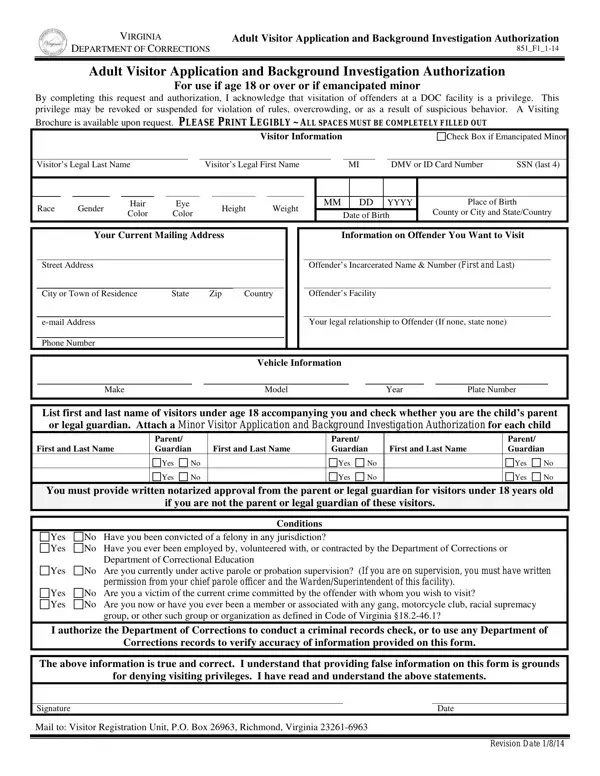
The Visitation Status At Virginia form, officially titled "VIRGINIA Adult Visitor Application and Background Investigation Authorization," serves as a critical document within the Virginia Department of Corrections' framework for managing visitations to individuals incarcerated within its facilities. This form is not merely a procedural hurdle; it embodies the acknowledgment that visiting an offender is a privilege that can be affected by a variety of factors. These include rule violations, overcrowding, and any behavior deemed suspicious. Designed primarily for use by adults, which encompasses individuals 18 years or older as well as emancipated minors, it requires the applicant to provide detailed personal information, such as legal name, identification numbers, and contact details, as well as specific details about the offender they wish to visit. Moreover, it demands transparency about the visitor's criminal history, affiliations, and current legal status, with a strong emphasis on accuracy and truthfulness under the threat of denied visiting privileges for false information. The form also includes a segment for listing minors who would accompany the visitor, underscoring the importance of authorized supervision. Through this comprehensive process, underscored by the necessity of a background check authorization, the form plays a pivotal role in maintaining the safety and orderliness of visitations in Virginia's correctional facilities.

QuestionAnswer
Form NameVisitation Status At Virginia Form
Form Length2 pages
Fillable?Yes
Fillable fields10
Avg. time to fill out2 min 30 sec
Other namesvirginia correctional visitation application, virginia department of corrections visitation, visitation virginia doc form, virginia department of corrections visitation application

How to Edit Visitation Status At Virginia Form Online for Free

Should you would like to fill out va doc visitation, there's no need to install any kind of programs - simply try using our online tool. FormsPal team is dedicated to making sure you have the perfect experience with our editor by regularly presenting new capabilities and enhancements. Our tool is now a lot more helpful with the newest updates! So now, filling out PDF documents is simpler and faster than ever. This is what you would want to do to start:

Step 1: Open the PDF form inside our editor by pressing the "Get Form Button" in the top part of this webpage.

Step 2: When you start the PDF editor, you will notice the document made ready to be filled in. Aside from filling out various blank fields, you may as well do other sorts of things with the PDF, namely adding custom words, modifying the original textual content, inserting images, affixing your signature to the document, and a lot more.

This document needs some specific details; to ensure consistency, take the time to take note of the following guidelines:

1. Start filling out the va doc visitation with a number of major blank fields. Consider all of the information you need and be sure there is nothing left out!

Stage no. 1 for submitting virginia correctional visitation application

2. Given that the previous section is complete, you should include the necessary specifics in First and Last Name, Parent Guardian, First and Last Name, Parent Guardian, First and Last Name, Yes, Yes, Yes, Yes, Parent Guardian, Yes, Yes, You must provide written notarized, if you are not the parent or legal, and Conditions so that you can move forward to the 3rd part.

virginia correctional visitation application conclusion process clarified (portion 2)

A lot of people often get some things incorrect while filling in Yes in this area. Don't forget to read twice whatever you enter right here.

Step 3: Ensure that the details are accurate and click "Done" to continue further. Get your va doc visitation when you register at FormsPal for a free trial. Quickly get access to the pdf in your personal account, together with any edits and adjustments being conveniently kept! We do not share the details you enter when filling out documents at our site.