
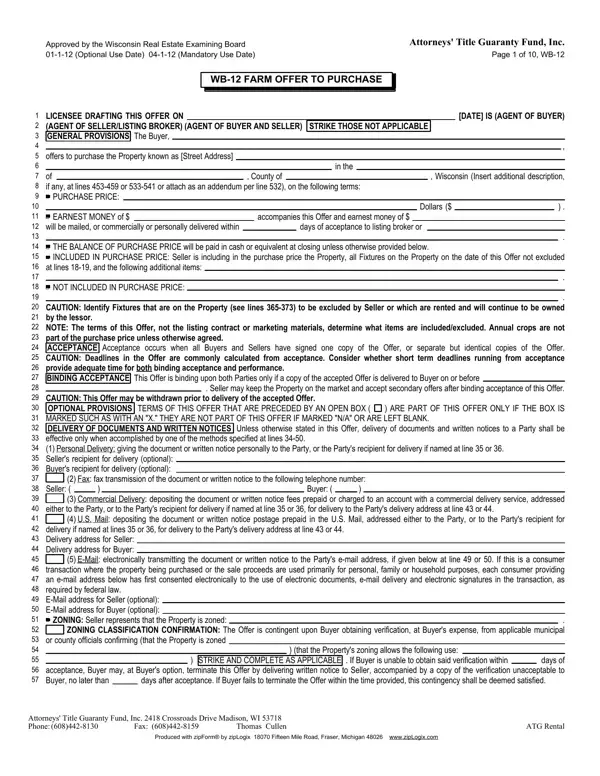
By using the online PDF tool by FormsPal, you'll be able to fill out or modify wisconsin wb farm here and now. We are aimed at giving you the best possible experience with our editor by consistently adding new capabilities and improvements. With these improvements, using our tool becomes easier than ever! In case you are seeking to get going, this is what it will take:
Step 1: Hit the "Get Form" button at the top of this page to access our tool.
Step 2: As soon as you start the PDF editor, you will get the document made ready to be completed. In addition to filling in different fields, you might also do other actions with the Document, specifically putting on your own textual content, editing the initial text, inserting graphics, placing your signature to the PDF, and a lot more.
It really is simple to finish the document using this helpful tutorial! Here is what you need to do:
1. The wisconsin wb farm will require certain information to be inserted. Be sure that the next blanks are finalized:
2. After this part is complete, you need to put in the necessary specifics in CAUTION This Offer may be, Personal Delivery giving the, Fax fax transmission of the, Seller, Buyer, Commercial Delivery depositing the, either to the Party or to the, US Mail depositing the document or, delivery if named at lines or, EMail electronically transmitting, ZONING Seller represents that the, ZONING CLASSIFICATION, or county officials confirming, that the Propertys zoning allows, and days of acceptance Buyer may at allowing you to move forward to the next step.
3. Within this part, check out Property Address, CLOSING, This transaction is to be closed, Page of WB, CLOSING PRORATIONS insurance if, at the place selected by Seller, CAUTION Provide basis for utility, The net general real estate taxes, taxes after state tax credits and, Current assessment times current, multiplied by current mill rate, CAUTION Buyer is informed that, Buyer and Seller agree to, Occupancy of the entire Property, and OCCUPANCY or in an addendum per. Every one of these need to be completed with utmost attention to detail.
4. The form's fourth subsection comes with the following form blanks to look at: Insert additional terms if any at, exempt from Wisconsin Rental, STRIKE ONE, GOVERNMENT PROGRAMS Seller shall, days of acceptance of this Offer a, MANAGED FOREST LAND All or part of, reference, COMPLETE DATE OR STRIKE AS, and, and INSERT CONDITIONS NOT ALREADY.
5. The pdf has to be finished by filling in this area. Here you will notice a full listing of form fields that need appropriate details in order for your document usage to be faultless: Property Address, WELL WATER CONTINGENCY This Offer, Page of WB days after acceptance, prior to closing if neither is, STRIKE ONE supplying water that is, Note if desired insert other, STRIKE ONE, WELL SYSTEM INSPECTION CONTINGENCY, prior to closing to inspect well, days after acceptance prior to, code in effect at time of, STRIKE ONE, STRIKE ONE, STRIKE ONE, and days after acceptance prior to.
As to prior to closing to inspect well and STRIKE ONE, make certain you review things in this current part. These are viewed as the most important fields in the PDF.
Step 3: Right after you have looked once more at the details you filled in, click on "Done" to conclude your form. Join FormsPal today and immediately obtain wisconsin wb farm, ready for download. Every single edit made is conveniently kept , enabling you to modify the form at a later time anytime. FormsPal ensures your information confidentiality by having a protected method that never records or distributes any private information used in the form. Be assured knowing your docs are kept protected whenever you use our service!
