
The Indiana motor vehicle power of attorney form, also called State Form 1940, is a document that names a person to handle vehicle-related matters for the vehicle's owner. The same document is supposed to be created if the owner conveys the rights to title and register a watercraft.[1] The power of attorney form is completed under oath.[1] You can create the FormsPal template online with Create My Document, or download the official BMV form as a PDF.
Last Updated: October 2026. This guide is reviewed and updated regularly to reflect current law. If you notice an error or outdated information, please contact us.
Build Your Document
Answer a few simple questions to make your document in minutes
Save and Print
Save progress and finish on any device, download and print anytime
Sign and Use
Your valid, lawyer-approved document is ready
Two roles appear in this document. The owner of the vehicle is the principal, who signs the paper. The agent is the person who acts for the owner on vehicle paperwork.
IC 30-5-4 of the Indiana state law regulates the creation of a POA form.[2] According to IC 30-5-4-1, to gain validity, the document has to:
A power of attorney signed in the presence of witnesses must carry the signatures of the principal and at least two witnesses.[3] State Form 1940 adds its own rule: “The Limited Power of Attorney form must be notarized to be valid.”[1]
| Document Name | Indiana Motor Vehicle Power of Attorney Form |
| State Form Name | Limited Power of Attorney Vehicle and Watercraft Transactions, State Form 1940 (R7 / 11-24) |
| Relevant Link | Indiana Bureau of Motor Vehicles |
| Avg. Time to Fill Out | 10 minutes |
| # of Fillable Fields | 27 |
| Available Formats | Adobe PDF |
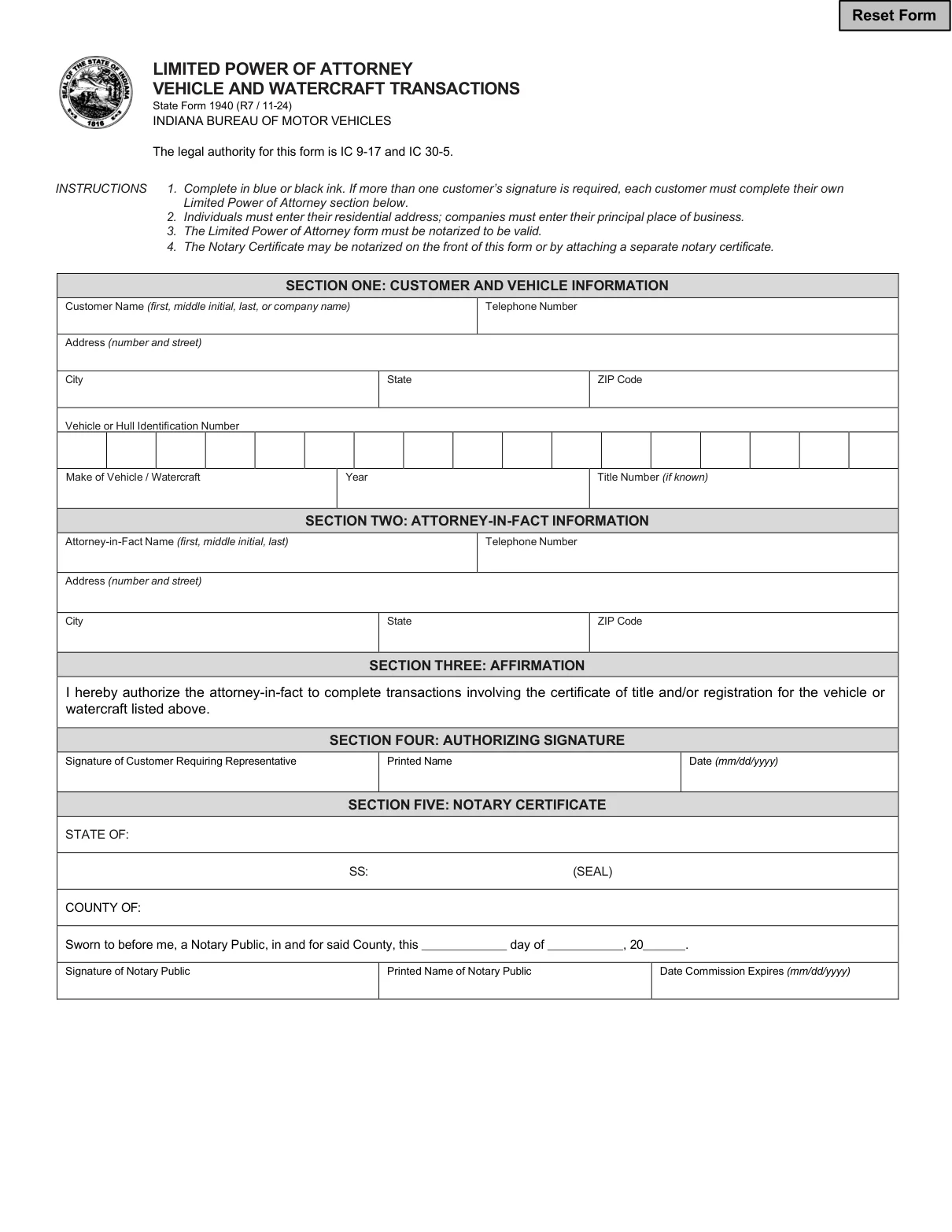
These steps follow the Indiana Bureau of Motor Vehicles’ Limited Power of Attorney Vehicle and Watercraft Transactions, State Form 1940 (R7 / 11-24), the official form this page hands out, section by section in the order the form runs. You may choose to complete the Indiana vehicle power of attorney form with the help of a legal assistant. The form’s instructions say to complete it in blue or black ink.[1]
The screenshots under each step show State Form 1940, the official Indiana BMV form, filled with sample entries in blue, so you can see where each answer goes. The names, addresses, dates and vehicle details are examples only.
Section One: Customer Name, Telephone Number and Address
Enter your name (first, middle initial, last), or the company name, and your telephone number. Then enter your address, city, state and ZIP code. The form’s instructions say individuals must enter their residential address and companies must enter their principal place of business.[1]

Section One: Vehicle or Hull Identification Number, Make, Year and Title Number
Enter the vehicle identification number (VIN) of a vehicle or the hull identification number (HIN) of a watercraft, one character per box. Then fill in the make, the year and, if you know it, the title number. Copy them from your title to avoid typos.

Section Two: Attorney-in-Fact Information
Enter the name (first, middle initial, last), telephone number and address of the person you appoint as your agent. On State Form 1940, the agent is named in Section Two, Attorney-in-Fact Information.[1]

Section Three: Affirmation
This section is printed, so there is nothing to enter. It reads: “I hereby authorize the attorney-in-fact to complete transactions involving the certificate of title and/or registration for the vehicle or watercraft listed above.”[1]

Section Four: Authorizing Signature
Check every entry first. Then sign on the Signature of Customer Requiring Representative line, print your name on the Printed Name line and enter the date (mm/dd/yyyy). The form’s instructions say that if more than one customer’s signature is required, each customer must complete their own Limited Power of Attorney section.[1]

Section Five: Notary Certificate
Leave this section blank. It is for the notary public, who completes it when the form is notarized. The next section explains that step.
Complete the PDF on a screen first and print it afterward. Typed answers are easier to read, and you can fix a typo without starting over.
Once Sections One to Four are complete, these steps take the form from a finished draft to a signed paper you can use. What signing takes depends on the document you use: State Form 1940, the BMV form this page hands out, or the FormsPal template you get from Create My Document. Go through the steps in order.
Get the Form Notarized
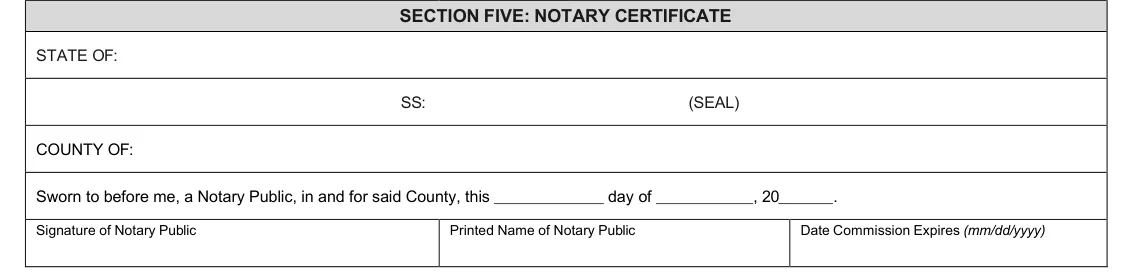
State Form 1940 says: “The Limited Power of Attorney form must be notarized to be valid.”[1] Section Five, Notary Certificate, is for the notary. It has lines for STATE OF and COUNTY OF, a place for the seal, the date after “Sworn to before me, a Notary Public, in and for said County,” and the Signature of Notary Public, the Printed Name of Notary Public and the Date Commission Expires.[1] The form also says the Notary Certificate may be notarized on the front of the form or by attaching a separate notary certificate.[1]
The FormsPal template: a notary or two witnesses
The FormsPal template from Create My Document is a different document, and Indiana’s power of attorney law sets its signing rule. A power of attorney must be signed by the principal, or at the principal’s direction, in the presence of a notary public or in the presence of witnesses.[3] One signed in the presence of witnesses must carry the signatures of the principal and at least two witnesses.[3] The template includes an acknowledgment for a notary public or other officer, which the notary completes if you sign before a notary.
Keep copies
Make a copy of the signed document for your records. Store the original with your other important papers.
It is a document in which a vehicle owner, called the principal, chooses another person, called the agent, to handle vehicle-related matters for them. You can create the FormsPal template online with Create My Document, or download the official BMV form, State Form 1940, as a PDF.
Yes. Use the Create My Document button at the top of this page and answer a few questions. You can then save your progress, download the PDF and print it.
Open the file in the FormsPal PDF editor to type your answers, or print it and write them in by hand. Follow the steps above so each answer goes in the right place.
Gather these items before you start. State Form 1940 asks for them in Sections One and Two.
Yes. The FormsPal template from Create My Document has a successor attorney-in-fact section where you can enter an alternate agent’s name and address. State Form 1940, the BMV form this page hands out, has no line for a backup agent.
FormsPal keeps every Indiana power of attorney form on one page, from general to medical documents. You can also browse the Indiana limited power of attorney template or an Indiana bill of sale.
General information, not legal or tax advice.
