
The Alabama motor vehicle power of attorney is a document that lets an owner name another person to handle their vehicle matters, such as registration or a title transfer. It is helpful when the owner cannot be there in person to take care of these tasks.
Last Updated: October 2026. This guide is reviewed and updated regularly to reflect current law. If you notice an error or outdated information, please contact us.
Build Your Document
Answer a few simple questions to make your document in minutes
Save and Print
Save progress and finish on any device, download and print anytime
Sign and Use
Your valid, lawyer-approved document is ready
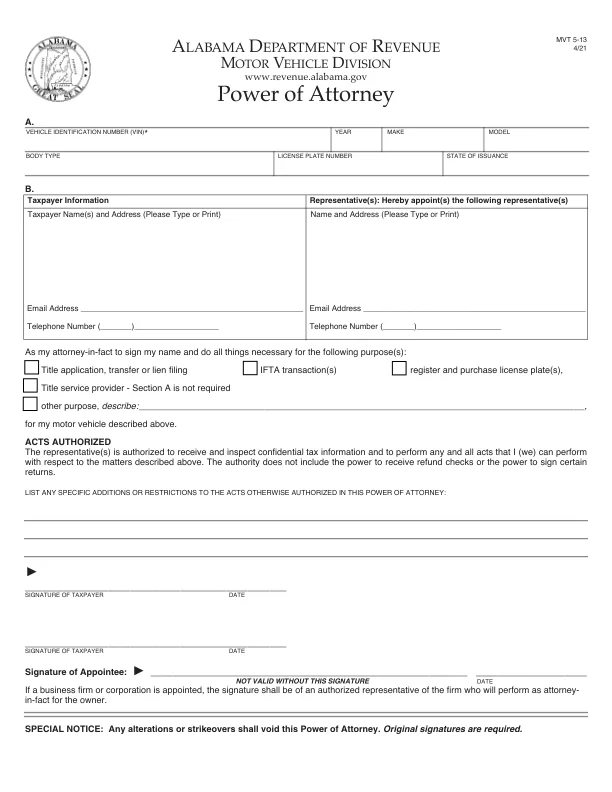
An Alabama motor vehicle power of attorney names an agent to deal with one vehicle on the owner's behalf. The PDF this page hands out is the Alabama Department of Revenue’s Power of Attorney, Form MVT 5-13 (4/21), a single page on which you check the purposes of the appointment, such as a title application, transfer or lien filing, or registering and purchasing license plates.[1] The owner is called the principal, and the person chosen to act is the agent, also known as the attorney-in-fact. On Form MVT 5-13, the owner is the taxpayer and the agent is the representative, who signs as the appointee.
The following steps must be followed to execute a valid power of attorney for motor vehicles in Alabama:
Form MVT 5-13 prints what it needs from you, from the vehicle details in Part A to the signatures at the bottom of the page. Understanding how to execute these Alabama power of attorney forms properly is essential for their recognition as valid in legal and administrative settings.
Form MVT 5-13 is the Alabama Department of Revenue's motor vehicle power of attorney form.[1] Alabama's general power of attorney law is the Uniform Power of Attorney Act (Ala. Code Title 26, Chapter 1A). These requirements are essential for the power of attorney form to be respected and recognized by third parties, such as the Alabama Department of Motor Vehicles and potential buyers or sellers.
The PDF this page hands out is Form MVT 5-13, a one-page form with 31 fillable fields that takes about 10 minutes to complete. The table below gives the document name, the state form name, a link to the Alabama Department of Revenue Motor Vehicle Division and the file format.
| Document Name | Alabama Motor Vehicle Power of Attorney Form |
| State Form Name | Power of Attorney, Form MVT 5-13 (4/21) |
| Relevant Link | Alabama Department of Revenue – Motor Vehicle Division |
| Avg. Time to Fill Out | 10 minutes |
| # of Fillable Fields | 31 |
| Available Formats | Adobe PDF |
These steps follow the Alabama Department of Revenue’s Power of Attorney, Form MVT 5-13 (4/21), the official form this page hands out.[1] It is a single page. Part A describes the vehicle, Part B names the taxpayer and the representative, and the purposes, the acts authorized and the signature lines follow. Fill in each part in the order below and check your entries before you print. Each step names one part of the form and tells you what to enter there.
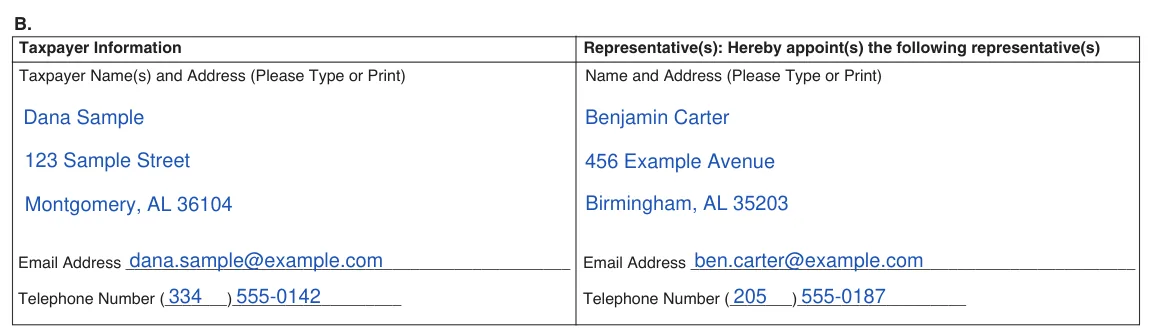
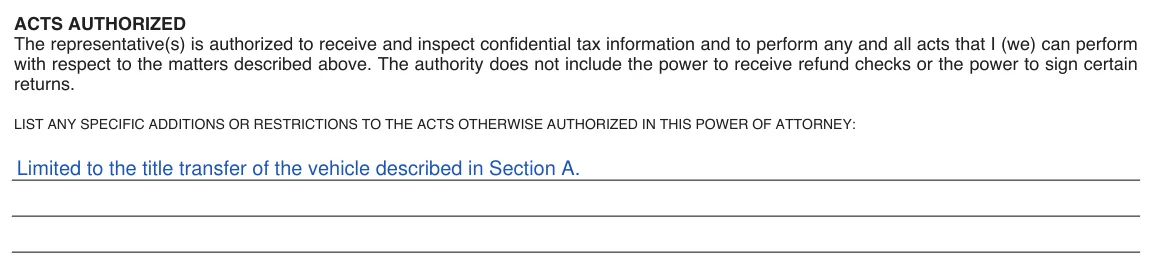
The screenshots under each step show the Alabama Department of Revenue Power of Attorney, Form MVT 5-13, the official Alabama form, filled with sample entries in blue, so you can see where each answer goes. The names, addresses, dates and vehicle details are examples only.
A. Vehicle identification number (VIN), year, make, model, body type, license plate number and state of issuance
Part A must include the vehicle’s VIN, year, make, model, body type, license plate number and state of issuance.[1] Enter the VIN, year, make and model on the first row, and the body type, license plate number and state of issuance on the second. Copy them from your title or registration. The form notes that Section A is not required when the purpose is Title service provider.

B. Taxpayer Information and Representative(s)
Part B has two columns. Under Taxpayer Information, type or print the name and address of each taxpayer, the vehicle owner, then an email address and a telephone number. Under “Representative(s): Hereby appoint(s) the following representative(s)”, type or print the name and address of the person or business you appoint, with their email address and telephone number.
Purpose(s)
The sentence below Part B appoints your representative “as my attorney-in-fact to sign my name and do all things necessary for the following purpose(s)”. Check each box that applies: Title application, transfer or lien filing, IFTA transaction(s), register and purchase license plate(s), Title service provider, or other purpose. If you check other purpose, describe it on the line beside the box.

Acts Authorized, additions or restrictions
The Acts Authorized paragraph is printed on the form, so there is nothing to enter there. It lets the representative receive and inspect confidential tax information and perform any and all acts you can perform for the matters above, but not receive refund checks or sign certain returns. To add to or limit those acts, write your additions or restrictions on the three lines below it.
Signature of Taxpayer and Date
Sign on the first SIGNATURE OF TAXPAYER line and write the date beside it. The form prints a second SIGNATURE OF TAXPAYER line, with its own date, for a second taxpayer. The signature lines have no fillable field, so sign by hand after you print.

Signature of Appointee and Date
The representative signs on the Signature of Appointee line and writes the date. The form prints “NOT VALID WITHOUT THIS SIGNATURE” under that line. If a business firm or corporation is appointed, the signature is that of an authorized representative of the firm who will perform as attorney-in-fact for the owner.

The special notice at the bottom of the form says: “Any alterations or strikeovers shall void this Power of Attorney. Original signatures are required.”[1] Read the whole page before you sign.
Once the form is filled in, a few practical steps remain before you hand it to anyone. Print it, check the details and keep a copy of everything you sign. What signing takes depends on the document you use: Form MVT 5-13, which this page hands out, or the FormsPal template you get from Create My Document. The steps below follow the order most people work in.
It is a document in which a vehicle owner names an agent to handle specific matters for a vehicle, such as registration or a title transfer. It helps when the owner cannot be there in person.
Gather these items before you open the form:
Having them on hand keeps the form to one sitting.
The VIN is usually printed on the vehicle's title and registration card. You can also find it on the insurance card and on a plate at the base of the windshield on the driver's side.
Most people finish in about 10 minutes. Having the agent's details and the VIN on hand makes it quicker.
Yes. Form MVT 5-13 has fillable fields for Parts A and B, the purpose boxes, the additions or restrictions lines and the dates, so you can download the PDF and type your entries, or complete it with the FormsPal PDF editor. The signature lines have no field, and the form says original signatures are required, so sign by hand after you print it.[1] You can also use the Create My Document button to build the FormsPal template by answering a few questions.
Form MVT 5-13 has no successor section. The FormsPal template from Create My Document has one: it names an alternate agent, and according to the template text, the alternate takes over if the first agent cannot or will not serve.
General information, not legal or tax advice.
