
Updated:
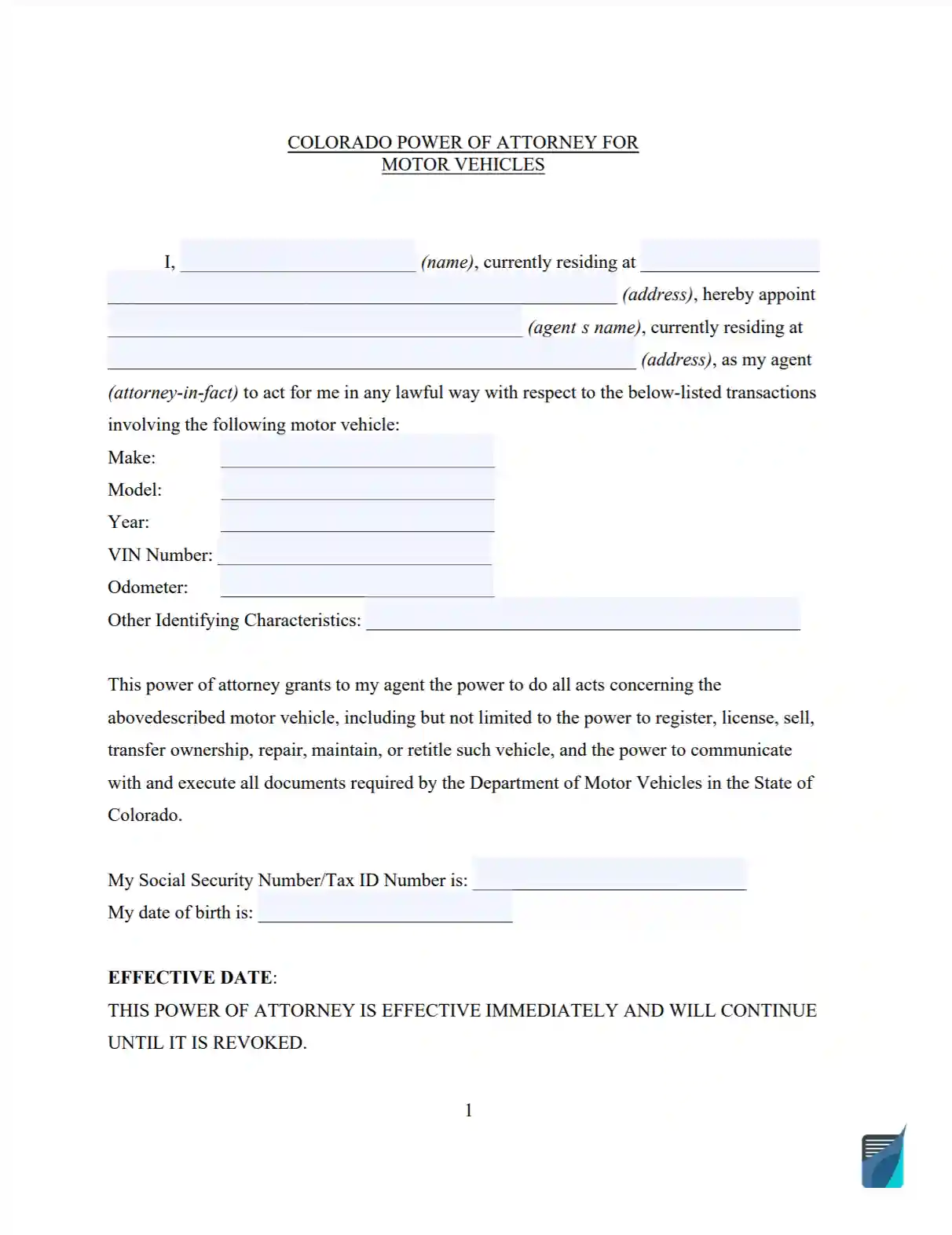
A Colorado motor vehicle power of attorney is a signed document in which you name an agent to handle paperwork for one vehicle on your behalf. The Colorado DMV form this page hands out, DR 2175, lists powers such as applying for a title or registration, recording a lien and transferring ownership. Create it online or download the PDF below. You can also browse other power of attorney forms or every Colorado power of attorney document.
Build Your Document
Answer a few simple questions to make your document in minutes
Save and Print
Save progress and finish on any device, download and print anytime
Sign and Use
Your valid, lawyer-approved document is ready
A power of attorney is a document in which one person, the principal, names another person or company, the agent, to act on their behalf. For a vehicle, the agent handles paperwork for that one car, truck or motorcycle. The principal is the owner who signs the form, and the form calls this person the Grantor.
The requirements and laws tied to a power of attorney in Colorado are described in Title 15 of the Colorado Revised Statutes. Additional information about a POA for vehicles is included in Chapter 14 of this Title (Sections 15-14-701 and 15-14-705). DR 2175, the form this page hands out, ends with a notary block for a notary public to complete.[2]
| Document Name | Colorado Motor Vehicle Power of Attorney Form |
| State Form Name | Colorado Form DR 2175 |
| Relevant Link | Colorado Division of Motor Vehicles |
| Avg. Time to Fill Out | 10 minutes |
| # of Fillable Fields | 54 |
| Available Formats | Adobe PDF |
Create the document with the form builder above or download the PDF. The steps below follow DR 2175, the Colorado Division of Motor Vehicles form this page hands out, one part of the form at a time. Work through the parts in order and write clearly.
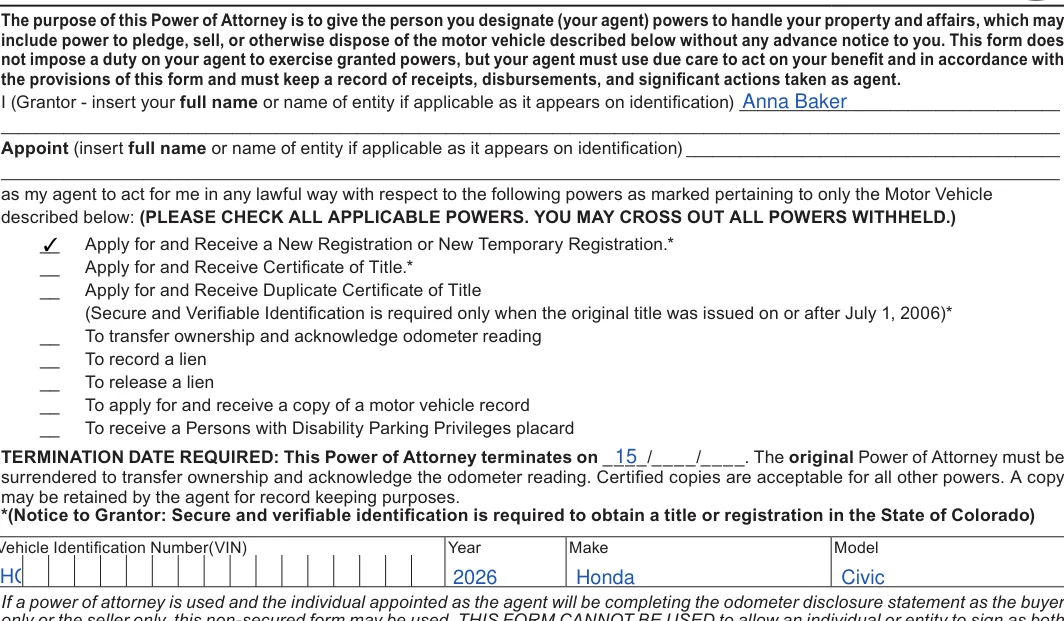
The screenshots under each step show the Colorado DMV Power of Attorney for Motor Vehicle Only (DR 2175), the official Colorado form, filled with sample entries in blue, so you can see where each answer goes. The names, addresses, dates and amounts are examples only.
Grantor, agent, powers, termination date and vehicle
Enter your full name as it appears on your identification on the Grantor line. If you act for an organization, enter its name instead.

On the next line, enter the full name of the person or company you appoint as your agent.

Check the powers you give your agent, such as registering the vehicle, applying for a title or recording a lien. Cross out any power you want to withhold. You can check every box on the list.

Enter the termination date, the day your agent's powers end.

Enter the VIN, year, make and model of the vehicle.

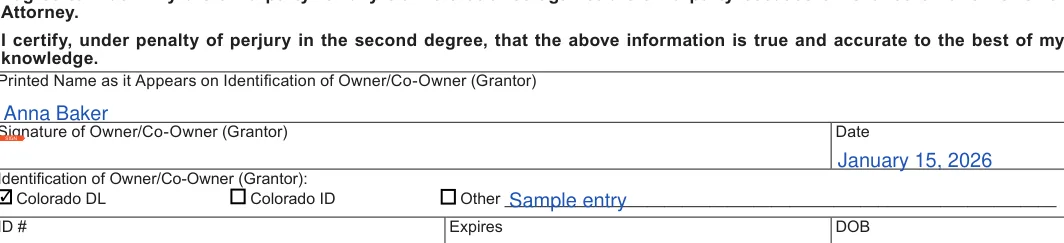
Printed name, signature and date of the Grantor
Read the notice to agents and the statements above the signature line before you sign.
Print your name as it appears on your identification, sign, and add the date. Then tick Colorado DL, Colorado ID or Other, and describe the document if you choose Other.

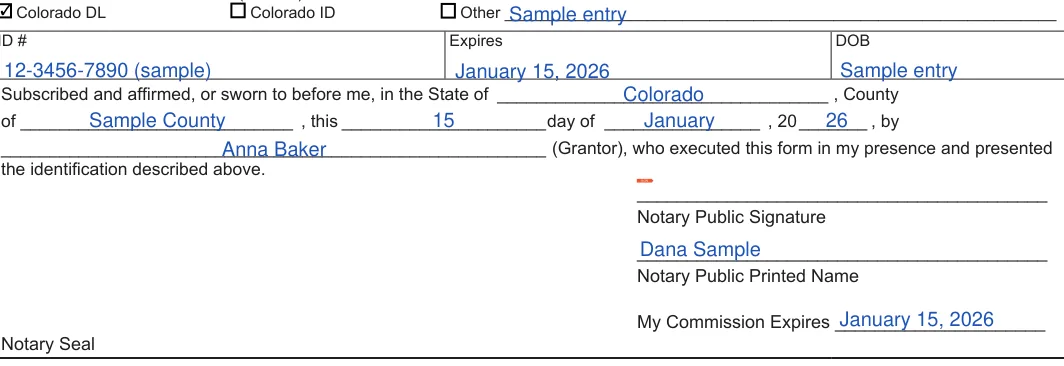
ID number, expiration, DOB and notary block
Enter the ID number, its expiration date and your date of birth in the identification box.
Leave the notary block at the bottom for the notary to complete. It asks for the state, county, date, signature, printed name, commission expiration and seal.
After you complete the fields, print the document and finish the last steps on paper. Bring the same identification you listed on the form when you meet the notary, and keep every copy together with your vehicle records.
Sign DR 2175 in front of a notary
DR 2175 ends with a notary block that reads: “Subscribed and affirmed, or sworn to before me, in the State of ..., County of ..., this ... day of ..., by ... (Grantor), who executed this form in my presence and presented the identification described above.” Lines for the notary’s signature, printed name, commission expiration and seal follow.[2] So sign the form in front of the notary and show the identification you listed on it. The Colorado Uniform Power of Attorney Act does not apply to a power created on a form a government agency prescribes for a governmental purpose, such as DR 2175.[1]

The FormsPal template: notarizing is optional
The FormsPal template from Create My Document is not a form a government agency prescribes, so the act applies to it.[1] Under the act, notarizing it is optional. A signature on a power of attorney is presumed to be genuine if the principal acknowledges the signature before a notary public or other individual authorized by law to take acknowledgments.[3]
Make Copies
Do not forget to create at least two copies of the document. Give your agent a copy and keep one for yourself.
The form has lines for the Grantor, the agent, the powers, the termination date and the vehicle. It ends with the Grantor's signature, the identification details and the notary block.
Select Create My Document and answer a few questions to build the FormsPal template. You can save your progress, finish on any device, then download and print it. The blank DR 2175 is also available from the download link above.
Have your full name, your agent's full name, the vehicle's VIN, year, make and model, and the identification you plan to list on the form.
Use the PDF link near the top of this page to download the blank DR 2175, or select Create My Document to build the FormsPal template instead.
General information, not legal or tax advice.
