The Tennessee motor vehicle power of attorney is a legal document allowing a vehicle owner to designate another person to handle matters related to their vehicle. This could include registering the vehicle, applying for a title, or making other transactions at Tennessee’s Vehicle Services Division. This power of attorney form is specific to motor vehicle matters and is limited to the actions specified in the document. You can download the official Tennessee form, Form RV-F1311401, as a PDF from this page, or build the FormsPal template online with Create My Document.
Last Updated: October 2026. This guide is reviewed and updated regularly to reflect current law. If you notice an error or outdated information, please contact us.
Create a personalized Tennessee Motor Vehicle Power of Attorney online now!
Build Your Document
Answer a few simple questions to make your document in minutes
Save and Print
Save progress and finish on any device, download and print anytime
Sign and Use
Your valid, lawyer-approved document is ready
... or download your Tennessee Motor Vehicle Power of Attorney as a PDF file
What Is a Motor Vehicle Power of Attorney in Tennessee?
A motor vehicle power of attorney is a document in which a vehicle owner, called the principal, names another person, called the agent or attorney-in-fact, to take care of paperwork for one vehicle. Typical examples are title and registration matters. The document lists the vehicle, the people involved and the agent's powers.
In Tennessee, the document typically used for this purpose is Form RV-F1311401, Power of Attorney for Vehicle Transactions, from the Tennessee Department of Revenue, and it is the PDF this page hands out.[1] It requires the vehicle owner’s (principal’s) information, the appointed agent’s information, and details about the vehicle, such as make, model, year, and VIN. Form RV-F1311401 does not require notarization. The vehicle owner signs the form as an affiant and certifies the information under penalty of law.[1]
Comprehensive Tennessee POA forms are available to ensure proper documentation for those who need to delegate authority for various legal and financial matters.
Key Terms
Principal: the vehicle owner who signs the document
Agent (attorney-in-fact): the person who handles the vehicle matters for the principal
Successor agent: a backup agent named in case the first agent cannot serve
VIN: the vehicle identification number printed on the title and registration
Notary public: an official who checks the identity of the person signing
Tennessee Motor Vehicle POA Form Details
You can use Form RV-F1311401 to authorize someone to manage vehicle-related transactions on your behalf in Tennessee, such as registration or title transfers. The form names one owner or business, one attorney-in-fact and one vehicle, and the table below sums it up at a glance.
Document Name
Tennessee Motor Vehicle Power of Attorney Form
State Form Name
Form RV-F1311401, Power of Attorney for Vehicle Transactions (Rev. 2-21)
If you use Form RV-F1311401, check the appropriate boxes next to the transactions your attorney-in-fact is authorized to perform. These can include:
Duplicate Title
Transfer of Title
Noting of Lien
Application for Title and Registration
Request for Verification of Ownership on Vehicles Found Abandoned, Immobile, or Unattended
Vehicle Information Request
Any other specified transactions
Your attorney-in-fact will be able to perform the vehicle-related tasks you have specified.
Tip: Form RV-F1311401 limits the authority to the vehicle you list and to the transaction types you check. Read the printed paragraph and your checked boxes before you sign so you know exactly what you are handing to your agent.
What to Gather Before You Start
Having the details ready makes the form quick to complete. Collect the items below before you open the PDF or click Create My Document, and check each detail against your IDs and the vehicle title or registration.
Your full name, and the business name if a business owns the vehicle
Your physical street address, telephone number and email address
Your attorney-in-fact’s full name and street address, and the business or title service they work for, if applicable
The vehicle’s make, model, body type, year and VIN
The transaction types you want to authorize
How to Fill Out the Tennessee Motor Vehicle POA
These steps follow Form RV-F1311401, the official Tennessee Department of Revenue form this page hands out. It is a single page with fillable fields, so you can type your entries before you print it. Each step names one part of the form and tells you what to enter there.
The screenshots under each step show Form RV-F1311401, the official Tennessee form, filled with sample entries in blue, so you can see where each answer goes. The names, addresses, dates and vehicle details are examples only.
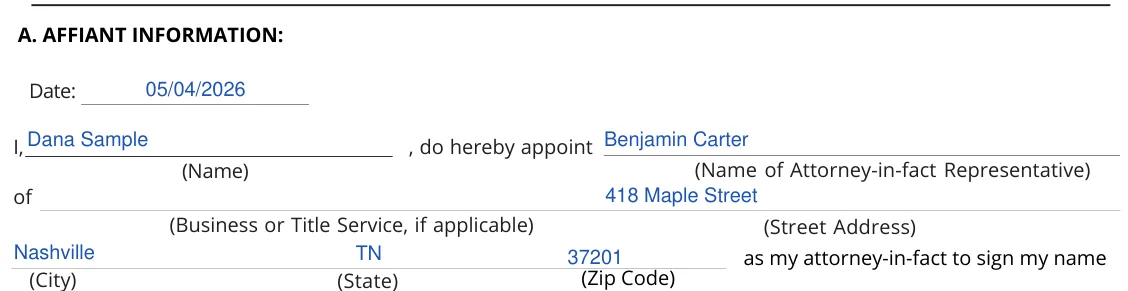
A. Affiant Information Enter the date at the top. On the next line, print your name after “I,” and the name of your attorney-in-fact after “do hereby appoint”. On the “of” line, add the business or title service your attorney-in-fact works for, if applicable, and their street address, then the city, state and zip code.Step 1: sample entries, not a real document.
Make, VIN, Model, Body Type and Year The paragraph above these lines is printed on the form. It lets your attorney-in-fact sign your name to title or registration documents for the vehicle, and it notes that these documents may contain the federally mandated odometer disclosure, which you are responsible for. Enter the make, VIN, model, body type and year. Copy the VIN from your title or registration.Step 2: sample entries, not a real document.
Check the appropriate box for each transaction type authorized Check a box for each transaction you authorize: Duplicate Title, Noting of Lien, Request for Verification of Ownership on Vehicles Found Abandoned, Immobile or Unattended, Vehicle Information Request, Application for Title and Registration, Transfer of Title, or Other. If you check Other (Specify), describe the transaction on the line below it.Step 3: sample entries, not a real document.
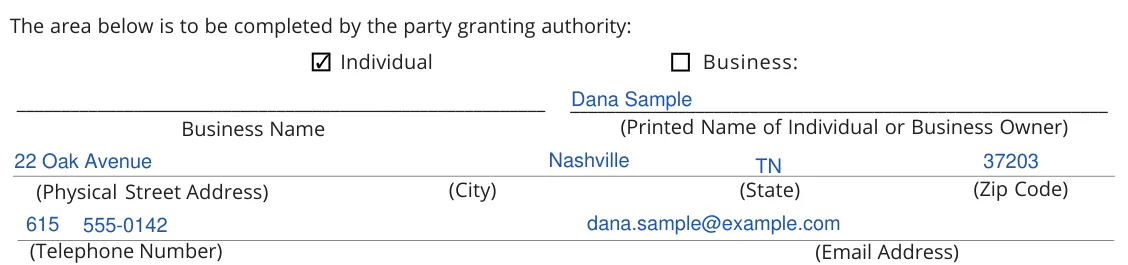
The area completed by the party granting authority Check Individual or Business. A business writes its name on the Business Name line. Print the name of the individual or business owner on the line to the right. Then fill in the physical street address, city, state, zip code, telephone number and email address.Step 4: sample entries, not a real document.
B. Acknowledgment Read the Affiant Certification Statement, then sign on the Affiant’s Signature line and write the date. By signing, you certify that the statements on the form are true and correct to the best of your knowledge, information and belief.[1]Step 5: sample entries, not a real document.
The instructions at the top of the form say to complete it in its entirety. The form is void if any information has been left blank or if any information entered on it has been erased or altered by any means.[1] Dealers use a different form, the secure power of attorney RV-F1316901, to transfer ownership when the original certificate of title is not available for the owner to make an odometer disclosure.[1]
How to Sign and Use the Tennessee Motor Vehicle Power of Attorney
Once the form is filled in, print it and finish the signing steps below. Keep the names, the VIN and the other details the same as on your IDs and vehicle papers.
Principal or Business Information. If an individual owns the vehicle, provide your name and signature where indicated. If owned by a business, write the business name and have an authorized representative sign on behalf of the business. Also, provide the physical address, city, state, zip code, telephone number, and email address.[1]
No notary section. Form RV-F1311401 has no notary section. The vehicle owner signs it as an affiant.[1] Sign on the Affiant’s Signature line in part B and write the date next to it.
Final Check. Before finalizing the document, make sure no required fields are left blank and that no alterations or erasures are made to the entries, as this could render the document void.[1]
Keep your copies. Keep a signed copy with your vehicle records and share a copy with your agent.
Common Mistakes to Avoid
Small slips cause most of the delays with vehicle paperwork. Look over the whole form before you print and sign, and compare the details with your IDs and the vehicle title or registration.
Mistyping the VIN: copy it letter by letter from the title or registration
Spelling a name or address differently from your ID
Leaving a line empty by accident, such as the year or the body type. The form is void if any information has been left blank.[1]
Forgetting to share a copy with your agent after the document is complete
Frequently Asked Questions
Can I fill out this Tennessee motor vehicle POA form online?
Yes. Click Create My Document at the top of the page, answer a few questions and save your progress. You can also download Form RV-F1311401, type into its fillable fields and print it, or fill it in with the FormsPal PDF editor.
What vehicle details does the form ask for?
Form RV-F1311401 asks for the make, VIN, model, body type and year of the vehicle.
Can I name a backup agent?
Form RV-F1311401 has no line for a backup agent. The FormsPal template from Create My Document has a Successor Attorney-in-Fact section on page 2, with lines for the alternate agent’s name and address.
What should I do with the signed document?
Keep a signed copy with your vehicle records and share a copy with your agent.
Create a personalized Tennessee Motor Vehicle Power of Attorney online now!
Mara has been practicing estate planning and trust law in California since 2003, taking pride in helping clients of all backgrounds and asset profiles form a complete and customized estate plan. Her specialties are: estate planning, wills and trusts, trust and probate administration.