
The Vermont motor vehicle power of attorney is a legal document that allows you (the principal) to designate another person (the agent or attorney-in-fact) to handle motor vehicle-related matters on their behalf. Vermont’s general power of attorney law is the Vermont Uniform Power of Attorney Act, 14 V.S.A. chapter 127.[2] It does not apply to a power created on a form a government agency prescribes for a governmental purpose, such as the DMV’s Form VN-101.[2] The agent you appoint should be a competent adult you trust. The power granted can be broad or limited, depending on the principal’s preferences.
Last Updated: October 2026. This guide is reviewed and updated regularly to reflect current law. If you notice an error or outdated information, please contact us.
Build Your Document
Answer a few simple questions to make your document in minutes
Save and Print
Save progress and finish on any device, download and print anytime
Sign and Use
Your valid, lawyer-approved document is ready
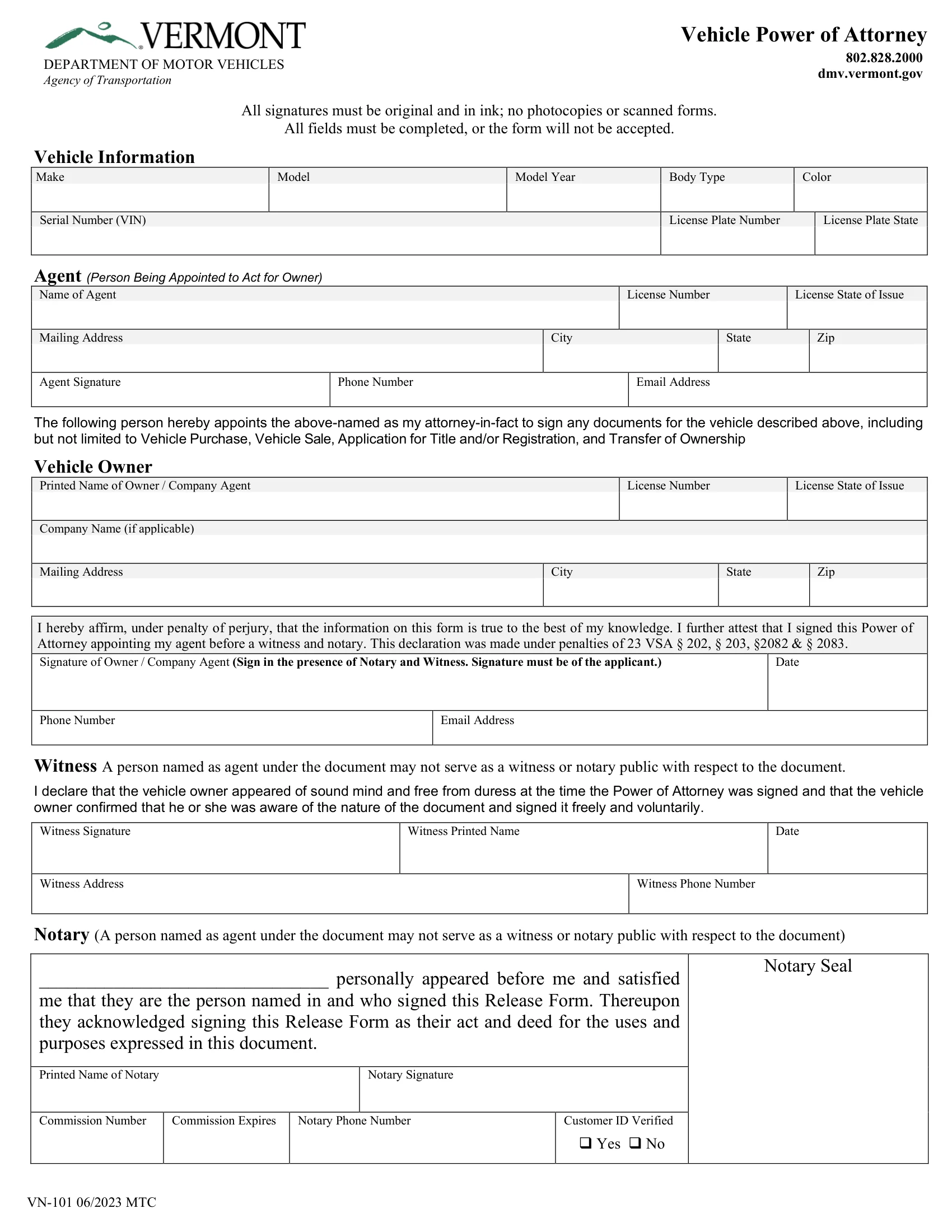
The State of Vermont mandates using Form VN-101 to establish a motor vehicle power of attorney. This form ensures all legal requirements are met, including signatures and the scope of authority granted. Form VN-101, the PDF this page hands out, appoints your agent to sign any documents for the vehicle described on the form, including but not limited to these:[1]
The table below sums up this document at a glance. It lists the document name, the state form name, the DMV link, the time the form takes and the file format. The field count comes from the PDF you can download on this page.
| Document Name | Vermont Motor Vehicle Power of Attorney Form |
| State Form Name | Form VN-101, Vehicle Power of Attorney (06/2023) |
| Relevant Link | Vermont Department of Motor Vehicles |
| Avg. Time to Fill Out | 15 minutes |
| # of Fillable Fields | 32 |
| Available Formats | Adobe PDF |
Form VN-101 is a document used in Vermont to assign a power of attorney specifically for motor vehicle transactions. This form enables a vehicle owner to appoint an agent to act on their behalf in various vehicle-related matters, such as registration, title transfer, and sale.
These steps follow the Vermont DMV’s Form VN-101, Vehicle Power of Attorney (06/2023), the official form this page hands out, part by part in the order of page 1.[1] Page 2 holds instructions for the agent, the vehicle owner and the witness, with nothing to fill in. The form says all fields must be completed, or it will not be accepted, and all signatures must be original and in ink.[1]
The screenshots under each step show Form VN-101, the official Vermont form, filled with sample entries in blue, so you can see where each answer goes. The names, addresses, dates and numbers are examples only.
Vehicle Information
Enter the make, model, model year, body type and color, then the serial number (VIN), the license plate number and the license plate state. Copy them from the title or registration.

Agent (Person Being Appointed to Act for Owner)
Enter the agent’s name, license number and license state of issue, mailing address, phone number and email address. The agent signs on the Agent Signature line. The agent does not have to sign at the same time as you, but must sign before using the power of attorney for the first time.

Vehicle Owner
The sentence above this part appoints the agent to sign documents for the vehicle. Print your name (or, for a company, the company agent’s name), your license number and license state of issue, the company name if there is one, and your mailing address.
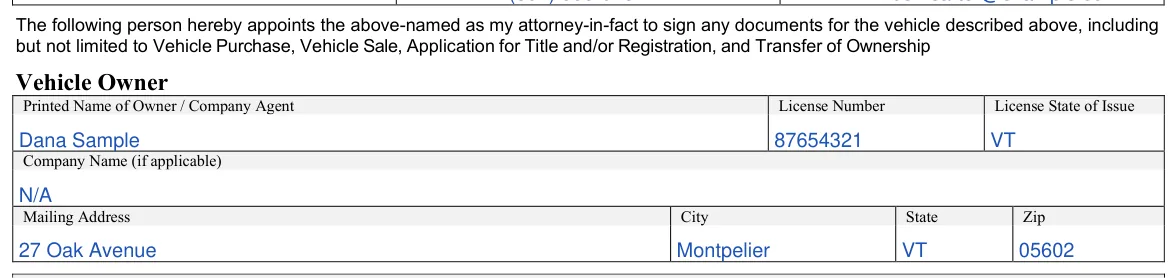
Signature of Owner / Company Agent
By signing, you affirm under penalty of perjury that the information on the form is true, and you attest that you signed before a witness and a notary. Sign in the presence of the notary and the witness, then add the date, your phone number and your email address.

Witness
The witness signs to declare that you appeared of sound mind and free from duress and signed freely and voluntarily, then prints their name and adds the date, their address and their phone number. The person named as your agent may not be the witness.

Notary
Leave this part to the notary. The notary fills in your name, signs, and adds the seal, the notary’s printed name, commission number, commission expiration and phone number, and marks whether your customer ID was verified. The person named as your agent may not be the notary.
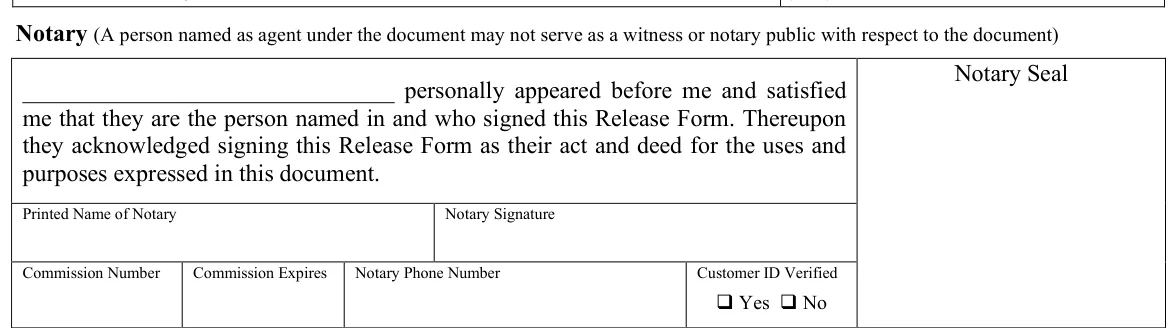
To execute Form VN-101, the Vermont POA form this page hands out, you must sign it in the presence of a notary and a witness.[1] The witness and the notary may not be the same person, and the person named as your agent may not serve as the witness or notary.[1] The Vermont Uniform Power of Attorney Act does not apply to VN-101, because it is a form a government agency prescribes for a governmental purpose.[2]
Sign the document
You must sign the document in the presence of a notary and a witness on the indicated date and provide your contact information, including phone number and email address.[1]
Agent signature
Additionally, the agent must sign the form to confirm their role, and you should also provide their contact number and email address for any necessary communications.[1]
Witness
A witness must be present to sign the form to attest that you, the principal, are of sound mind and signed the document voluntarily.[1] The witness must provide their signature, print their name for clarity, and specify the date they signed the form.[1] Their address and phone number must also be included.[1]
Notary
Lastly, the notary completes the Notary part. In it, the notary states that you personally appeared and satisfied the notary that you are the person named in and who signed the document, and that you acknowledged signing it as your act and deed. The notary adds a seal, printed name, signature, commission number, commission expiration and phone number, and marks whether your customer ID was verified.[1]
The FormsPal template
If you use the FormsPal power of attorney template from Create My Document instead, the Vermont Uniform Power of Attorney Act applies to it. Under the act, you must sign it, and a signature is presumed to be genuine if you acknowledge it before a notary public or another individual authorized by law to take acknowledgments.[3] So notarizing the template is optional and makes your signature presumed genuine. The template’s acknowledgment page is the part the notary completes.
A few small slips are easy to make. Read this list once the form is filled in, and fix anything that does not match before you print the final copy. Each one takes seconds to check.
It lets you name an agent to handle vehicle matters for you, such as registering, transferring or selling a vehicle. The appointment sentence above the Vehicle Owner part lists the actions, including vehicle purchase, vehicle sale, application for title and/or registration, and transfer of ownership, so you can read it before you sign.
Keep these details close by when you open the form:
Check each item against the vehicle title and your ID.
The VIN is printed on the vehicle title and registration. Many vehicles also show it on a plate near the base of the windshield and on a label inside the driver's door.
Yes. Use the Create My Document button above to answer a few questions and build the document online. You can also download the PDF and fill it in with the FormsPal PDF editor before you print it.
Form VN-101 has no line for a backup agent. The FormsPal template from Create My Document does. Its page 2 has a Successor Attorney-in-Fact paragraph with a line for the first agent’s name and lines for the name and address of a backup agent.
On Form VN-101 it is the Notary part at the bottom of page 1, which the notary completes after you sign in front of the notary and a witness.[1] The FormsPal template from Create My Document has an acknowledgment block for a notary public on its page 3, with lines for the county, the date, the officer’s name and title, and the signature and seal.
General information, not legal or tax advice.
