
Updated:
Get Form Now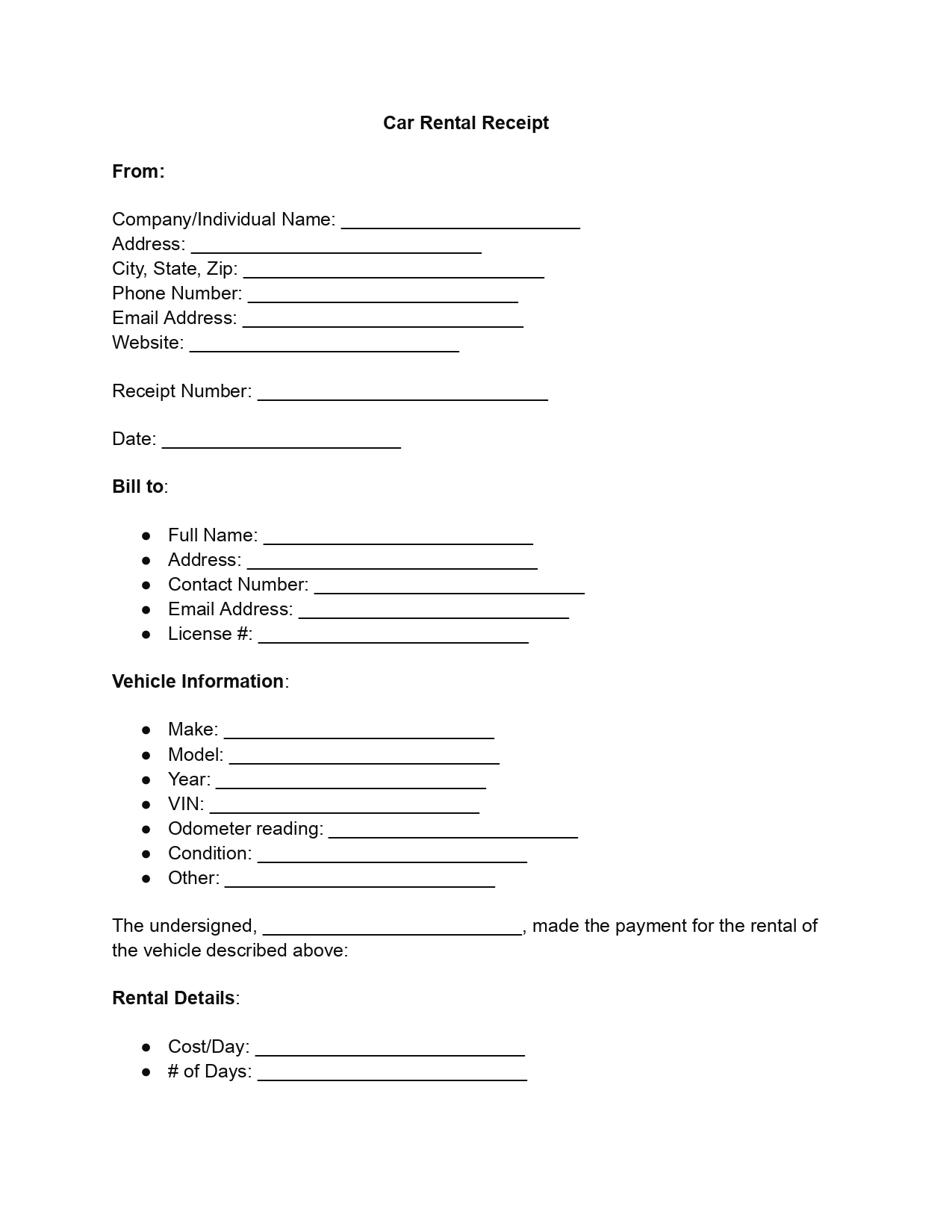
A car rental receipt template is a ready-made form that records what a customer paid to rent a vehicle. It lists the renter, the car, the rental period and the total, so both sides hold the same record. Fill it in online for free, then download it as a PDF or print it.
A car rental receipt is the written record of one rental. This document is a clear agreement between the rental service and the customer. The car rental invoice outlines the financial aspects of the rent, as well as the expectations and responsibilities of all parties involved.
A rental car invoice ensures a smooth and clear transaction between rental services and their clients. Their importance is rooted in three main aspects:
Using car rental receipts, rental companies, and customers ensure their transactions are transparent, legally sound, and accurately documented. This approach promotes mutual confidence while simplifying financial and legal processes, making it a crucial practice in car rental.
You do not have to build the document from scratch. A car rental receipt template standardizes transaction documentation, improving efficiency and reducing errors. It keeps costs, rental time and customer details in the same place on every receipt, so there is less room for confusion about costs and services.
A complete rental receipt answers four questions: who rented the car, which car it was, how long it was rented, and what was paid. Use this list as a quick check on any receipt template before you hand the receipt over. The steps further down show where each item goes on the template.
This free car rental receipt template is easy to picture with sample data. The entries below are made up, so replace each one with your own details. Every row matches a part of the template that the steps further down explain.
| Part of the receipt | Example entry |
|---|---|
| Company name | Sample Auto Rentals |
| Address | 123 Main Street, Anytown, ST 12345 |
| Receipt number and date | 0001, March 15 |
| Renter | Anna Baker, license number 1234567 |
| Vehicle | Sample Sedan, 2024, VIN 1ABCD23456E789012 |
| Odometer at pick-up | 24,500 miles |
| Rental | 3 days at $50 a day, subtotal $150 |
| Tax and total due | 8% tax is $12, total due is $162 |
| Payment | Credit card, transaction ID 000123 |
| Signatures | Anna Baker and a Sample Auto Rentals representative |
Following this simple step-by-step guide, you can easily fill out the car rental receipt in our PDF editor. Open the free template, work through the seven parts below in order, and check the totals at the end. Then download the finished receipt as a PDF or print it.
Start by entering the name of the rental company or individual renting out the vehicle in the “Company/Individual Name” section. Follow this by detailing the address, including city, state, and zip code. Add contact information such as phone number, email address, and, if applicable, the website. This section sets the foundation for the receipt by identifying the issuer.
Input the receipt number (a unique identifier for the transaction) and specify the date the receipt is issued. This step is crucial for record-keeping and future references.
Here, write down the full name of the customer renting the car. Include the customer’s address, contact number, email address, and license number. This section is vital for identifying the renter and any necessary future contact.
Detail the rented vehicle’s make, model, year, and Vehicle Identification Number (VIN). Add the odometer reading at the start of the rental period and describe the vehicle’s condition. If there are any other relevant details about the vehicle, note them in the “Other” field.
Specify the rental cost per day and the number of days the vehicle is rented for, and calculate the subtotal. Enter the applicable tax rate, compute the total tax, and then the total amount due for the rental period.
For example, a car rented for 3 days at $50 a day adds up like this:
Indicate the payment method the customer uses (e.g., credit card, cash, check) and include the transaction ID or check number if applicable. This information is essential for tracking payments and ensuring transparency.
The final step involves the renter acknowledging receipt of the vehicle and agreeing to the stated terms and conditions by signing and dating the document. The authorized signature from the rental company or individual representative is also required.
Most problems with a rental receipt come from missing or unclear entries. A quick review before anyone signs saves a lot of back and forth later. These are the mistakes people make most often:
Check the totals twice. The total due should equal the daily rate times the days, plus tax and any extra charges.
These short answers cover the questions people ask most often when they fill in a car rental receipt. Each answer is short, so you can check one detail and get back to the form. They are written for renters and for rental owners alike.
Hand it over once the renter has paid. Fill in the template at pick-up or at return, go through the totals with the renter, and sign it together. Then download the PDF or print a copy for each side.
An invoice asks the customer to pay. A receipt confirms that the customer has paid. This template records the rental details and the payment, so fill it in once the money has changed hands.
Yes. Fill in the free template online, then download the finished receipt as a PDF. You can email the PDF to the renter or print a paper copy. The template works on a phone, a tablet or a computer.
Work through three short steps:
The example above shows the math with sample numbers.
Yes. The first part of the template takes the name of a rental company or of a person who rents out a vehicle. A private owner can fill it in the same way.
Write the deposit down on its own receipt. A car deposit receipt template works well for that. The final rental receipt then shows the full payment.
Both sides. Give the renter a signed copy or a PDF, and keep a signed copy for your own records.
General information, not legal or tax advice.
