
Updated:
Get Form Now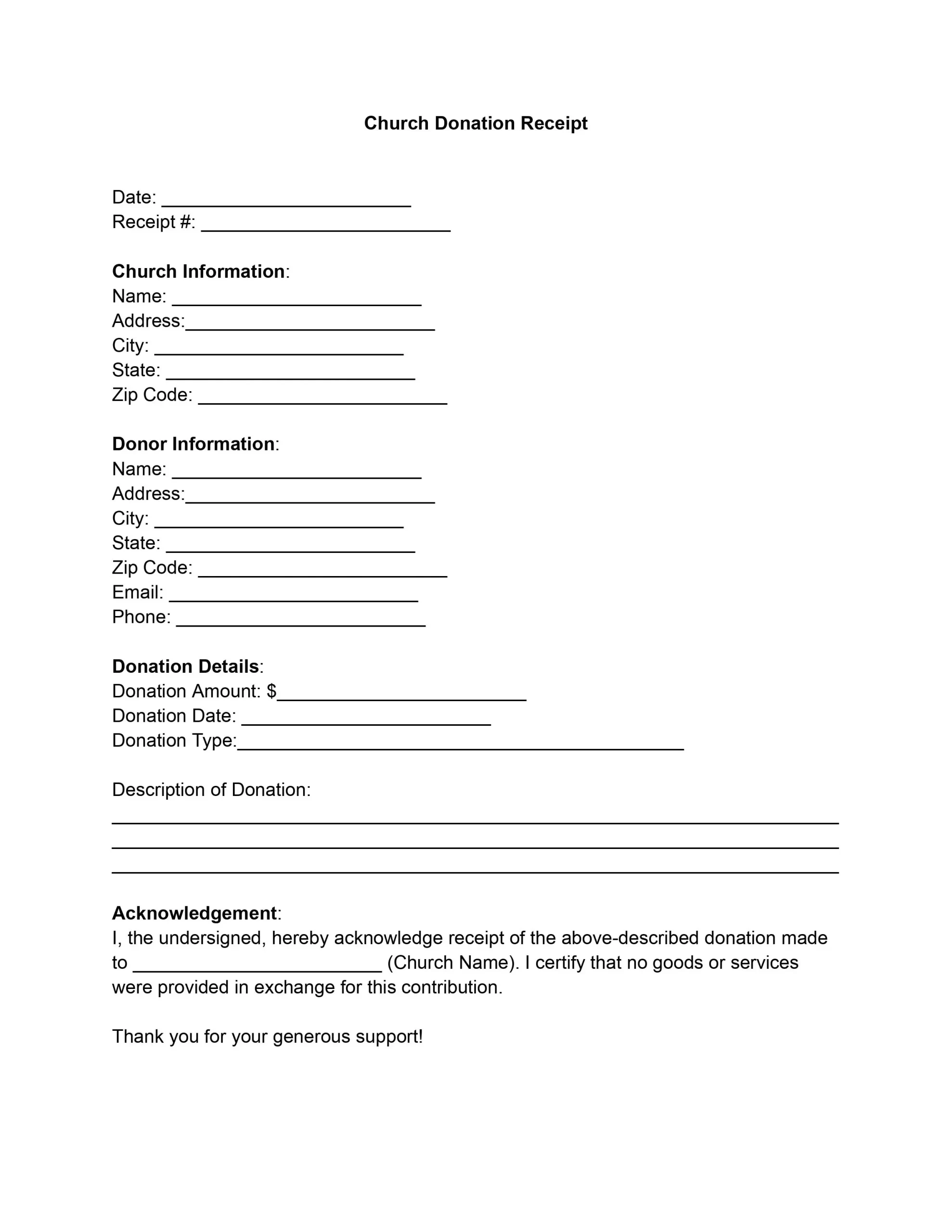
A church donation receipt template is a ready-made form that a church fills in to thank a donor and record a gift. It has fields for the church, the donor, the donation, and a signature. Follow the steps below to complete each field, then keep a copy.
A Church Donation Receipt is a document a church provides to individuals or entities who have made charitable contributions. For the donor, it is a record of their contribution detailing the donation date, amount, and nature (monetary or in-kind). This documentation is crucial for tax purposes, as donations to recognized charitable organizations, including churches, may qualify for a tax deduction under IRS regulations.
The receipt serves two groups. For the church, these receipts are proof of its stewardship of the resources entrusted to it, promoting a culture of transparency and accountability. For donors, these receipts are important documents acknowledging their generosity and supporting their eligibility for tax deductions under the law.
From the church’s perspective, issuing a donation receipt is a practice of good governance and transparency. It acknowledges the receipt of the donation, thereby building trust and goodwill between the church and its community of supporters. Furthermore, it helps the church maintain accurate records of all contributions received, essential for financial reporting, budgeting, and planning. Key elements often included in a church donation tax deduction receipt are:
By providing these receipts, churches comply with legal requirements and strengthen their relationships with donors, encouraging future generosity and participation in the church’s mission and activities.
Work through the template from top to bottom. The seven steps below follow the order of the fields, from the date and receipt number to the signature. Use your records for each entry so every field matches. To complete the form on screen, open it in our PDF editor, then print or save the receipt.
Enter today’s date and a unique receipt number. The number helps both sides find this donation later.
Fill in these details for the church:
This section identifies the church as the recipient of the donation and ensures that the receipt is recognized as an official document from the church.
Enter these details for the donor:
This section is crucial for personalizing the receipt and keeping accurate records of who has contributed to the church.
Complete these fields:
If the donation is in-kind, briefly describe what was donated. This part is essential for tax purposes and for the donor to remember what they contributed.
In the space provided, restate the church’s name to acknowledge the receipt of the donation described above. This statement is a formal acknowledgment from the church confirming the donation receipt.
Signify that no goods or services were provided in exchange for the donation. This declaration is necessary for the donation to be tax-deductible under IRS rules.
The person authorized to issue receipts signs here. Then add the signer’s name and title and enter the date. This section is critical for the authenticity of the receipt, showing that an official church representative has confirmed the donation.
The sample below shows how a finished receipt can look. The names, address, and amounts are made up, so replace each one with your own entries. Compare each row with the seven steps above to see what goes in every field.
| Field | Example entry |
|---|---|
| Date and receipt number | May 10, 2026, Receipt #1001 |
| Church information | Grace Community Church, 456 Oak Avenue, Springfield, IL 62701 |
| Donor information | Anna Baker, 123 Main Street, Springfield, IL 62701, anna.baker@example.com, 555-0100 |
| Donation | $250.00, May 8, 2026, check |
| Acknowledgement | Grace Community Church acknowledges receipt of the donation described above. |
| Goods or services | No goods or services were provided in exchange for this donation. |
| Authorized signature | Maria Lopez, Church Administrator, May 10, 2026 |
Clear wording lets anyone reading the receipts see what donors gave. For a cash gift, enter the amount. For an in-kind gift, list each item, say how many there are, and note the condition. These examples show the level of detail to aim for.
Each line names the type of gift, the amount or quantity, and the condition when it applies. Copy the same pattern into the receipts you issue for other donations.
Small slips are easy to make when you fill in many receipts. Watch for these mistakes before you hand over a receipt. A short review now saves you from having to make corrections later.
Read the receipt once more before it goes out. A quick check catches typos and missing entries, and it takes only a minute or two. Go through this list for the receipts you issue.
You can issue receipts for each gift or send one summary of all donations for the tax year. Either way, keep copies of the receipts with your records.
The template covers these parts, from the top of the form to the signature at the bottom. Fill in each part in order, one after the other, so that every entry matches:
Describe the gift in the donation section. List each item, give the quantity, and add enough detail that anyone reading the receipt can tell what was given.
A person authorized to issue receipts signs it. Below the signature, add their name, title, and the signing date.
A unique receipt number makes each receipt easy to find later. Enter it in the receipt number field and use the same number on the file copy.
Yes. The same template works for every gift, and you change only the entries that differ, such as the donor’s name, the amount, and the date.
A receipt gives donors a written record of each gift, with the date, the amount, and the church that received it. Donors often keep their donation receipts with other financial and tax records. A tax professional can explain how donations apply to a specific return.
General information, not legal or tax advice.
