
Paid in Full Receipt Template

Get Form Now
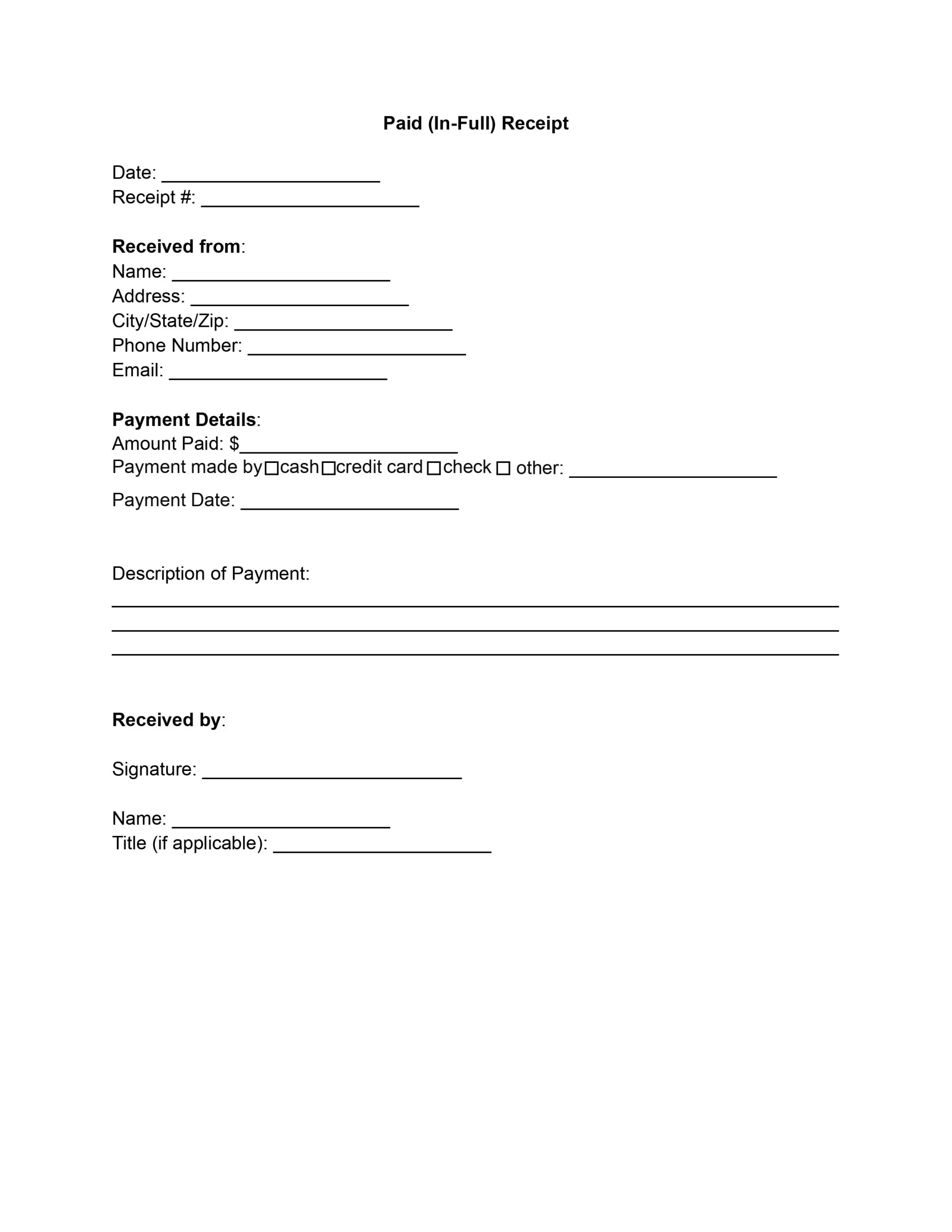
Paid receipt preview
Get Form Now
Edit
Fill out
Sign
Export or Print
Download your fillable Paid in Full Receipt Template in PDF

A paid in full receipt is a signed record that a payer has handed over the whole sum owed for an invoice, a service, or a loan. Use this free template to fill in the payment details, add both signatures, and save a clean copy as a PDF.

Last Updated: October 2026. This guide is reviewed and updated regularly to reflect current law. If you notice an error or outdated information, please contact us.

What Is a Letter of Payment in Full?

A paid in full receipt is a formal acknowledgment from the payee that the payer has paid the entire sum due. It settles a debt or obligation and is often given after the final payment of an invoice or an installment plan.

The filled-in template confirms that the debt or obligation tied to the payment is settled. This matters most when a customer pays an invoice in parts over time, because one final document sums up the whole account. Upon receiving the full payment, the issuance of this receipt provides concrete evidence that the payer has fulfilled their financial commitment in full, leaving no outstanding balance.

The receipt usually names a few basic details, and it often refers to the invoice or the services it settles.

  • The payer and the payee
  • The payment date
  • The total paid

Because the receipt is short and signed by both sides, it is easy to file with the original invoice and to hand over again whenever someone asks for proof of the final payment. A clear receipt also saves time if the payer or the payee needs to look up the payment months later.

Why Give a Receipt for Payment in Full?

Financial transactions must be clear and secure. A final receipt gives both sides a written record that the payment is complete, which keeps the account easy to read for everyone who reviews it later.

So, a paid in full document protects both parties involved.

  • For the payer, it serves as documentation that they fulfilled their payment commitment, shielding them from any future claims of unpaid debt arising from the transaction.
  • For the payee, it’s proof that the money was received in full, which can be helpful for accounting and financial audits.

Businesses use a standardized template for paid in full receipt letters to capture all necessary details, including the date of payment, the amount paid, and parties involved. Such clarity prevents confusion and helps maintain accurate financial records, which are essential for accounting and tax purposes.

Moreover, using a clear and formal paid in full letter sample helps prevent errors such as double billing. It is a definitive record that a payment has been made in full, safeguarding against accidental claims that the debt remains unpaid.

Including a paid in full invoice template in the payment process is a simple but useful step that may considerably improve financial transaction management. It maintains legal and financial integrity while creating a professional environment favorable to developing strong, long-term commercial connections.

What to Include on the Receipt

A complete receipt answers who paid, who was paid, how much, when, and for what. Each item matches a part of the template, so you can compare it with your invoice before you sign.

  • The name, address, contact number, and logo of the business that received the payment
  • The payment date and the total paid
  • The names and contact details of the payer and the payee
  • A short description of the goods or services that the invoice covers
  • A statement that the payment was received in full
  • Signatures of the payer and the payee
Before you sign, confirm that the names, dates, and totals match your invoice and your bank statement.

Example of a Filled-In Receipt

Here is how a completed receipt might read. The details are made up.

  • Payee: Maple Street Landscaping, 123 Main Street, Springfield 12345
  • Payer: Anna Baker
  • Date: June 15, 2026
  • Paid: $1,250.00 for invoice 1042, spring garden cleanup services

How to Edit Paid in Full Receipt Template

Follow these six steps to edit the free template online for your transaction. Work from top to bottom and compare each part with your invoice. When the receipt is complete, save it and download the PDF.

  1. Customize the header. Add your company or business name, address, contact number, and logo at the top of the template. Keep it accurate and up to date so the document looks professional.
  2. Enter the transaction details. Fill in the payment date, the total paid, the names and contact details of the payer and payee, and a description of the goods or services provided. Double-check these details for accuracy to avoid any future disputes.
  3. Acknowledge the payment. Include a statement that acknowledges the receipt of payment in full. This statement should indicate that the specified amount covers the debt or obligation, leaving no outstanding balance. This acknowledgment is crucial for the receipt’s validity.
  4. Add the payment method. Specify the method of payment used by the payer, such as cash, check, credit card, or bank transfer. Including this detail provides a clear record of how the payment was made, which is helpful for accounting purposes and resolving potential payment disputes.
  5. Sign the receipt. Leave a signature section at the bottom of the template for both parties. Both the payer and the payee should sign the receipt to validate it. The signatures serve as a mutual agreement that the information presented in the receipt is accurate and that the payment has been received in full.
  6. Review and save. Read the whole receipt to make sure every detail is correct and complete. Look for any spelling or numerical errors. Once everything looks right, save it and download the PDF.
Tip: keep a signed copy and give the other party a copy too. Store yours with the original invoice so both papers are easy to find.

Frequently Asked Questions

These answers cover common questions about filling out and keeping a final receipt. They explain how the template fits with an invoice and when to use it, and what to enter in each field.

How does the receipt work with an invoice template?

Send your invoice from your usual invoice template. After the customer pays it in full, fill in this receipt with the same invoice number, date, and total.

Can I use the template for a final installment?

Yes. The template works for an invoice paid in one payment and for the last payment of a plan. Enter the total paid and a short description of what the payment covered.

General information, not legal or tax advice.

Jennifer M. Settles
Jennifer M. Settles
Author & Attorney
With over 25 years of experience as a business and transactional attorney, Jennifer has mastered the craft of closing highly successful deals for her clients. Through her wide-ranging expertise in commercial contracts, real estate transactions, M&A and corporate law, Jennifer secures results that are second-to-none.