
A one time credit card authorization form is a document that a customer signs to give a merchant permission to charge their credit card for a single transaction. It comes up often when the merchant and customer do not meet face to face, such as online or over-the-phone payments. The one time credit card payment authorization form typically includes the card number, the amount to be charged, and a signature that validates the transaction.
Last Updated: October 2026. This guide is reviewed and updated regularly to reflect current law. If you notice an error or outdated information, please contact us.
Build Your Document
Answer a few simple questions to make your document in minutes
Save and Print
Save progress and finish on any device, download and print anytime
Sign and Use
Your valid, lawyer-approved document is ready
Merchants can significantly reduce the risk of fraudulent transactions using one-time authorization forms. Since the authorization is for a single transaction, the potential for unauthorized charges is minimized, safeguarding the merchant and the cardholder.
Merchants also are required to adhere to PCI standards, which include strict guidelines on the storage and handling of credit card information. One-time authorization forms allow compliance with these standards by ensuring that sensitive cardholder data is not stored longer than necessary.
Moreover, one-time authorization forms give consumers precise control over their financial transactions. They can ensure they are only charged for the specific amount they have authorized for a particular transaction, reducing the likelihood of billing errors or unauthorized charges.
One time credit card authorization forms streamline the payment process, especially for one-off purchases or services where setting up recurring payments is unnecessary. It makes shopping or paying for services online or over the phone more convenient and straightforward.
Here is what each side gets from a single-use authorization:
So, one-time credit card authorization forms play a crucial role in modern commerce by balancing the need for convenience with the imperative for security. For merchants, they simplify compliance and reduce fraud risk, while for consumers, they offer greater control and peace of mind.
A one time authorization works best when you plan to bill a card once and do not expect to bill it again. If you run a small business, you may ask customers to sign one when their cards cannot be swiped in person, for example after they place an order by phone. These are common situations:
A one time authorization covers a single payment. A recurring authorization covers repeated payments on a schedule, such as a monthly membership or service plan. The table below shows how the two compare for a small business and its buyers.
| Feature | One time authorization | Recurring authorization |
|---|---|---|
| Number of payments | One | Several, on a schedule |
| Typical use | Deposits, one-off orders, single invoices | Memberships, subscriptions, ongoing services |
| Card information | Used once for the agreed payment | Kept on file for the later payments |
| Next purchase | Fill in a new form | The same form covers it |
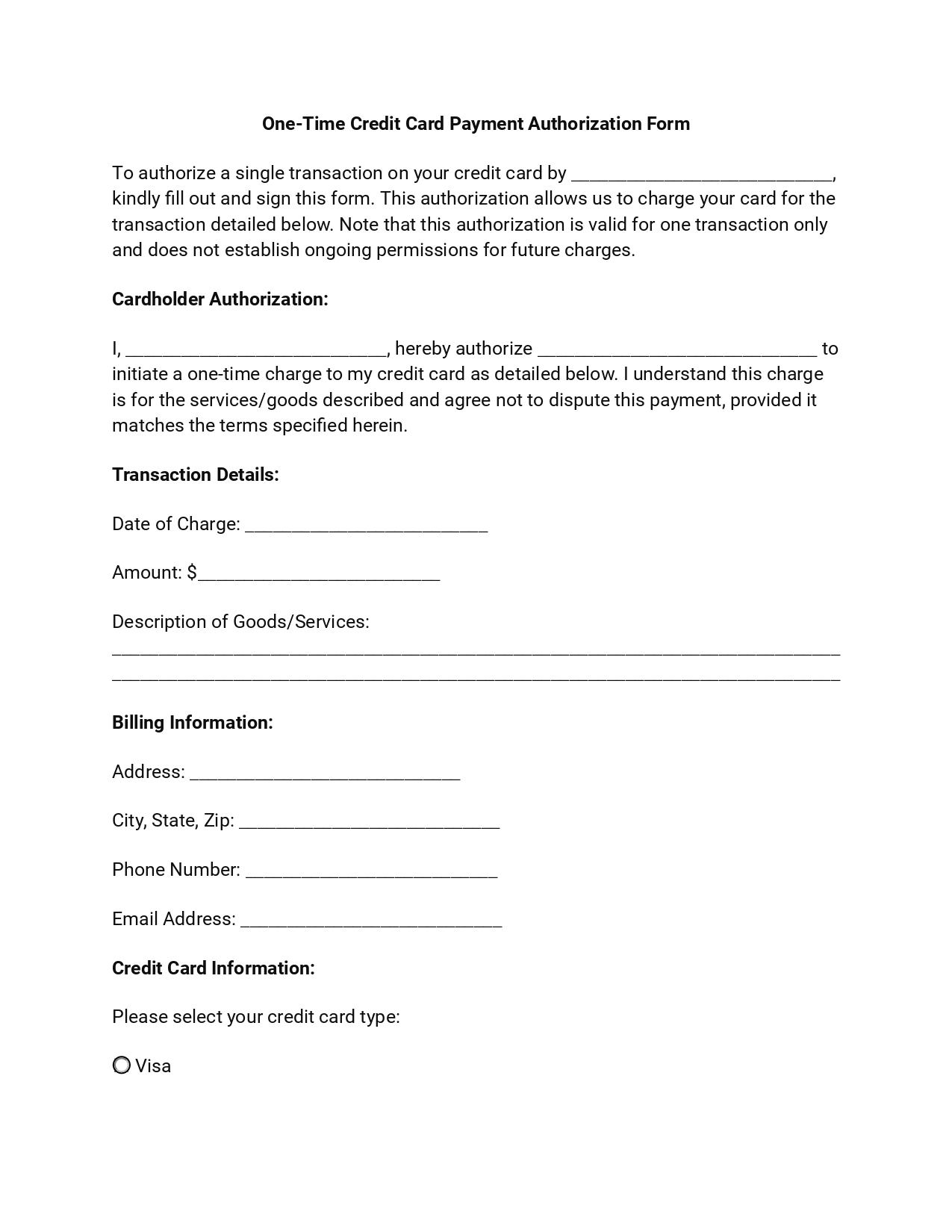
This document, crucial for single transactions, captures the necessary details to process a payment while protecting the cardholder’s information. Here are the essential components that constitute one time credit card payment authorization form:
In addition to these essentials, including merchant information and, optionally, terms and conditions can further extend the effectiveness of the form. Together, these components provide a framework that protects the interests of all parties.
A completed form might look like the sample below. All names and numbers are made up.
| Field | Sample entry |
|---|---|
| Merchant | Main Street Catering |
| Name on card | Anna Baker |
| Billing address | 123 Main Street, Springfield |
| Payment total | $150.00 |
| Payment day | June 15 |
| Description | Deposit for a company event |
| Card | Visa ending in 1234 |
| Signature | Signed by hand |
Start from the free template on this page and fill in each field for your own business or purchase. Have your card and the merchant’s name in front of you first, because the form takes only a few minutes to complete. Following these steps ensures a lawful transaction between you and the merchant, safeguarding both parties’ interests and providing a solid foundation for financial transactions.
Gather these items first:
Enter the merchant’s name or the name of the company you authorize to bill your credit card. This points the authorization to the right business and avoids any doubt about who receives the payment.
Write your full name exactly as it appears on the credit card. This shows who is approving the payment and matches the name on the card, which helps prevent mismatches.
Specify the exact dollar amount you authorize to be charged to your credit card. Double-check this figure before you move on so it matches what you agreed to.
Indicate the day on or after which the payment can be processed. This gives both sides a clear timeline for when the payment is expected.
Detail the goods or services you are paying for. A short description records what the payment is for and keeps both sides on the same page.
Fill in your billing address, phone number, city, state, zip code, and email address. This comprehensive billing information is used to verify the transaction and for any necessary follow-up or receipts.
Write your card type and fill in your cardholder name, account/credit card number, expiration date, CVV code, and billing zip code. This information is vital for processing the transaction.
Conclude by signing your name and dating the form. Your signature is the final step in validating the authorization, making the document legally binding. Make sure the day you sign is the same as or earlier than the day the payment is processed.
Keep your card number private. Give the signed form only to the merchant you are paying, and avoid sending it by regular email or text message.
Once the form is signed, a few habits keep the payment smooth for the merchant and the customer. These tips suit any business that takes card payments by phone, mail, or online.
It lets a merchant charge your card once for an agreed amount. Businesses use it for phone orders, mailed orders, deposits, and other payments where the card is not swiped in person. Because it covers one payment, it does not set up any later payments.
A one time form covers one payment. For a second purchase, fill in a fresh form with the new amount and day. If you expect regular billing, ask the merchant about a recurring form instead.
Give the original to the merchant and keep a signed copy for your own records. Store it in a safe place, and compare it with your card statement when the payment posts.
Yes. Use the free template on this page: select Create My Document, answer a few simple questions, and your form is ready in minutes. You can save your progress, finish on any device, then download and print it.
Share the signed form only with the merchant you are paying. Hand it over in person or use a secure upload from the business instead of a regular email or text message. Black out the card number on the copy you keep.
General information, not legal or tax advice.
