
A credit card authorization form is a document that gives a business the cardholder’s permission to charge a card for one purchase or a series of payments. Use the free template on this page to create your own, then download it, print it, and keep a signed copy.
Last Updated: October 2026. This guide is reviewed and updated regularly to reflect current law. If you notice an error or outdated information, please contact us.
Build Your Document
Answer a few simple questions to make your document in minutes
Save and Print
Save progress and finish on any device, download and print anytime
Sign and Use
Your valid, lawyer-approved document is ready
Consider a café or restaurant that provides lunch catering for a local business. Instead of charging the business for every delivery, which could be cumbersome, the café might ask the business to sign a credit card authorization. This streamlines the process by allowing the café to charge the business’s card for deliveries without negotiating payment methods or obtaining signatures for each transaction.
Another example is a company that leases expensive equipment. To protect themselves from potential damages, the leasing company may use a credit card authorization form to place a hold on the customer’s card every time they pay to lease an item, releasing the hold once the equipment is returned.
This form template suits many kinds of businesses. Some bill clients on a recurring basis for goods or services. Others take deposits for future purchases.
One significant advantage of using a credit card authorization form is that it allows businesses to charge a customer’s credit card without the customer being physically present during the transaction. It also helps protect sellers from chargeback fraud. This happens when a buyer pays online with a card, then asks the card issuer for a chargeback after receiving the goods or services.
Chargebacks can pose a problem for businesses, as the disputed funds may be held, and resolving the issue can be time-consuming and require extensive paperwork.
A credit card authorization form document enables businesses to charge customers at regular or irregular intervals, providing legal permission. A signed document increases the chances of winning a dispute with the card issuer if any issues arise. Merchants, service providers, and organizations that accept credit card payments often use such forms.
For businesses that handle recurring payments, credit card authorization forms offer two key benefits:
These forms streamline the payment process and offer additional protection for sellers and customers.
Most businesses choose between two types of authorization. A one-time credit card authorization form covers a single charge, such as a deposit or a purchase. A recurring credit card authorization form covers payments that repeat on a schedule, such as a monthly service fee.
Anyone who prefers to pay from a bank account can use an ACH authorization form instead. The free template on this page covers both: you pick one-time or recurring, then choose a bank or card payment method.
A complete form records who is paying, which card is used, what the cardholder agrees to, and when. Compare any form template against the list below before you send it out.
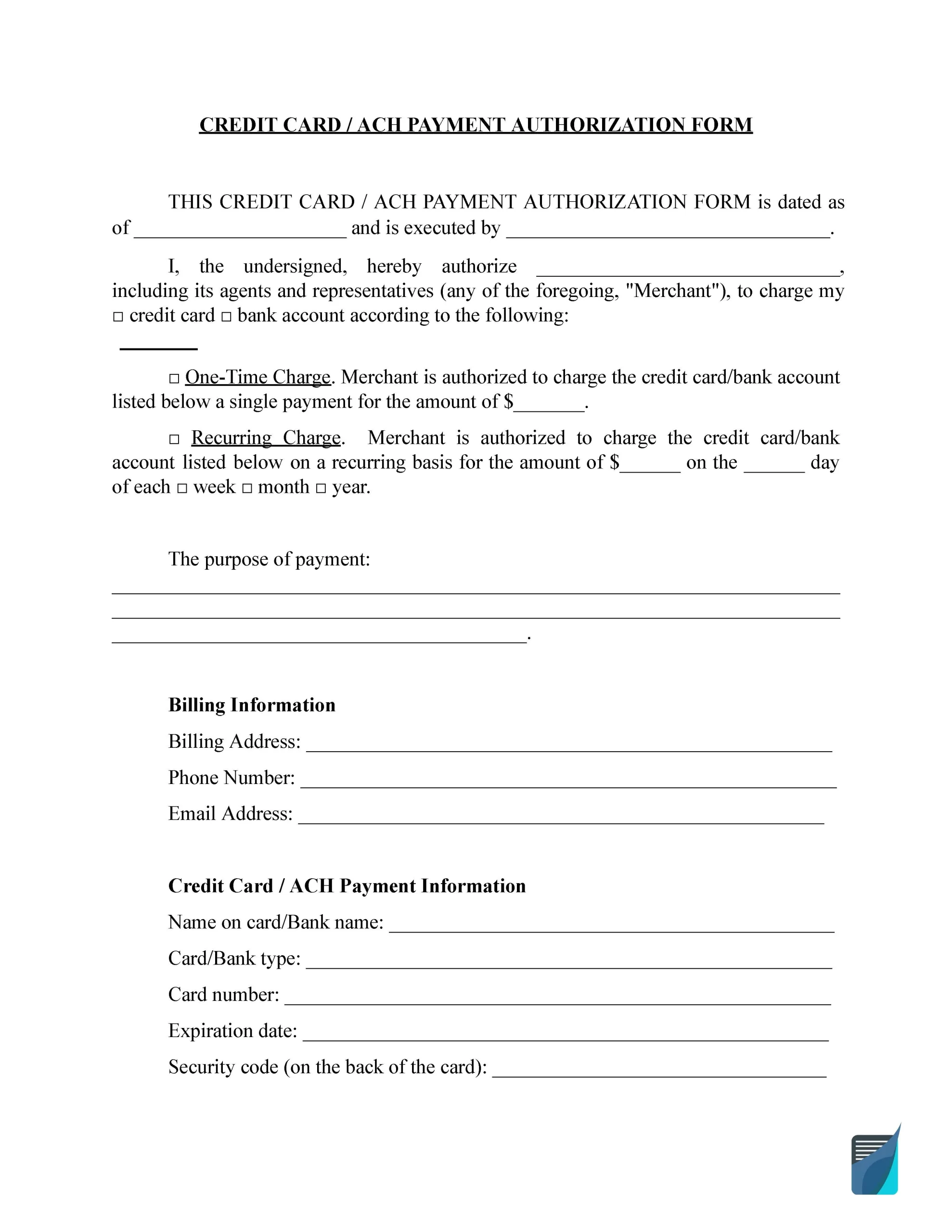
Typical credit card authorization forms will include:
Including these elements in a card authorization form ensures a robust document that complies with regulatory standards and protects against potential disputes.
Using the form takes three steps: collect the customer’s details, choose the authorization type, and get a signature. By following these steps, businesses can use credit card authorization forms to facilitate transactions and protect themselves from potential payment-related issues.
Once the buyer and seller have agreed on the purchase terms, they can complete the written consent form. The form should contain enough information for the payment processor, typically including the customer’s name, card number, expiration date, and billing address.
The credit card authorization form should indicate whether the authorization is for a recurring basis, a one-time charge, or recurring transactions.
Finally, have the customer sign the form to confirm their consent to the charges. Keep the signed form on file for your records and in case of any disputes.
The process of charging a credit card or customer’s bank account is fairly simple, especially if you use our website’s ready-made forms and instructions. You must download a free form and complete the information according to our simple instructions.
Select either the “Recurring Charge” or “One (1) Time Charge” option, depending on whether you want to authorize regularly scheduled monthly charges or a single charge.
For the chosen authorization type, fill in the required fields:
Provide the necessary billing details, including:
Choose either the Bank (ACH) or Credit Card option, and fill in the required fields for the customer’s or third party’s credit card information:
For Bank (ACH):
For Credit Card:
Read the terms and conditions carefully. By signing the form, you agree to the outlined terms and authorize the specified charges. If you understand and agree with the terms, sign the form, and print your name. Also, provide the date of your signature.
Once the form is completed, submit and mail it to the merchant as required. Retain a copy for your records, and remember to notify the merchant in writing if you need to make changes or cancel the authorization.
Before you sign, check that the name, card number, and amount on the form match your card and your records.
A business uses it to get a cardholder’s permission to charge a card. It works for:
It also gives both sides a written record of what was agreed.
Yes. Choose the recurring option, then list the amount, how often the charge happens, and the date or day of each billing period. For a single charge, choose the one-time option instead.
No. Pick the Bank (ACH) option or the Credit Card option, then fill in only the fields for the one you chose.
Both sides can keep a copy. The business files the signed original with its payment records, and the cardholder holds on to a copy in case a question comes up later.
Use the free template on this page. Click Create My Document, answer a few simple questions, and the form is ready in minutes. You can save your progress, finish on any device, then download and print it.
General information, not legal or tax advice.
