
Updated:
Get Form Now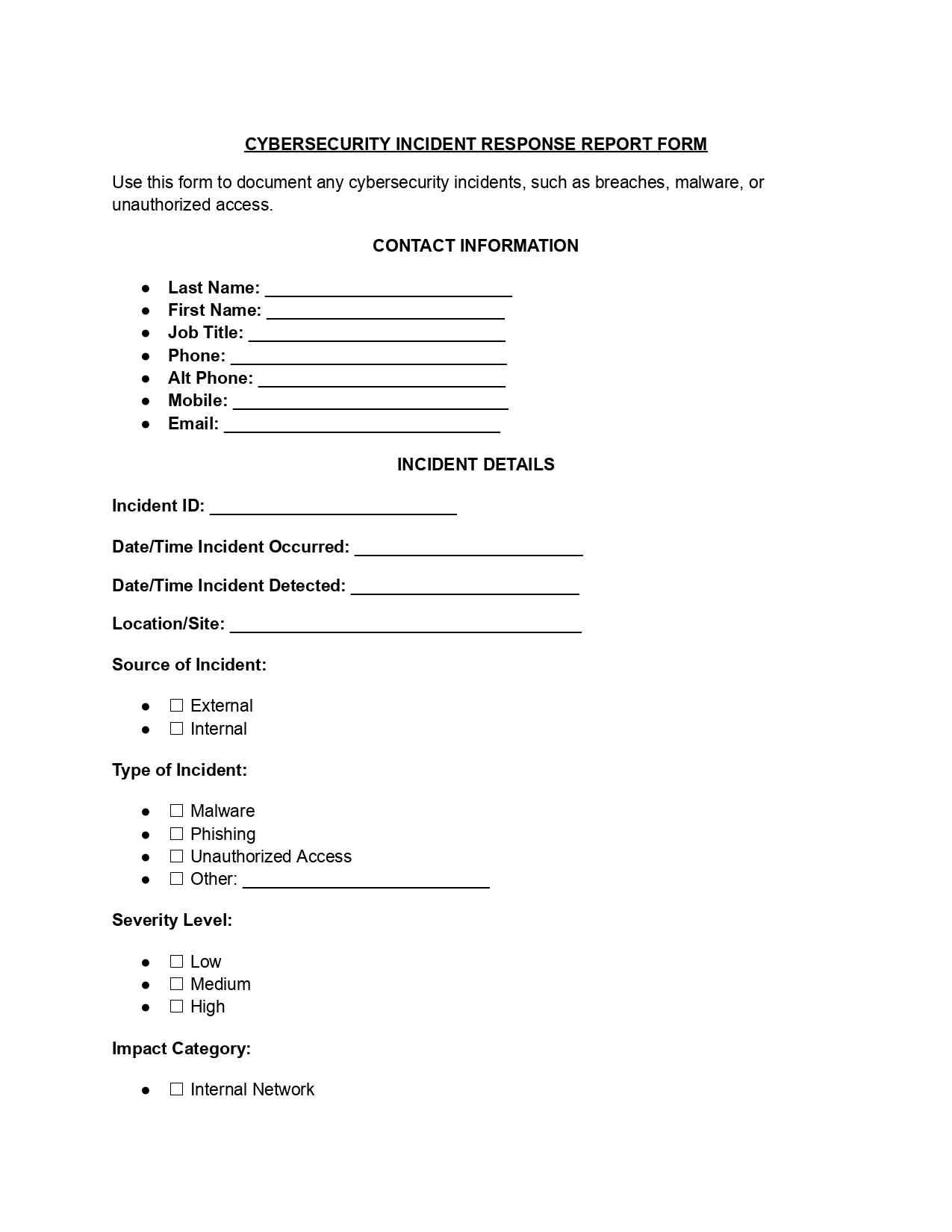
A cybersecurity incident response report is a written record of a security incident, such as a data breach, a ransomware attack, or a phishing email that led to unauthorized access. It shows what happened, which systems and data were affected, and what your team did to contain the problem. This free FormsPal template helps you capture those details in one organized document.
An incident response report is the single place where your security team records a cyber incident from the first alert to the final fix. It gives IT staff, managers, and outside advisers the same clear picture of the event. A good report answers four plain questions:
Because every incident is written up in the same format, it is easy to compare one security incident with another and to spot patterns over time.
The record is useful long after the incident ends. A new team member can read an old entry and see how a similar problem was handled, which systems were involved, and which choices helped.
Over time the finished entries become a shared memory for the organization. They also make it easier to explain an incident to people who were not part of the response.
A finished write-up is read by more than the person who wrote it. Each reader looks for something different, so clear and complete entries save everyone time. The usual readers include:
The response team should begin documenting the event as soon as a potential security threat is identified, such as unauthorized access or a malware infection. This way, all pertinent information is captured right from the start. Scenarios where this form is helpful include:
The template helps structure the investigation and remediation efforts, ensuring a thorough approach to managing the incident.
A completed report is a big help in post-incident reviews and audits. For example, if a company experiences a data breach, the team can review the finished form to improve its security measures and response strategies. It also works as a training document, because it shows how the incident was handled and how similar incidents can be handled better in the future.
Knowing the name of the incident type makes the form easier to fill in and easier to search later. Security teams most often see the following kinds of cyberattacks and incidents, and the form works for each of them:
Having your facts in front of you makes the form quick to complete. Pull together the following items before you write the first line, and add more as the response moves forward:
Filling out the template takes six short steps, and each one matches a part of the form. Work through them in order while the facts are fresh. Keep your wording factual so anyone who reads the report later can follow what happened and why the team acted as it did.
Enter the name, job title, phone number, and email address of the person handling the incident response. This gives everyone a clear point of contact for follow-up actions.
Record a unique incident ID and note whether the source was internal or external. Then fill in these details, using the exact times from your logs when you can:
List every system, application, network segment, and data set the incident touched. A complete list shows how far the incident reached and helps the team decide where to act first.
Write a clear account of what happened, in the order it happened. Include the likely entry points and the first effects your team noticed. Stick to facts and leave out guesses.
For example: At 9:14 a.m., Anna Baker in Accounting opened a link in an email that looked like a bank notice. At 9:20 a.m., her laptop began showing a lock screen, and the helpdesk was called.
Write down each action your team took to limit the damage, along with the time of each one. Cover both technical steps, such as isolating a device from the network, and communication steps, such as alerting staff.
Add any other observations, lessons learned, or ideas that may help with future responses or investigations. These notes feed straight into your post-incident review.
Most incident response frameworks follow the same broad stages, so a team can respond in a steady, planned way. The form starts during detection and analysis, grows through containment and recovery, and is finished in the post-incident review. Here is how it connects to each stage:
The best time to think about documentation is before anything goes wrong. An organization that has agreed on a response plan, a contact list, and a place to store its records can act with less confusion when an alert arrives. Most attacks reach a business over the internet, and technology changes quickly, so many teams review their incident response framework and practice together. A few simple habits help:
Practice also shows where your own standards for naming files and writing times need to be clearer, so that entries from different people look alike.
Every completed form adds to your organization's risk management records. Over time, a stack of them shows which cyberattacks happen most often, which parts of the network are hit first, and which security controls work. That analysis of past events helps technology and operations leaders manage risk, plan improvements, schedule testing, and decide where a strategic investment will make the business more secure.
Timely and accurate entries make the analysis far more reliable. Managing risk effectively starts with knowing exactly what occurred, so the details you record today become the evidence behind tomorrow's security decisions. Clear reporting also lets a manager see the risk in plain terms and compare one analysis with the next.
A write-up is only useful if the next reader can understand it without calling you. These habits keep your cyber incident notes short, accurate, and easy to follow, whether they are read tomorrow or a year from now:
Once the form is finished, read it through one more time and check that the dates, system names, and incident ID match your logs. Then share it with the people who took part in the response so they can add anything that is missing.
Store your own copy with the other security files, and bring the lessons learned back to your incident response plan so the team can respond faster next time.
Responding well does not end when systems are back online. Follow-up activities help the organization restore normal operations and become more secure. Common follow-up activities include:
Teams often ask the same few questions when they first use this template. The short answers below point back to the steps above, so you can find the right part of the form quickly.
Usually the person leading the response fills it out, with input from IT, security, and any manager involved. Their details go in Step 1.
The form has a place for these details:
They overlap, but they are not the same. An IT incident report covers technical problems in general, such as an outage or a failed update. This form focuses on security incidents. If your event was a technical problem rather than an attack, the cybersecurity IT incident report may fit better.
Step 5 covers mitigation. List each action with the time it happened, and mention who carried it out.
Yes. A suspected event can be recorded too. Mark clearly what is confirmed and what is still being checked, and update the entry as the facts become clear.
Start as early as you can, even if some fields are blank. You can complete the rest as the facts come in and the incident is understood.
Share it with the response team, review the lessons learned, and keep a signed copy with your security records.
General information, not legal or tax advice.
