
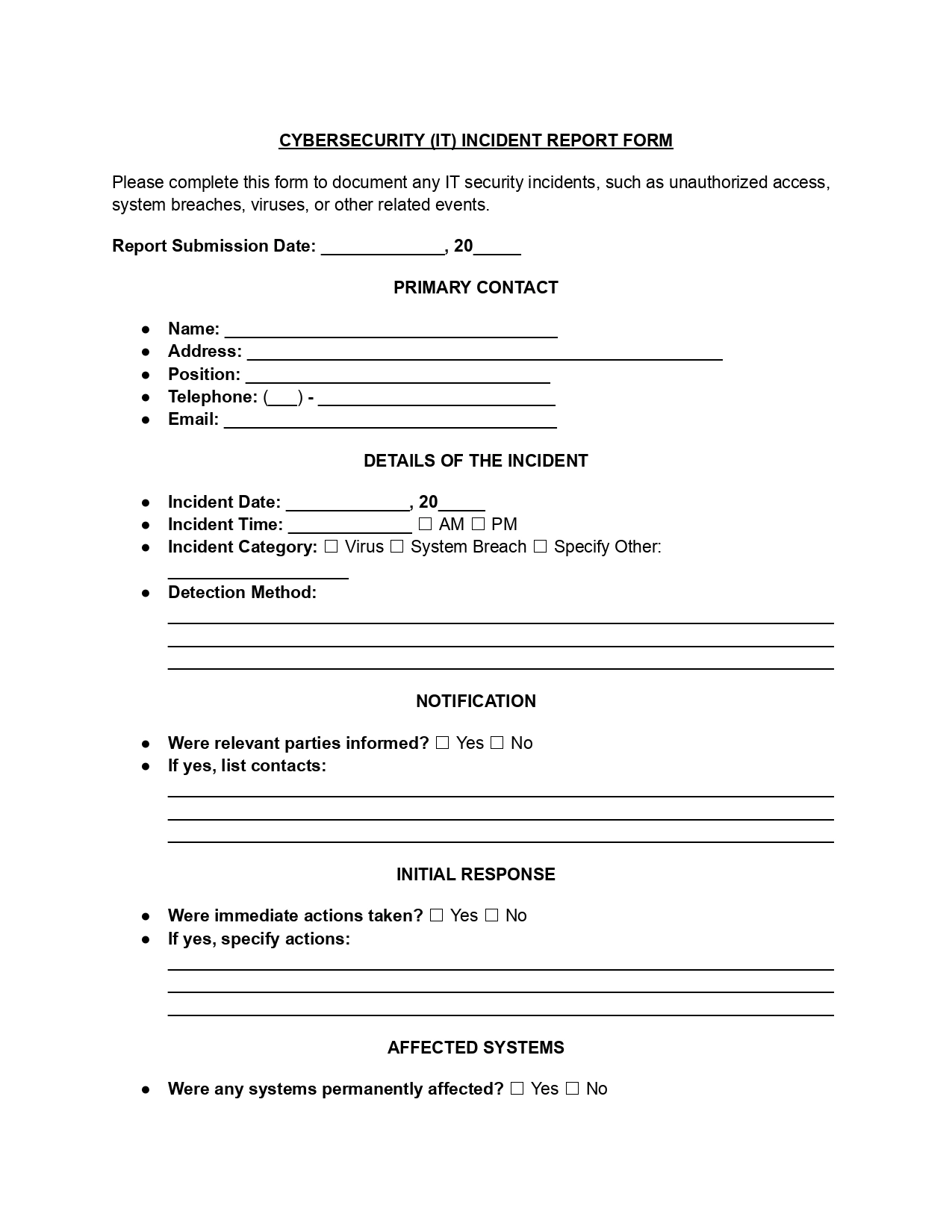
A cybersecurity incident report template is a structured document organizations use to record and assess any security breach or threat that impacts their IT systems, networks, or data. This form provides a full record of the event, its impact, and the following actions taken. Use this free, fillable PDF template to document each security incident the same way every time.
Last Updated: October 2026. This guide is reviewed and updated regularly to reflect current law. If you notice an error or outdated information, please contact us.
A cybersecurity incident is any event that threatens information assets’ integrity, confidentiality, or availability. This covers various actions like unauthorized entry, data breaches, malware infections, denial of service attacks, and unintentional data leaks due to human mistakes. The common thread among these incidents is their potential to harm business operations, client relationships, and legal standing.
When a cybersecurity incident involves the unauthorized access, theft, or exposure of Protected Health Information, the affected entity must adhere to the U.S. Department of Health and Human Services (HHS) guidelines under the Health Insurance Portability and Accountability Act (HIPAA). These guidelines, codified in 45 C.F.R. § 164.408, specify the following reporting requirements:
When a cybersecurity incident does not involve PHI, there is no federal requirement under HIPAA to report the incident. However, the victim organization has the option of reporting such cases to the Federal Bureau of Investigation (FBI).
The FBI categorizes cyberattacks into two main types. The threat response covers attacks that aim to disrupt an organization’s daily operations through malicious activities. The asset response involves incidents where personal data, intellectual property, or other assets are stolen.
A cyber incident report template gives every incident report in your company the same shape. When each report asks the same questions, it is easier to document an event accurately and to spot trends or repeat weak points. That consistency also helps your team respond and recover faster, because the key steps are already laid out.
It also helps ensure regulatory compliance by maintaining logs and documentation that may be required for legal or audit purposes.
Many industries are governed by regulations that require detailed reporting of cybersecurity incidents. A standardized cyber security incident report form ensures that all required information is collected, helping organizations comply with GDPR, HIPAA, or other national cybersecurity laws. It also helps improve communication about incidents with all stakeholders, including management and external partners.
The National Institute of Standards and Technology (NIST) provides comprehensive guidelines for handling cybersecurity incidents. The NIST Cybersecurity Incident Report Template follows a comprehensive framework that includes:
Key components include immediate detection with advanced tools, systematic containment strategies, and thorough recovery plans. It also requires clear internal and external notification protocols that are critical for regulatory compliance.
Gather your facts before you open the security incident report PDF. Having them in front of you makes the template faster to complete and the answers more accurate. Pull together the items below, and add to them as the investigation moves forward.
This step-by-step guide walks you through our cyber security incident report template (PDF) one part at a time. Work through the parts in order and keep your answers short and factual. If a detail is not known yet, say so and update it once the facts are clear.
Enter the date you are filling out the report. This date helps track how long the response took and keeps the incident timeline in order.
Add the main contact for the incident. This person is the first point of communication for any questions about it. Fill in the following:
Enter the date and time of the incident. Then select the category that fits best:
Use the space provided to describe in detail how the incident was detected.
Check “Yes” or “No” to show whether the relevant parties have been told about the incident. If yes, list the contacts who have been notified.
Check “Yes” or “No” to show whether immediate action was taken after the incident was detected. If it was, describe what was done.
Check “Yes” or “No” to show whether any systems were permanently affected. If so, describe the damage.
Check “Yes” or “No” to show whether the source of the attack is known. If it is, describe the source.
Check “Yes” or “No” to show whether any data was compromised during the incident. If it was, describe the affected data.
Add any other comments about the incident. Check “Yes” or “No” and provide details if there is more information to share.
This part is for the person who receives the report. They add their name, the date the report was received, and any actions taken after receipt.
A clear report is easy to scan and easy to trust. Use these habits while you work with the cybersecurity incident report template so that anyone who reads it later can follow what happened without a call to the author.
Once the template is filled in, share it with the people handling the response and keep a signed copy with your security records. A finished security incident report is also useful for a later review, because it shows what worked and what to change next time.
Teams often ask the same few questions when they first use this security incident report template. The short answers below point back to the steps above, so you can find the right part of the form quickly.
Usually the person leading the response fills it out, with input from IT staff and any manager involved. That person’s details go in Step 2.
The template has a place for these items:
They overlap, but they are not the same. This template records the event and its impact in a short, structured way. If you also need to track the containment and recovery work in detail, the cybersecurity incident response report may fit better.
Yes. Use one copy of the PDF template for each security incident, so every event has its own record and timeline.
Yes. A suspected event can be recorded too. Mark clearly what is confirmed and what is still being checked, and update the entry as the facts become clear.
This template is for IT and data security events. For an injury, a safety event, or another problem at work, the workplace incident report template is a better fit.
Start as early as you can, even if some fields are blank. You can complete the rest as the facts come in.
Mention them in Step 9, and say where each file is stored. Keep the files themselves with the report so they are easy to find later.
Share it with the response team, review the lessons learned, and keep a signed copy with your security records.
General information, not legal or tax advice.
