
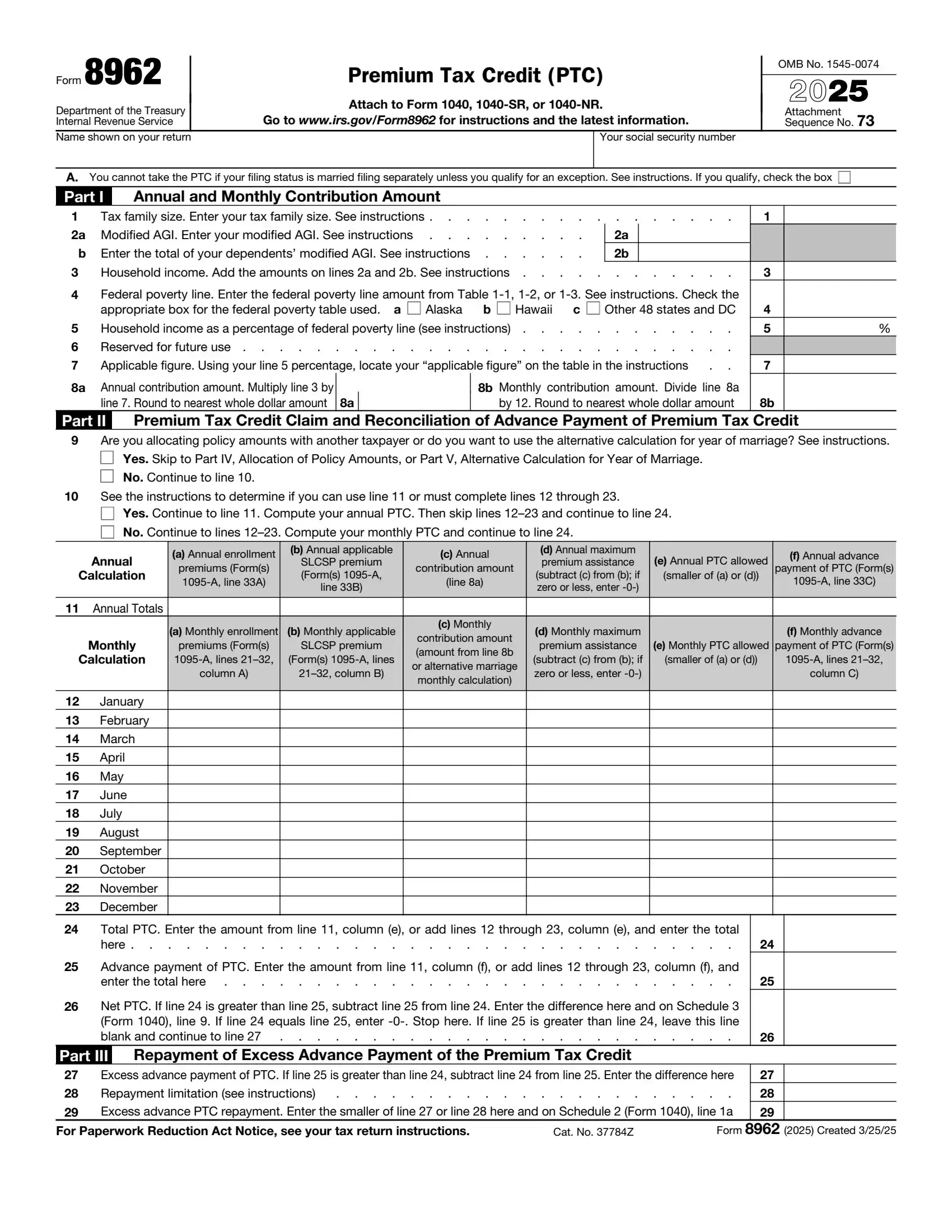
IRS Form 8962, titled “Premium Tax Credit (PTC),” is a form used by taxpayers to calculate the premium tax credit they are eligible to receive if they purchase health insurance through the Health Insurance Marketplace. This form is necessary for individuals claiming the premium tax credit or who need to reconcile any advance payment of the premium tax credit (APTC) made on their behalf to their health insurance providers. The PTC is a refundable credit that helps make purchasing health insurance more affordable for individuals with moderate incomes.
The purpose of Form 8962 is to ensure that taxpayers receive the correct amount of premium tax credit based on their actual income and family size compared to the estimates provided when they enrolled in an insurance plan through the Marketplace. Suppose the advance payments of the credit that the Marketplace paid to the insurance provider exceed the actual premium tax credit calculation. In that case, taxpayers must repay the excess with their tax return. Conversely, they can claim the difference on their tax return if the advance payments were less than the credit they qualify for.
What it is: Form 8962, Premium Tax Credit (PTC): use it to figure the amount of your PTC and reconcile it with APTC.[2]
Where and when to file: Attach to Form 1040, 1040-SR, or 1040-NR. Go to www.irs.gov/Form8962 for instructions and the latest information.
Where to get it: You will need Form 1095-A to complete Form 8962.[2]
You must file Form 8962 with your income tax return (Form 1040, 1040-SR, or 1040-NR) if any of the following apply to you.[2]
You are taking the PTC.[2]
APTC was paid for you or another individual in your tax family.[2]
APTC was paid for an individual you told the Marketplace would be in your tax family and neither you nor anyone else included that individual in a tax family.[2]
You will need Form 1095-A to complete Form 8962.[2]
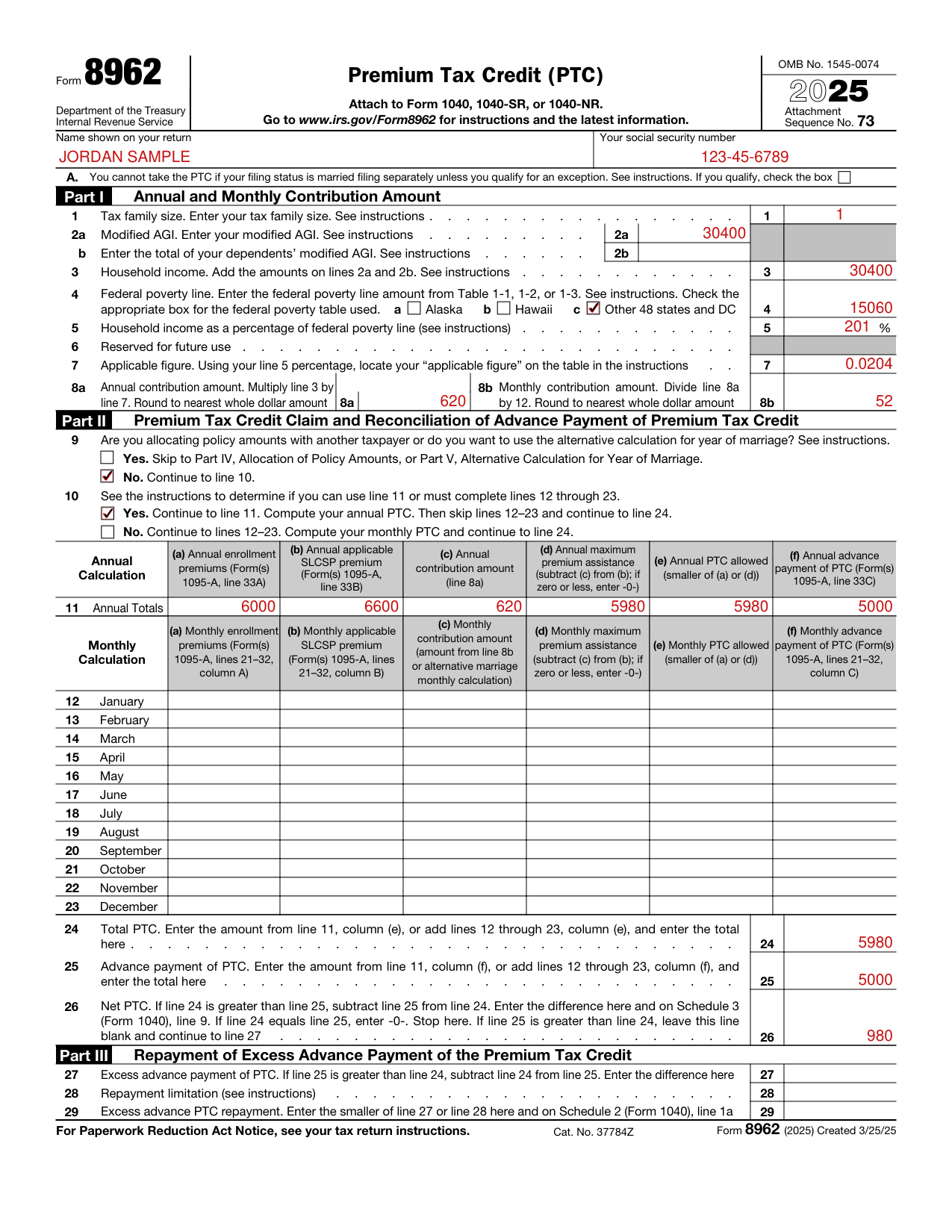

Enter the Name shown on your return and Your social security number.

You cannot take the PTC if your filing status is married filing separately unless you qualify for an exception. If you qualify, check the box on line A.
By checking this box, you are certifying that you qualify for an exception to the requirement to file a joint return with your spouse. Do not attach documentation of the abuse or abandonment to your tax return.[2]

Enter on line 1 your tax family size.
Line 1 Tax family size: enter your tax family size. Line 2a Modified AGI: enter your modified AGI. Line 2b: enter the total of your dependents' modified AGI.
Enter on line 2b the combined modified AGI for your dependents who are required to file an income tax return because their income meets the income tax return filing threshold.
Line 3: add the amounts on lines 2a and 2b. Combine them even if one or both of them are negative. If the total is less than zero, enter -0- on line 3.[2]

Check the box to indicate your state of residence in 2025. Enter on line 4 the amount from Table 1-1, 1-2, or 1-3 that represents the federal poverty line for your state of residence for the family size you entered on line 1 of Form 8962. If you moved during 2025 and you lived in Alaska and/or Hawaii, or you are filing jointly and you and your spouse lived in different states, use the table with the higher dollar amounts for your family size.
Line 5 Figure your household income as a percentage of the federal poverty line using Worksheet 2.
Enter on line 7 the decimal number from Table 2 that applies to the amount you entered on line 5. If the amount on line 5 is 150 or less, your applicable figure is 0.0000. If the amount on line 5 is 400 or more, your applicable figure is 0.0850.
Multiply line 3 by line 7 and enter the result on line 8a, rounded to the nearest whole dollar amount. Divide line 8a by 12.0 and enter the result on line 8b, rounded to the nearest whole dollar amount.[2]
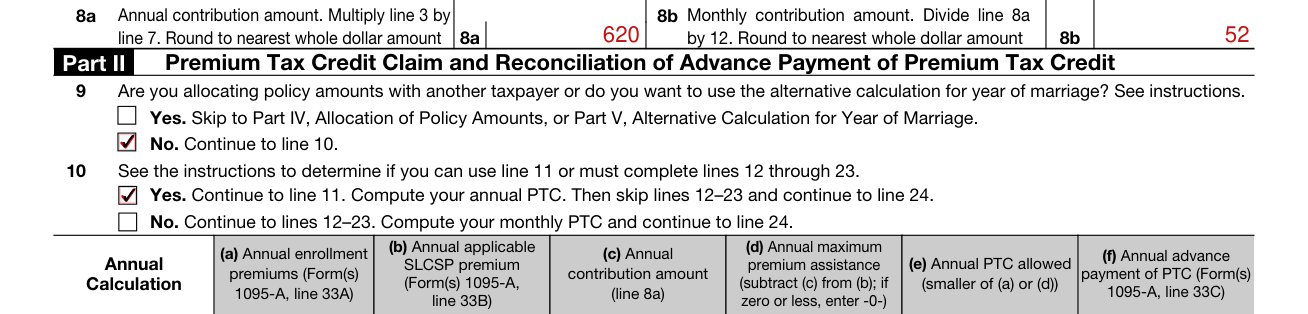
Line 9: Are you allocating policy amounts with another taxpayer or do you want to use the alternative calculation for year of marriage? Yes. Skip to Part IV, Allocation of Policy Amounts, or Part V, Alternative Calculation for Year of Marriage. No. Continue to line 10. Line 10: See the instructions to determine if you can use line 11 or must complete lines 12 through 23.
If you were enrolled in a qualified health plan for fewer than 12 months during 2025, check "No" and continue to lines 12 through 23. Check "Yes" and continue to line 11 if all of the following apply for each qualified health plan you or a member of your tax family was enrolled in for 2025. Otherwise, check "No" and continue to lines 12 through 23.
You were enrolled in the qualified health plan for all 12 months during 2025. Your enrollment premium was the same for every month of 2025. Your SLCSP premium is the same for every month of 2025.[2]

Box 5, Note: If you checked "Yes" on line 10 and you are completing line 11, do not complete lines 12 through 23. Once you complete line 11, skip to line 24.
In column (a), enter the annual enrollment premiums from Form 1095-A, line 33, column A. In column (b), enter the annual applicable SLCSP premium from Form 1095-A, line 33, column B.
Box 5, Column (c): enter the amount from line 8a of Form 8962.
Box 5, Column (f): enter the APTC amount from Form 1095-A, line 33, column C.[2]
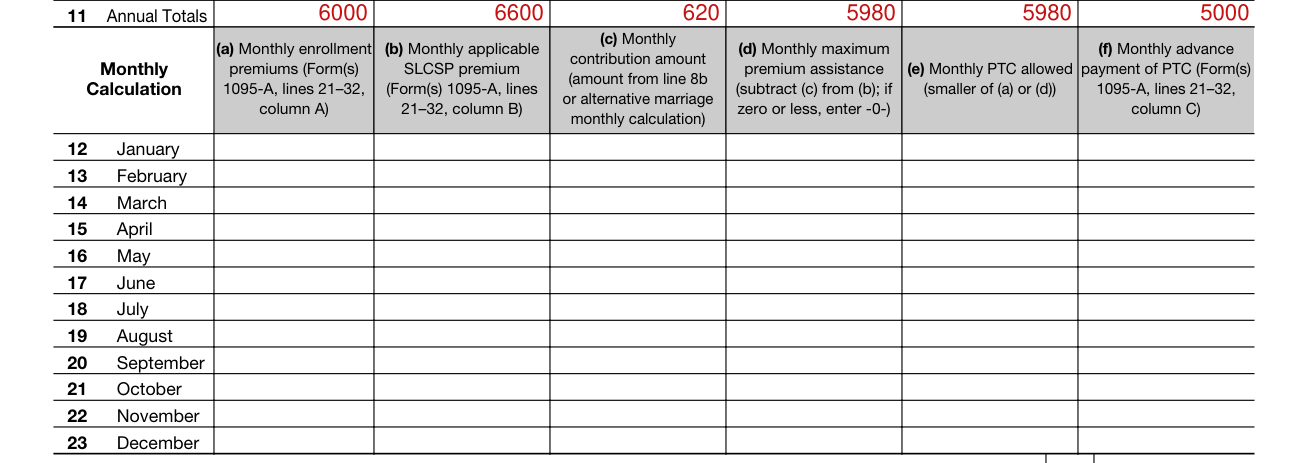
Lines 12 through 23, Monthly Calculation: if you checked "No" on line 10 and you are completing lines 12 through 23, do not complete line 11.[2]

Line 24: enter the amount from line 11(e) or add lines 12(e) through 23(e) and enter the total. Line 25: enter the amount from line 11(f) or add lines 12(f) through 23(f) and enter the total.
If line 24 is greater than line 25, subtract line 25 from line 24 and enter the result on line 26. Also enter the amount from line 26 on Schedule 3 (Form 1040), line 9. Skip lines 27 through 29. If line 24 is equal to line 25, enter -0- on line 26 and skip lines 27 through 29. If line 25 is greater than line 24, leave line 26 blank and go to Part III.[2]

Part III-Repayment of Excess Advance Payment of the Premium Tax Credit: complete this part to figure the amount of excess APTC you must repay. If line 25 is greater than line 24, subtract line 24 from line 25 and enter the result on line 27. The excess APTC you must repay may be limited to the amounts in Table 5. Enter the appropriate amount from Table 5 on line 28.
If line 28 is blank, enter the amount from line 27 on line 29. Also enter the amount from Form 8962, line 29, on Schedule 2 (Form 1040), line 1a.[2]
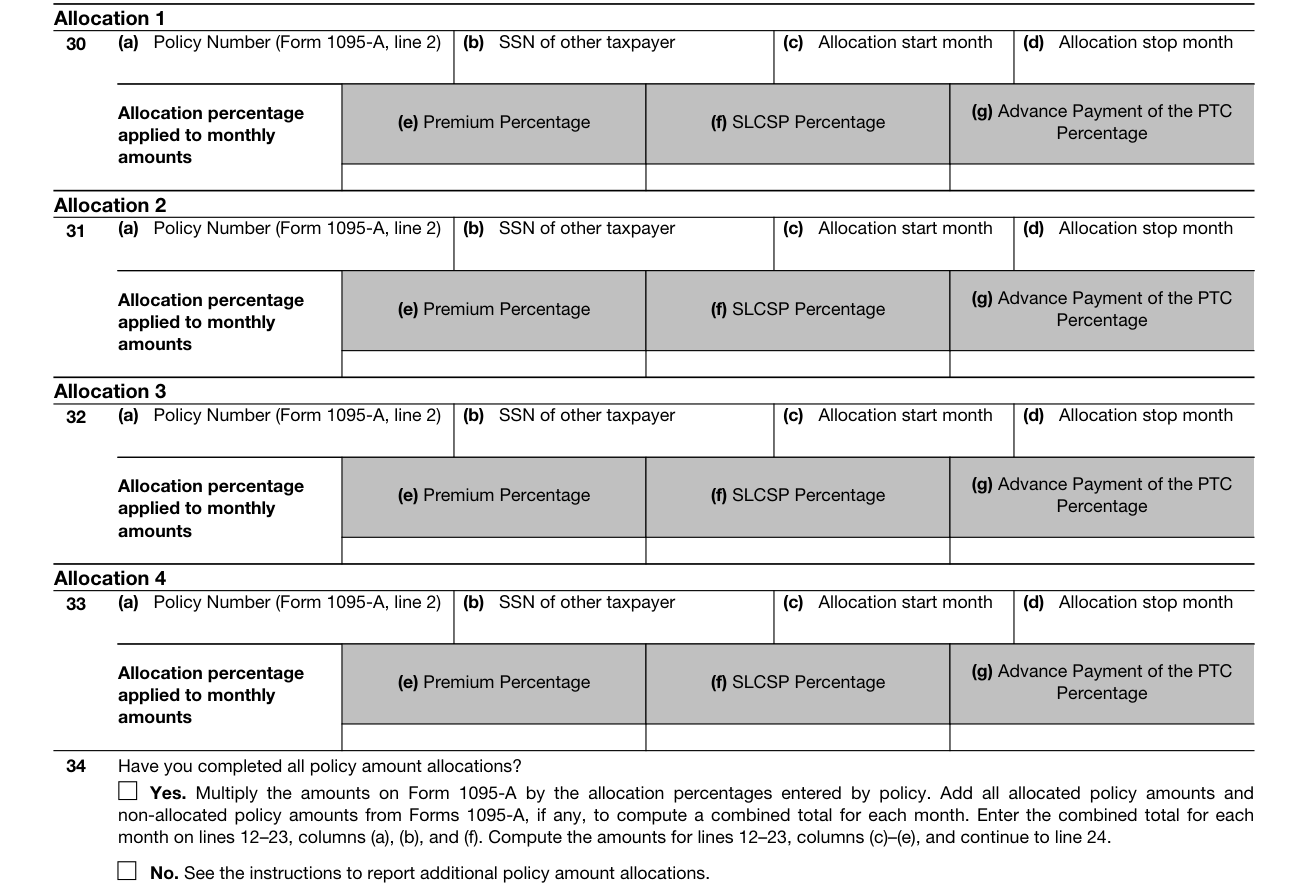
Line 9: Before you complete line 10, you must complete Part IV if you are allocating policy amounts with another taxpayer and complete Part V if you want to use the alternative calculation for year of marriage (defined later).[2]

Part V, Alternative Calculation for Year of Marriage: complete line(s) 35 and/or 36 to elect the alternative calculation for year of marriage.
You may take the PTC (and APTC may be paid) only for health insurance coverage in a qualified health plan (defined later) purchased through a Health Insurance Marketplace (Marketplace, also known as an Exchange).[2]
If you are filing Form 8962, you cannot file Form 1040-SS.[2]
You must file Form 8962 to compute and take the PTC on your tax return.[2]
If you or a member of your family enrolled in health insurance coverage for 2025 through a Marketplace, you should have received Form 1095-A, Health Insurance Marketplace Statement, from the Marketplace. Form 1095-A shows the months of coverage purchased through the Marketplace and any APTC paid to your insurance company to help cover your monthly premium. If APTC was paid on your behalf, or if APTC was not paid on your behalf but you wish to take the PTC, you must file Form 8962 and attach it to your tax return (Form 1040, 1040-SR, or 1040-NR).[2]
If the APTC is more than your PTC, you have excess APTC and you must repay the excess, subject to certain limitations. If the APTC is less than the PTC, you can get a credit for the difference, which reduces your tax payment or increases your refund.[2]
Attach to Form 1040, 1040-SR, or 1040-NR. Go to www.irs.gov/Form8962 for instructions and the latest information.
[1] Form 8962 (2025), Premium Tax Credit (PTC), Internal Revenue Service (the Official source link on this page).
[2] Instructions for Form 8962 (2025), Internal Revenue Service.