
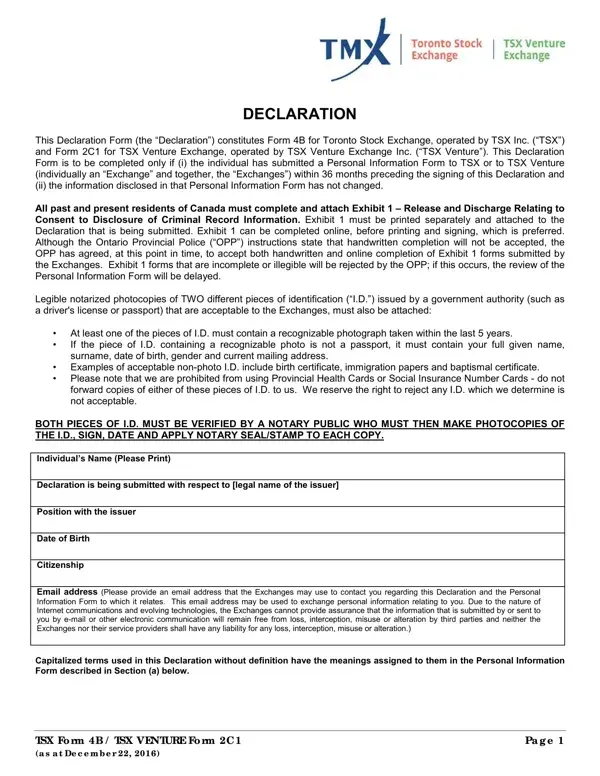
The 2C 1 Form, also called the TSX Venture Exchange Declaration or Form 4B, is required when a registered participant needs to reaffirm their existing Personal Information Form (PIF) disclosure without resubmitting the full form. This applies when the PIF was submitted to TSX or TSX Venture within the previous 36 months and all disclosed information remains current.
To complete the form, confirm your PIF details are accurate, consent to the exchange's use of your personal information under its PIF Collection Policy, and provide notarized photocopies of two government-issued photo IDs. Non-compliance with these requirements can delay registration approval and may conflict with Canadian securities regulations. For related forms, see the Canadian Declaration Form or notarized identity verification form.
| Question | Answer |
|---|---|
| Form Name | 2C 1 Form |
| Form Length | 5 pages |
| Fillable? | No |
| Fillable fields | 0 |
| Avg. time to fill out | 1 min 15 sec |
| Issuing Authority | TSX Venture Exchange |
| Jurisdiction | Canada |
| Form Category | Declaration / Re-Declaration |
| Related Form | Form 4B (Toronto Stock Exchange) |
| Other names | form 2c1, form 2c1 for tsx venture, 2 c1 form, 2c1 download, tsx declaration |
2C 1 Form isn’t the one you’re looking for?