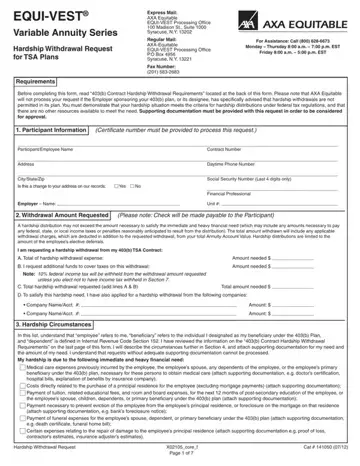
Creating the axa withdrawal document is a breeze using our PDF editor. Keep up with the next actions to prepare the document right away.
Step 1: The initial step will be to select the orange "Get Form Now" button.
Step 2: So, you're on the file editing page. You can add information, edit existing details, highlight particular words or phrases, place crosses or checks, insert images, sign the document, erase unwanted fields, etc.
These particular sections are contained in the PDF document you'll be creating.
Fill in the In this list understand that, Medical care expenses previously, Hardship Withdrawal Request, Xcoref Page of, and Cat areas with any details that can be demanded by the software.
The application will require you to include certain key details to conveniently fill out the section Please provide a description of, A Enter date hardship immediate, B Based on the heavy inancial, How did you arrive at the amount, Did you consider all other, Yes, and If No explain why not.
As part of paragraph C Please complete the following, I can alleviate this hardship by, Yes Yes Yes Yes, No No No No, D Please list all qualiied plans, participation and have not yet, I have taken all available, Yes, and If No explain why not, indicate the rights and responsibilities.
Finalize by analyzing these sections and writing the suitable data: I have taken all available, Yes, If No explain why not, I have taken all available, Yes, If No explain why not, Hardship Withdrawal Request, Xcoref Page of, and Cat.
Step 3: After you've selected the Done button, your document is going to be obtainable for export to any kind of device or email address you identify.
Step 4: Make duplicates of the file - it may help you stay clear of potential issues. And don't be concerned - we do not publish or view your details.
For related retirement and financial hardship forms, see the Hardship Withdrawal Request form, the 403b Request Form, or the AXA Distribution Form for standard distributions from your annuity plan.
Frequently Asked Questions about 403b Hardship Withdrawal
What qualifies as a hardship for a 403b AXA withdrawal?
The IRS allows six qualifying reasons for a 403b hardship withdrawal: unreimbursed medical expenses, costs to purchase a primary residence, tuition and education fees for the next 12 months, payments to prevent eviction or foreclosure on your primary home, funeral or burial expenses, and costs to repair casualty damage to your primary residence. Each reason requires supporting documentation submitted with the EQUI-VEST withdrawal form.
How long does the AXA 403b hardship withdrawal process take?
Most AXA Equitable hardship withdrawal requests are processed within 5 to 10 business days after all required documentation is received. Incomplete applications or missing supporting documents will delay processing. Verify all sections of the form are complete before submitting.
Is a 403b hardship withdrawal subject to taxes and penalties?
Yes. A 403b hardship withdrawal is subject to ordinary income tax and typically a 10% early distribution penalty if you are under age 59.5. The EQUI-VEST hardship withdrawal form includes a federal tax withholding election section. Withdrawing before age 59.5 should be a last resort given the tax cost.
Can a 403b hardship withdrawal be repaid to the plan?
No. Unlike a 403b loan, a 403b hardship withdrawal cannot be repaid to the retirement plan. The funds are permanently removed from your account. If you need temporary access to funds you can repay, a plan loan may be a better option. Review the financial hardship claim form for alternative hardship documentation options.

Please withdraw the total amount needed 
Please withdraw the specific
Withdrawals from
I do not want federal income taxes (and state, if applicable) withheld from my hardship withdrawal. I have provided my U.S. residence address and Social Security number in Section 1 of this form. I understand that I am responsible for the payment of any estimated taxes, and that I may incur penalties if my payments are not enough.