
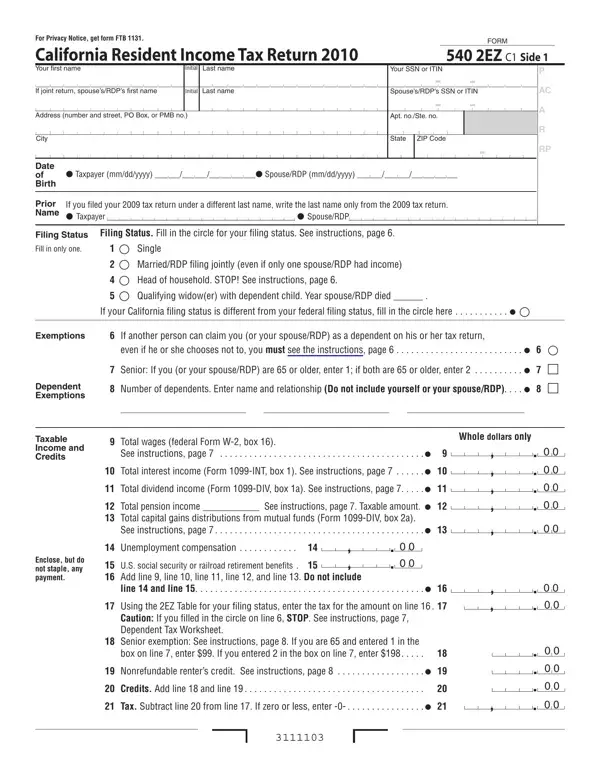
Completing Form 540 2EZ online is straightforward with the FormsPal editor. You can fill in your California tax return without downloading any software. Follow these steps to complete the form:
Step 1: Click the "Get Form" button at the top of this page to open Form 540 2EZ in our online editor.
Step 2: The editor lets you add text, adjust existing content, and apply your signature, all within a few minutes.
Step 3: Fill out each section in order. Begin with your personal information, Social Security number, and the tax year you are filing for:
Step 4: Complete the income and exemptions section. Fill in these fields: Exemptions, If another person can claim you, Dependent Exemptions, Taxable Income and Credits, Total wages from federal Form W-2, Interest and dividend income, and Unemployment compensation. Verify each dollar amount before moving on.
Step 5: Fill in the senior exemption and credits section. Include the Senior Head of Household Credit and the Young Child Tax Credit if you qualify.
Step 6: Complete the use tax, voluntary contributions, and amount owed sections. Enter your full name and Social Security number in the required fields. Double-check that all dollar amounts are whole numbers, as the form requires whole dollars only.
Step 7: Complete the final section covering your refund or amount due. If you want a direct deposit refund, enter your bank routing number and account number. Add your signature and your spouse's or Registered Domestic Partner's signature if filing jointly.
Step 8: Click "Done" to finalize your Form 540 2EZ. You can then download it as a PDF or email it from your FormsPal account. Your data is stored securely and never shared.
If your tax situation requires a more detailed return, see the California Form 540 for standard filers. Part-year residents and nonresidents should use Form 540NR. If you owe taxes and need to mail a payment separately, use the California 540-V payment voucher.
