
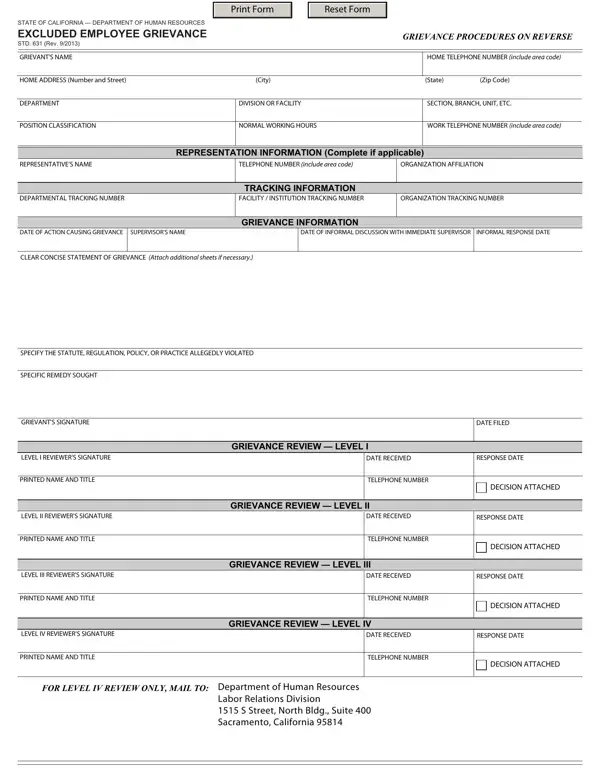
The STD 631 form is used by California excluded employees to file formal workplace grievances. Before editing this form online, gather your employee ID, the specific statute or regulation at issue, and your supervisor’s contact details. For California state workers dealing with other HR matters, you may also find the CalHR 754 form or the 1199 grievance form helpful.
Using the online editor for PDFs by FormsPal, you are able to complete or modify the STD 631 form here. Our team is aimed at making sure you have the ideal experience with our tool by continuously introducing new features and improvements. To get started, follow these steps:
Step 1: Just press the “Get Form Button” in the top section of this page to open our pdf file editor. There you’ll find everything that is needed to work with your file.
Step 2: Using our advanced PDF editor, you’ll be able to do more than simply fill out blank fields. Try each of the features and make your forms look sublime with custom textual content put in, or optimize the file’s original input to excellence - all that supported by the capability to incorporate almost any graphics and sign the PDF off.
This form will need specific data to be filled in, so be certain to take some time to enter what’s asked:
1. While filling in the STD 631 form, be certain to include all needed blanks in their associated part. It will help to speed up the process, making it possible for your details to be handled quickly and properly.
2. When the previous section is finished, it is time to include the required specifics in SPECIFY THE STATUTE REGULATION, SPECIFIC REMEDY SOUGHT, GRIEVANTS SIGNATURE, LEVEL I REVIEWERS SIGNATURE, PRINTED NAME AND TITLE, LEVEL II REVIEWERS SIGNATURE, PRINTED NAME AND TITLE, LEVEL III REVIEWERS SIGNATURE, PRINTED NAME AND TITLE, GRIEVANCE REVIEW LEVEL I, DATE FILED, DATE RECEIVED, RESPONSE DATE, TELEPHONE NUMBER, and DECISION ATTACHED so you’re able to move forward further.
3. Your next part is usually hassle-free - fill in all the form fields in LEVEL IV REVIEWERS SIGNATURE, PRINTED NAME AND TITLE, GRIEVANCE REVIEW LEVEL IV, DATE RECEIVED, RESPONSE DATE, TELEPHONE NUMBER, DECISION ATTACHED, FOR LEVEL IV REVIEW ONLY MAIL TO, and Labor Relations Division S Street in order to complete this process.
Be very careful when completing Labor Relations Division S Street and RESPONSE DATE, because this is where many people make errors.
Step 3: Check what you have entered into the form fields and then hit the “Done” button. Sign up with us today and immediately get access to the STD 631 form, available for download. Every single change made is handily saved, meaning you can customize the document at a later point anytime. We don’t share or sell any information you use while completing documents at FormsPal.
