
719A Form PDF Details

The 719A Form is the DC Medicaid Prior Authorization Form. Physicians and authorized prescribers use it to request pre-approval for medical services, equipment, or supplies under the District's Medicaid Fee-for-Service program and the Early and Periodic Screening, Diagnosis, and Treatment (EPSDT) program for children.

To complete the 719A Form correctly, prescribers must include patient and provider details, diagnosis codes, and a written justification for the requested service. The form requires a mandatory signature from the physician or authorized prescriber. Missing information can delay processing or result in rejection by the DC Department of Health Care Finance (DHCF).

Submissions typically include supporting documents such as a Letter of Medical Necessity, a clinical evaluation or assessment, and a treatment plan. Together, these materials enable a comprehensive review that confirms treatments are medically necessary rather than experimental.

Providers filing a prior authorization request may also need a prescription drug prior authorization form or a medical management authorization form depending on the type of service requested.

QuestionAnswer
Form Name719A Form
Form Length9 pages
Fillable?No
Fillable fields0
Avg. time to fill out2 min 15 sec
Other names719a form, 719a, 719a printable, 719 form
Issuing AuthorityDC Department of Health Care Finance (DHCF)
Who Can FilePhysicians and authorized prescribers
Form PurposePrior authorization for medical services and supplies

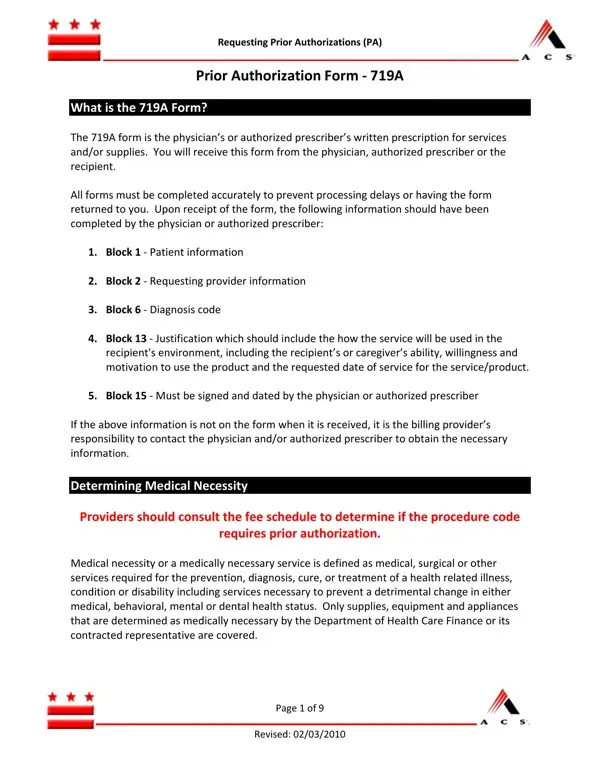
Form Preview Example

Requesting Prior Authorizations (PA)

Prior Authorization Form ‐ 719A

What is the 719A Form?

The 719A form is the physician’s or authorized prescriber’s written prescription for services and/or supplies. You will receive this form from the physician, authorized prescriber or the recipient.

All forms must be completed accurately to prevent processing delays or having the form returned to you. Upon receipt of the form, the following information should have been completed by the physician or authorized prescriber:

1.Block 1 ‐ Patient information

2.Block 2 ‐ Requesting provider information

3.Block 6 ‐ Diagnosis code

4.Block 13 ‐ Justification which should include the how the service will be used in the recipient's environment, including the recipient’s or caregiver’s ability, willingness and motivation to use the product and the requested date of service for the service/product.

5.Block 15 ‐ Must be signed and dated by the physician or authorized prescriber

If the above information is not on the form when it is received, it is the billing provider’s responsibility to contact the physician and/or authorized prescriber to obtain the necessary information.

Determining Medical Necessity

Providers should consult the fee schedule to determine if the procedure code

requires prior authorization.

Medical necessity or a medically necessary service is defined as medical, surgical or other services required for the prevention, diagnosis, cure, or treatment of a health related illness, condition or disability including services necessary to prevent a detrimental change in either medical, behavioral, mental or dental health status. Only supplies, equipment and appliances that are determined as medically necessary by the Department of Health Care Finance or its contracted representative are covered.

Page 1 of 9

Revised: 02/03/2010

Requesting Prior Authorizations (PA)

Services determined as medically necessary must be:

1.Appropriate to the individual’s physical, mental, developmental, psychological, and functional health

2.Clinically appropriate in terms of type, frequency, extent, setting and duration

3.Reasonable and necessary part of the recipient’s treatment plan

4.Not furnished for the convenience of the recipient’s family, attending practitioner or other practitioner or supplier

5.Be necessary and consistent with generally accepted professional medical standards (i.e., not experimental or investigational)

6.Be established as safe and effective for the recipient’s treatment protocol

7.Be furnished at the most appropriate level that is suitable for use in the recipient’s home environment

For general information about what is covered under the District’s Medicaid FeeforService program, as well as what is covered under the Early and Periodic Screening, Diagnosis and Treatment (EPSDT) program for children; please refer to Section 13.0 of the provider handbook.

Required Documentation

In addition to confirming medical necessity, the following documents are required.

1.Prior Authorization Form (PA 719A form): This form is used by physicians and authorized prescribers to order durable medical equipment, supplies, and services and products (i.e., DME/POS, dental, optical) that are necessary to treat a health care condition. This serves as the recipient's prescription.

2.The Letter of Medical Necessity provides DC Medicaid with a visual image of the patient’s needs. This letter is issued by the physician or authorized prescriber.

3.Evaluation/Assessment is submitted if necessary.

4.Plan of Treatment medically justifies the necessity for all supplies and equipment under this program and must be attached to the 719A form.

Page 2 of 9

Revised: 02/03/2010

Requesting Prior Authorizations (PA)

Completing the 719A – Prior Authorization Form

Billing provider

a.Enter the billing provider’s Medicaid number.

b.Print the name of the billing provider who is requesting reimbursement for the service(s) or product(s) provided.

Block 1: Patient

a.Enter the recipient’s 8digit Medicaid number as it appears on the Medical Assistance Card.

b.Enter the recipient's name as it appears on the Medical Assistance Card.

c.Enter the recipient’s address including street, city, state and zip code.

d.Enter the recipient’s telephone number.

e.Enter the recipient’s date of birth.

f.Select the appropriate box

Block 2: Requesting Provider

a.Enter the requesting provider’s Medicaid number.

b.Enter the name of the practitioner requesting the service for the recipient

c.Enter the street address for the provider.

d.Enter the city, state, and zip code for the provider.

e.Enter the telephone number of the provider.

Block 3: Other health insurance coverage

a.Enter the name of the policy holder, plan name, address and policy of any third party reported by the recipient or known by the provider to cover the services being requested.

b.If not applicable, leave blank or enter “N/A”.

Block 4: Requested service

a. Select the appropriate block for the requested equipment or service.

Block 5: Patient location

a.Select the block that appropriately describes the patient’s location.

b.Enter the discharge date, if the patient is still in a facility.

Block 6: Diagnosis

a.Enter the appropriate diagnosis code from the ICD9 CM that best reflects the patient’s condition and describes the need for the service or equipment requested.

Page 3 of 9

Revised: 02/03/2010

Requesting Prior Authorizations (PA)

Block 7: Procedure code

a.Enter the HCPCS (procedure) code with the appropriate modifier (if applicable) of the equipment or service being requested.

Block 8: Description of services, durable medical equipment or supplies

a.Enter the description of the requested equipment or service as listed in the HCPCS Coding Manual.

Block 9: Time required

a. Enter best estimate

Block 10: Freq or units

a.Enter the number of services required or the number of items required to provide for the patient’s needs.

b.The time the service is needed may exceed limits and require adjustments by the Department of Health Care Finance for the balance of time needed for the service.

Block 11: Estimated charge ($)

a. Enter the estimated customary and usual charge for the service or equipment.

Block 12: Approved amount ($)

a.The field is completed by the Department of Health Care Finance or its contracted representative with the allowed reimbursement amount.

Block 13: Justification

a.Enter medical justification for the equipment or supplies to be provided.

b.Enter the date of service for the requested product or service.

Note:

a.Do not enter the ICD9 CM code.

b.When requesting additional equipment accessories (i.e., a standard wheelchair) include height and weight, if the equipment is for extra heavy, extra tall, etc.

Block 14: For Dental Use Only

a. Enter the appropriate tooth number and surface area.

Block 15:

a.Signature of requesting provider: This form must be signed by the provider requesting the services to be prior authorized.

b.Date: Enter the date the form was signed. The date of the signature will be considered the effective date unless physician authorizes date in block 13 as DOS.

Page 4 of 9

Revised: 02/03/2010

Requesting Prior Authorizations (PA)

Quick Tips:

Please be mindful of the following when completing a 719A form:

Copies of the 719A form are acceptable for original prior authorization requests.

Initial and date any corrections made on the form.

All 719A forms must be typed or printed legibly.

Use miscellaneous codes ONLY when a more precise and appropriate HCPCS code is not available.

When using a miscellaneous code, include the manufacturer’s quote, invoice or paid receipt with the 719A form, in addition to the required documentation.

Prior authorization (PA) does not guarantee payment. A PA only authorizes that services and/or equipment may be provided.

Payment for services and supplies is rendered in accordance to the fee schedule.

Do not submit claims for a procedure requiring prior authorization without first obtaining the PA number. If you submit a claim for a procedure code that requires a PA, your claims will deny. Please consult the fee schedule to verify if the procedure code requires prior authorization. Once the PA request has been approved, you will receive a Prior Authorization letter containing the prior authorization number to enter on your claim.

If the 719A form was returned, you may resubmit the form after making the necessary corrections. Be sure that you initialed and dated any modifications made on the form. Resubmissions must include all required documentation and the letter received identifying the reason for the return.

Submit new 719A forms only when requested.

Page 5 of 9

Revised: 02/03/2010

How to Edit 719A Form Online for Free

Follow these steps to complete the DC Medicaid 719A prior authorization form correctly and avoid common rejection causes.

  1. Enter patient information. Provide the patient's full name, Medicaid ID, date of birth, and contact details in the fields at the top of the form.
  2. Complete provider details. Include the prescribing physician's name, NPI number, address, phone number, and signature. All provider fields are required.
  3. Identify the requested service. Enter the ICD-10 diagnosis code, procedure code, and a written justification explaining why the service or supply is medically necessary for this patient.
  4. Attach supporting documentation. Submit a Letter of Medical Necessity, a clinical evaluation or assessment, and a plan of treatment. Incomplete submissions are a leading cause of rejection.
  5. Submit to DHCF. Send the completed 719A Form and all supporting documents to the DC Department of Health Care Finance or its contracted review body for processing.

For related forms, see our pharmacy prior authorization form or browse Maryland Medicaid forms.