
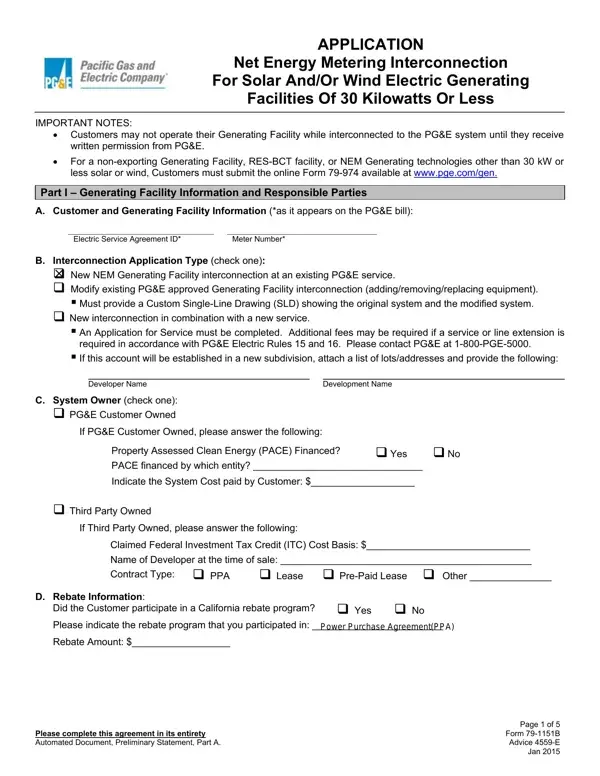
79 1151B Form PDF Details

The 79 1151B form is the official application for interconnecting solar or wind electric generating facilities of 30 kilowatts or less with the PG&E distribution system. Filing this form is mandatory before your generating facility can begin operation. PG&E will review your submission and issue written permission once all requirements are satisfied.

The form covers these key areas:

This form applies only to solar and wind installations at or below 30 kW. For other utility-related forms, see the Application for Electric Service and the Utility Bill Template on FormsPal.

QuestionAnswer
Form Name79 1151B Form
Form Length5 pages
Fillable?No
Fillable fields0
Avg. time to fill out1 min 15 sec
Other namespge 79 form, 1151b, pge metering 30, pge 79 1151b 02 form

QuestionAnswer
Form Name79 1151B Form
Form Length5 pages
Fillable?No
Fillable fields0
Avg. time to fill out1 min 15 sec
Other namespge 79 form, 1151b, pge metering 30, pge 79 1151b 02 form

How to Edit 79 1151B Form Online for Free

79 1151b 02 can be filled out effortlessly. Simply try FormsPal PDF editor to get the job done without delay. In order to make our editor better and less complicated to work with, we consistently design new features, with our users' feedback in mind. To get the process started, go through these simple steps:

Step 1: Click the orange "Get Form" button above. It's going to open our pdf tool so that you could begin completing your form.

Step 2: With this online PDF tool, it is possible to do more than just fill in blank fields. Edit away and make your docs look great with custom textual content put in, or tweak the original content to excellence - all comes with the capability to insert any type of images and sign the file off.

This PDF form will involve specific information; to ensure accuracy and reliability, you should consider the tips hereunder:

1. The 79 1151b 02 necessitates particular information to be entered. Be sure the following blanks are filled out:

The best ways to fill in 79 1151b portion 1

2. Now that the previous array of fields is done, you have to insert the essential details in Property Assessed Clean Energy, Yes No, PACE financed by which entity , Indicate the System Cost paid by, Third Party Owned If Third Party, Claimed Federal Investment Tax, Contract Type, PPA, Lease PrePaid Lease Other , D Rebate Information, Did the Customer participate in a, Yes No, Rebate Amount , Please complete this agreement in, and Page of Form B Advice E Jan so that you can move on to the next part.

Did the Customer participate in a, Claimed Federal Investment Tax, and  Third Party Owned If Third Party inside 79 1151b

3. This next part is considered quite easy, Part I Generating Facility, Company Name, Street Address, Email, California Contractors State, City, Phone Number, State, Zip, F Preparer of this Application if, Customer on the Interconnection, Preparer Name, Date Prepared, Part II Description of the, and A Variances from Distribution - every one of these fields will need to be filled out here.

Filling out segment 3 of 79 1151b

4. To go ahead, this next part requires filling out a few form blanks. These comprise of B Photovoltaic PV Generating, B Mounting Method Rooftop, B Tracking Type, Fixed, Ground SingleAxis DualAxis , Mixed, If fixed please indicate Tilt , B Are Performance Monitoring and, Please complete this agreement in, and Page of Form B Advice E Jan , which you'll find key to moving forward with this particular PDF.

Stage number 4 of completing 79 1151b

5. And finally, this final part is what you'll want to wrap up before using the document. The blanks here are the following: Inverter Manufacturer, Model Number, PV Panel Manufacturer, B Photovoltaic Generator , Inverter Manufacturer, PV Panel Manufacturer, Model Number, Model Number, Model Number, Rating kWunit, CEC A Rating kWunit, Nameplate, Rating kWunit, PTC B Rating kWunit, and Output Voltage.

Stage # 5 in completing 79 1151b

In terms of PTC B Rating kWunit and B Photovoltaic Generator , be certain that you do everything right in this current part. These two are definitely the most significant ones in the form.

Step 3: Make sure the details are right and simply click "Done" to progress further. Go for a free trial option with us and gain immediate access to 79 1151b 02 - download or modify from your FormsPal account. We do not share any information that you provide while filling out forms at our website.