Please rate Af 1768

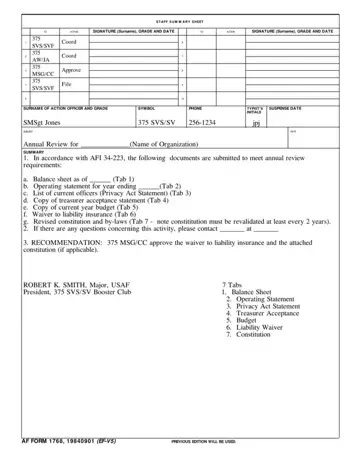
The Staff Summary Sheet, also designated the AF IMT 1768, is the United States Air Force's primary routing document for administrative packages that require documented review at multiple command levels. Action officers originate the package, write a concise summary of the proposed action, attach supporting materials, and forward the submission for sequential review and approval through the coordination chain.
Each AF Form 1768 contains a header identifying the originating office, the action officer's name and grade, and a subject line describing the action. The summary paragraph below gives reviewers a plain-language explanation of what is being requested and the recommended course of action. This summary must be brief enough to read in minutes yet detailed enough for a reviewer who has no prior familiarity with the background.
The coordination tabs are the core of the form. Each tab corresponds to one reviewing authority in the approval chain. The official signs and dates the tab, records their grade, and notes any objections. If a reviewer does not concur, the package returns to the action officer for revision before it can advance. Most administrative packages require three to five levels of coordination before reaching the final approval authority.
Attachments commonly bound to the Staff Summary Sheet include balance sheets, annual operating statements, current officer rosters, revised constitutions or by-laws, and liability waiver documents. The Air Force requires biennial revalidation of certain recurring attachments, so the action officer must confirm that all supporting documents are current before routing the package. Each attachment is numbered sequentially and referenced explicitly in the summary paragraph.
Air Force personnel at all levels use the Staff Summary Sheet to document coordination of personnel actions, budget requests, facility changes, and policy amendments. The form's structured approach reflects the Air Force's commitment to documented accountability and chain-of-command discipline. The sequential signature requirement creates an unbroken audit trail that commanders can reference if questions arise after an action is completed.
For related Air Force administrative forms, see the AF Form 1206 (award and decoration nominations), Air Force Form 1168, Air Force Form 1181, and Air Force Form 24. The form summary sheet template provides a civilian equivalent for general administrative routing.
| Question | Answer |
|---|---|
| Form Name | Af 1768 |
| Form Length | 1 pages |
| Fillable? | No |
| Fillable fields | 0 |
| Avg. time to fill out | 15 sec |
| Other names | af form 1768, af form 1768 pdf, af 1768 pdf, af form 1768 fillable |
Af 1768 isn’t the one you’re looking for?
Please rate Af 1768
