
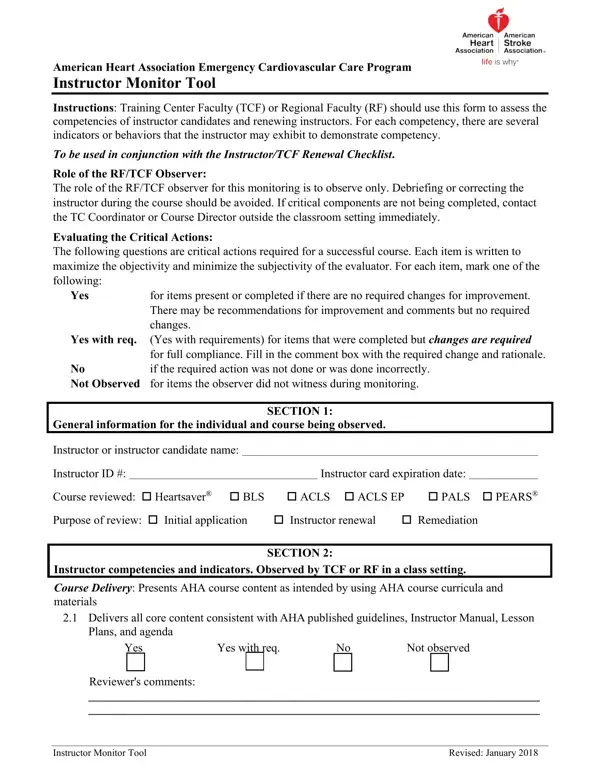
Aha Instructor Monitor Form PDF Details

The American Heart Association (AHA) Instructor Monitor Form is a comprehensive tool designed to evaluate the performance and competencies of instructor candidates and renewing instructors within the Emergency Cardiovascular Care Program. Developed to ensure the highest standards of instructional delivery and content fidelity, the form facilitates a detailed assessment by Training Center Faculty (TCF) or Regional Faculty (RF). Key elements emphasized include adherence to AHA course curricula, effective use of teaching aids such as videos and equipment, the promotion of student engagement and retention, and the adjustment of course delivery to suit the audience's needs. Additionally, it covers the instructor's ability to accommodate learners with special needs, employ effective team dynamics, and manage testing and remediation according to AHA guidelines. Professionalism, ethical behavior, and maintaining student confidentiality are also critical components of the evaluation. Observers, acting in a strictly observational capacity, record their findings without intervening in the course's proceedings, ensuring any corrective actions are discussed post-observation to maintain the integrity of the educational experience. This meticulous approach to monitoring teaching effectiveness underscores the AHA's commitment to elevating emergency cardiovascular care education, ensuring that instructors not only deliver content accurately but also create an inclusive, supportive, and effective learning environment.

QuestionAnswer
Form NameAha Instructor Monitor Form
Form Length10 pages
Fillable?Yes
Fillable fields128
Avg. time to fill out28 min 10 sec
Other namesaha instructor evaluation form, instructor monitor, aha form monitoring, instructor monitor form

How to Edit Aha Instructor Monitor Form Online for Free

aha instructor monitor form can be completed in no time. Simply use FormsPal PDF editor to do the job without delay. Our team is aimed at giving you the best possible experience with our editor by constantly presenting new capabilities and improvements. Our tool is now much more intuitive thanks to the most recent updates! Now, filling out PDF documents is simpler and faster than before. To start your journey, take these easy steps:

Step 1: Open the form in our editor by pressing the "Get Form Button" in the top section of this page.

Step 2: After you access the editor, you will find the form all set to be filled in. In addition to filling out different blank fields, you could also do some other things with the Document, namely putting on custom text, changing the original textual content, inserting illustrations or photos, putting your signature on the PDF, and much more.

With regards to the fields of this precise form, this is what you need to know:

1. The aha instructor monitor form necessitates specific details to be inserted. Ensure that the next blanks are filled out:

Writing segment 1 of instructor monitor form

2. Your next part is usually to fill in the following blank fields: Reviewers comments , Instructor Monitor Tool, and Revised January .

The right way to complete instructor monitor form portion 2

3. This subsequent section is pretty simple, Yes , Yes with req, No , Not observed, Reviewers comments , Allows adequate time for content, Yes , Yes with req, No , Not observed, Reviewers comments , Promotes retention by reinforcing, Yes , Yes with req, and No - each one of these empty fields will have to be completed here.

Stage no. 3 in filling out instructor monitor form

4. Now complete the next part! In this case you'll get all of these Yes , Yes with req, No , Not observed, Reviewers comments , Relates course material to, Yes , Yes with req, No , Not observed, Reviewers comments , Effectively operates technology, Yes , Yes with req, and No blanks to fill out.

instructor monitor form writing process clarified (part 4)

In terms of Yes and Yes with req, be sure that you double-check them in this section. Those two could be the key fields in the PDF.

5. Finally, this last portion is precisely what you'll want to complete prior to closing the PDF. The fields in this case are the next: Yes , Yes with req, No , Not observed, Reviewers comments , Accommodates students who have, Yes , Yes with req, No , Not observed, Reviewers comments , Provides timely and appropriate, Yes , Yes with req, and No .

Stage number 5 for submitting instructor monitor form

Step 3: You should make sure your details are correct and simply click "Done" to continue further. Join FormsPal today and instantly gain access to aha instructor monitor form, ready for downloading. Every single change you make is conveniently preserved , making it possible to customize the document at a later time if necessary. With FormsPal, you can certainly fill out forms without needing to get worried about data leaks or entries getting shared. Our secure software helps to ensure that your private details are stored safe.