
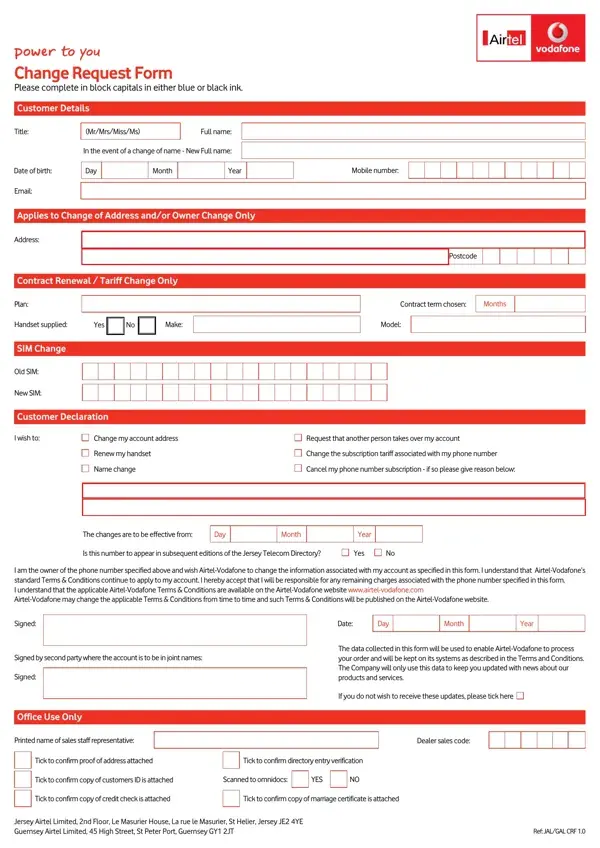
Handling PDF documents online is actually easy with our PDF editor. You can fill in sim swap airtel here effortlessly. Our editor is consistently developing to grant the best user experience achievable, and that is due to our commitment to constant enhancement and listening closely to customer opinions. To begin your journey, go through these simple steps:
Step 1: Just click the "Get Form Button" at the top of this site to get into our pdf form editing tool. There you'll find all that is required to work with your document.
Step 2: This editor will allow you to modify most PDF files in various ways. Enhance it by writing customized text, adjust existing content, and add a signature - all when you need it!
Concentrate when filling out this form. Make sure that all necessary blanks are completed accurately.
1. Begin completing your sim swap airtel with a group of essential fields. Consider all of the necessary information and be sure nothing is neglected!
2. The subsequent stage would be to complete these particular blank fields: Customer Declaration, I wish to, Change my account address, Request that another person takes, Renew my handset, Name change, Change the subscription tariff, Cancel my phone number, The changes are to be effective, Day, Month, Year, Is this number to appear in, Yes, and I am the owner of the phone number.
It is possible to get it wrong when filling out the Change my account address field, so make sure you take a second look before submitting it.
3. The following section is related to Tick to confirm proof of address, Tick to confirm directory entry, Tick to confirm copy of customers, Scanned to omnidocs, YES, Tick to confirm copy of credit, Tick to confirm copy of marriage, Jersey Airtel Limited nd Floor Le, and Ref JALGAL CRF - fill out each one of these blank fields.
Step 3: Prior to finalizing the form, check that all form fields have been filled out the correct way. The moment you are satisfied with it, press "Done." Join us now and immediately use sim swap airtel, all set for download. Each and every edit you make is conveniently kept, letting you change the form later when required. FormsPal guarantees your information confidentiality by using a protected system that in no way saves or distributes any private data used in the form.
Frequently Asked Questions
What changes can the Airtel SIM Swap form be used for?
The form covers SIM card replacement, account address updates, ownership transfers, tariff plan changes, handset renewal, and phone number cancellation for Airtel-Vodafone customers. All requests must be completed in block capitals and submitted with the appropriate supporting documents.
What documents do I need to complete the Airtel SIM Swap form?
You will need a valid photo ID, your current mobile number, and proof of address if you are updating your registered address. For account ownership transfers, both the current and incoming account holder must provide identifying details before the change is processed.
Where can I find other telecom and account forms?
For a similar SIM replacement process on another network, see our Vodafone SIM Replacement Form. If you are setting up as an Airtel partner, the Airtel Agent Application is also available. Customers updating their address with other organisations can use our general Address Change Form.
