
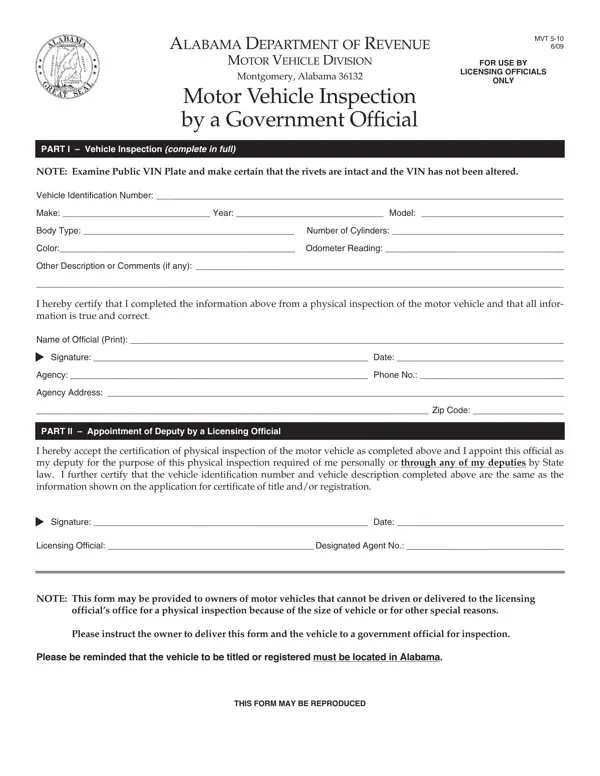
Part I - To be completed by Owner (Owner/Lienholder & Vehicle Information)
Part II: To be completed by Owner (Appointment of Licensing Official by Owner).
Part III: To be completed by Licensing Official (Appointment of Deputy by a Licensing Official).
Part IV: To be completed by Government Official (Vehicle Inspection by a Government Official).
Vehicle: VEHICLE IDENTIFICATION NUMBER, SERIAL NUMBER OR HULL IDENTIFICATION NUMBER, YEAR, MODEL, MAKE, COLOR, CYLINDERS.
Lienholder: Lienholder Name, Lien Date, Lienholder Address.
| Question | Answer |
|---|---|
| Form Name | Form MVT 5-9 |
| Form Length | 1 page |
| Fillable? | Yes |
| Fillable fields | 24 |
| Avg. time to fill out | 4 min |
| Edition | 6/23 |
| Issuing agency | Alabama Department of Revenue Motor Vehicle Division |
| Other names | MVT 5-9, MVT5-9, MVT 5-9 6/23, Alabama MVT 5-9, Alabama VIN inspection form, Alabama vehicle inspection form |
| Official source | Form MVT 5-9 (Rev 6/23), Alabama Department of Revenue Motor Vehicle Division |
Alabama Vin Inspection Form isn’t the one you’re looking for?