
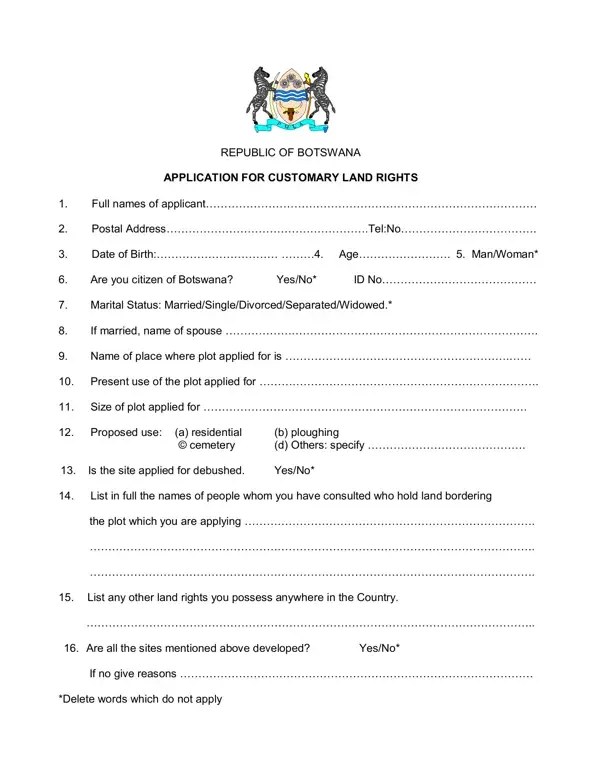
The Application for Customary Land Rights form is required by any Botswana citizen who wants to secure rights to a plot of land under the country's customary land tenure system. The Land Board administers this process across all tribal areas in Botswana. Regional boards include the Kweneng Land Board, the Ngwato Land Board, the Tati Land Board, and others. You must submit your completed application to the Land Board office that covers the area where the land is located.
Who Is Eligible to Apply
Only Botswana citizens may apply for customary land rights. The form collects your full name, contact details, date of birth, and citizenship status. If you are married, you must also include your spouse's name and relevant personal details. Customary land rights in Botswana reflect communal land management principles, so marital status and family context are relevant to the allocation decision.
What the Form Requires
The application form asks for the following information:
Why Neighboring Consultations Are Required
One of the most important parts of the form is the neighboring landholder consultation list. This section requires you to name every neighbor you consulted before applying. The Land Board uses this list to confirm community awareness of the proposed land use. Missing or incomplete entries in this section are one of the most common reasons applications are delayed or returned for revision.
Consequences of Providing False Information
The application form includes a mandatory declaration that all information is accurate. Under Botswana law, providing false information in a land application is a criminal offense. The Land Board may cross-check your application against existing land records, community registers, and prior allocations. Discrepancies can result in rejection of the application and potential legal proceedings.
What Happens After You Submit
After submission to your regional Land Board office, a land overseer reviews the form. The overseer checks for conflicts with existing land allocations and consults community records. The review process typically takes several weeks. Approved applicants receive formal confirmation of their customary land rights. Keep this confirmation as a permanent legal record. For related documents, see our Bargain and Sale Deed for land transactions and the Gift Deed form for property transfers. You can also review the Botswana Health Council Renewal Form for another example of an official Botswana government registration document.
| Question | Answer |
|---|---|
| Form Name | Application Customary Land Rights Form |
| Form Length | 2 pages |
| Fillable? | No |
| Fillable fields | 0 |
| Avg. time to fill out | 30 sec |
| Country | Botswana |
| Other names | botswana land board application forms pdf, land application forms, land application forms botswana, ngwato land board application forms |
Application Customary Land Rights Form isn’t the one you’re looking for?