
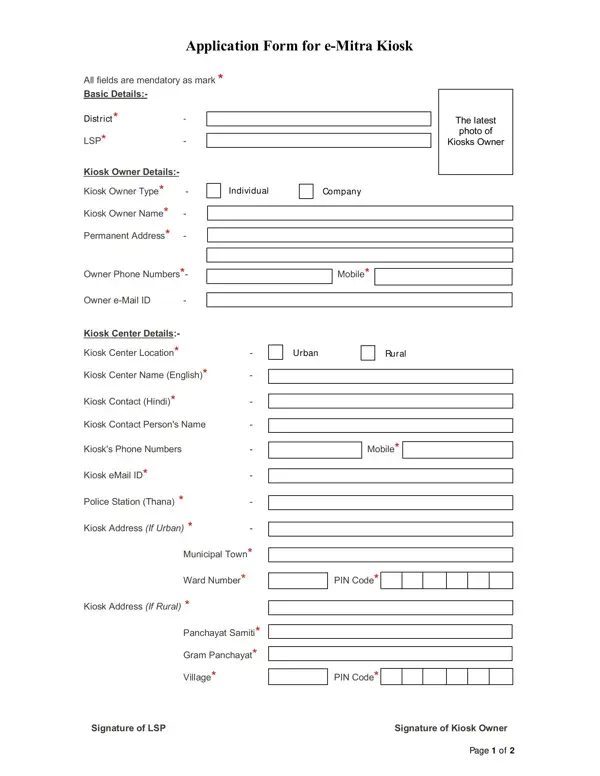
Application Form For E Mitra Kiosk PDF Details

The Application Form for E Mitra Kiosk enables individuals and companies to register as Local Service Providers (LSPs) and operate e-Mitra service centers across Rajasthan. This form is administered by the Department of Information Technology (DoIT) and is required for all new kiosk applications as well as ownership transfers of existing kiosks on the eMitra portal.

Who Needs This Form?

You need to complete this application form if you intend to:

Eligibility Requirements

Before submitting the application form, applicants must meet the following criteria:

Required Documents

Gather the following documents before filling out the application form:

How to Complete the Application Form

Complete each section of the application form accurately to avoid delays in processing:

  1. Basic details: Enter your district name, current LSP information, and attach a recent photograph of the kiosk owner.
  2. Ownership type: Specify whether the kiosk is owned by an individual or a company and provide the owner's full name, permanent address, contact number, and email ID.
  3. Kiosk center information: Enter the kiosk center name in both English and Hindi. Provide the full address, contact details, and the name of the concerned police station.
  4. Urban or rural setting: Indicate whether the kiosk is in an urban or rural area and provide the corresponding address details.
  5. Bank account information: Provide the bank account details of the kiosk for processing financial transactions through the eMitra system.
  6. Existing kiosk details: If the kiosk is already registered on the eMitra portal, enter the kiosk ID and the associated LSP name.
  7. Document checklist: Confirm that all required documents are enclosed, including ID proof, police verification, educational certificates, and bank details.
  8. Declaration: Sign the declaration confirming that all information provided is accurate and complete.

For other government and official documentation, see our business registration form and notarized identity verification form. If you need to open a bank account for kiosk operations, the bank account activation form provides relevant documentation details.

QuestionAnswer
Form NameApplication Form For E Mitra Kiosk
Form Length2 pages
Fillable?No
Fillable fields0
Avg. time to fill out30 sec
Other namesemitra near me, e-mitra kiosk application, emitra registration form, emitra new registration online

How to Edit Application Form For E Mitra Kiosk Online for Free

Use FormsPal's free online PDF editor to open, fill in, and download the Application Form for E Mitra Kiosk without installing any software. Follow the steps below to complete your form.

Steps to Fill Out the Form

  1. Open the form: Click the "Fill Out Form" button at the top of this page to open the PDF in FormsPal's online editor.
  2. Enter basic details: Fill in your district name and current LSP information. All fields marked with an asterisk (*) are required.
  3. Complete owner information: Select whether the kiosk is owned by an individual or a company. Enter the owner's full name, permanent address, phone number, and email ID.
  4. Add kiosk center details: Enter the kiosk center name in English and Hindi. Provide the full address, contact information, and the name of the concerned police station.
  5. Specify location type: Indicate whether your kiosk is in an urban or rural area and provide the complete address for the applicable setting.
  6. Enter bank details: Add the bank account information for your kiosk to enable financial transactions through the eMitra system.
  7. Complete the document checklist: Confirm all required documents are available: ID proof, police verification certificate, educational qualifications, and bank account details.
  8. Sign the declaration: Review all entered information, then sign the declaration at the bottom of the form to confirm accuracy.
  9. Download or print: Once complete, download the filled PDF or print it to submit to your district e-Mitra office.

Frequently Asked Questions

What is an e-Mitra service center?
An e-Mitra service center is a physical kiosk authorized by the Rajasthan government to deliver government-to-citizen (G2C) services. These centers allow citizens to access over 300 state and central government services, including bill payments, certificate applications, and other administrative services.

What is an LSP in e-Mitra?
LSP stands for Local Service Provider. An LSP is the individual or company that operates an e-Mitra kiosk and is responsible for delivering citizen services. The application form must be submitted by the proposed LSP to begin the registration process.

Is the form the same for urban and rural kiosk applications?
Yes, the same application form is used for both urban and rural kiosk applications. The form includes separate fields for urban and rural addresses so applicants can provide the relevant location details based on their kiosk setting.

How long does kiosk approval take?
Processing times vary depending on the district authority and the completeness of the application. Ensure all required documents are enclosed and all fields are filled in accurately to avoid processing delays.

For additional documentation resources related to kiosk operations, explore our employment verification form and other official PDF forms.