
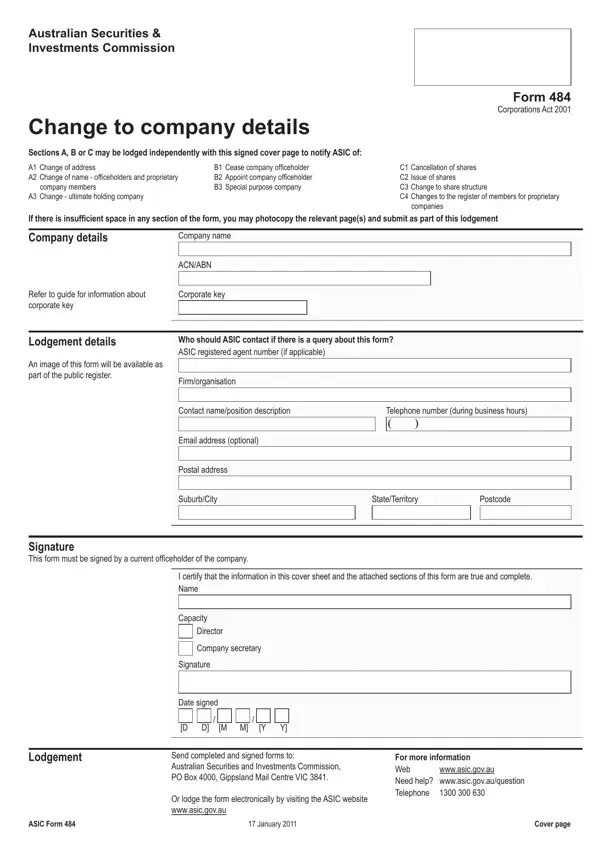
ASIC Form 484 PDF Details

Australian companies use ASIC Form 484 – Change to Company Details to notify ASIC of important updates to their registered information. The form covers registered address changes, officeholder appointments and cessations, share structure adjustments, and member register updates. It is divided into three sections, each targeting a different category of change.

Section A – Company addresses and ultimate holding company. Use Section A to update the company’s registered office address, principal place of business, or the name and ACN of an ultimate holding company. For any address change, supply the new street address and the date the change takes effect. ASIC does not accept a PO Box as a registered office address.

Section B – Company officeholders. Section B covers the appointment and cessation of directors, secretaries, and alternate directors. For each change you must provide the officeholder’s full legal name, date of birth, place of birth (town/city and state/country), and residential address, along with the date the change took effect. A new appointee must provide written consent before their appointment is effective.

Section C – Share structure and member register (proprietary companies). Proprietary companies use Section C to report changes to share structure or the top 20 members list. This includes the issue or cancellation of shares, and transfers that change which members appear in the top 20. For each change specify the share class, the number of shares involved, and the consideration paid.

Form 484 must be lodged within 28 days of the change for Sections A and B notifications. Late lodgement may attract penalty fees from ASIC. Form 484 is now submitted online only via ASIC Connect at asic.gov.au. Paper forms are no longer accepted.

It is central to keeping ASIC’s public company register accurate and up to date. For related ASIC filings, see ASIC Form 201 for new company registration and ASIC Form 388 for annual solvency declarations.

Note: Form 484 is now lodged online only through ASIC’s official portals.

QuestionAnswer
Form Name ASIC Form 484
Form Length 6 pages
Fillable? No
Fillable fields 0
Avg. time to fill out 1 min 30 sec
Other names asic form 484 download, asic forms search, form 484 asic download, form 484 change to company details

How to Edit ASIC Form 484 Online for Free

You can complete your change to company details form online using our PDFinity® editor. The tool lets you fill fields, add text, sign the document, and download your finished file. Our editor is continuously updated based on user feedback. Follow these steps to fill out Form 484:

Step 1: Click the “Get Form Button” at the top of this page to open the PDF editor. The form loads ready for editing in your browser, with all three sections visible.

Step 2: The editor displays every field in the form. You can complete the required sections, add signatures, and adjust content as needed:

1. Start with the cover page: enter the company name, ACN or ABN, corporate key, and tick the sections you are lodging (Section A, B, or C). Also include the contact details of the person completing the form. Do not leave the corporate key blank as ASIC will reject the lodgement without it.

form 484 pdf conclusion process described (portion 1)

2. Complete the declaration on the cover page before lodging. A current director or company secretary must sign and date the form, certifying the information is true and correct. Include the lodgement date and, if applicable, the postal address for correspondence with ASIC. The form must be signed by someone with authority to act on behalf of the company.

Director Company secretary, Capacity, and wwwasicgovau of form 484 pdf

3. To cease an officeholder in Section B, select the role (Director, Secretary, or Alternate director), enter the name of the person the alternate is acting for if applicable, then provide the date the officeholder ceased, the date of change, and the officeholder’s full name, given names, date of birth, and place of birth (town/city and state/country).

form 484 pdf completion process explained (stage 3)

Take care when entering given names. Errors here are one of the most common reasons ASIC requests a correction. Double-check every name matches the officeholder’s identity documents exactly.

4. To cease an additional officeholder, repeat the Section B process for each person: select the role, provide the date of cessation and date of change, and enter the full name, given names, date of birth, and place of birth (town/city and state/country) for each additional officeholder.

form 484 pdf conclusion process detailed (stage 4)

5. To appoint a new officeholder in Section B, select the role being filled (Director, Secretary, or Alternate director) and enter the date of appointment. Provide the appointee’s full name, given names, date of birth, and place of birth (town/city and state/country). If the appointee has changed their name, include the former name as well.

Completing section 5 of form 484 pdf

Step 3: Review all completed fields, then click “Done” to save the form. Download, email, or access it from your FormsPal account page. Once ready, lodge the form through ASIC Connect at asic.gov.au. FormsPal keeps your information secure throughout the process.

Frequently Asked Questions About Form 484

What types of changes does Form 484 cover?
Form 484 covers three categories: Section A for registered address and ultimate holding company changes, Section B for director and secretary appointments and cessations, and Section C for share structure and member register changes in proprietary companies.

Who is required to sign Form 484?
A current director or company secretary must sign the declaration on Form 484 before it is lodged. The signatory certifies that all information in the form is true and correct at the date of signing.

What is the deadline for lodging Form 484?
For address and officeholder changes under Sections A and B, Form 484 must be lodged within 28 days of the change taking effect. Missing the deadline may result in a penalty notice from ASIC. Lodging promptly keeps your company register accurate and avoids compliance issues.

How is Form 484 now submitted to ASIC?
Since late 2023, Form 484 is submitted online only. Paper lodgement is no longer accepted by ASIC. Complete the form using the editor on this page, then lodge directly through the ASIC Connect portal at asic.gov.au. If you use a company service provider, they can lodge on your behalf through their ASIC agent access.

What supporting documents are needed?
For officeholder appointments under Section B, the company must hold the appointee’s signed consent to act as director or secretary before submitting Form 484. No consent document is lodged with ASIC, but the company must retain it on file. For address changes, no supporting document is required.

For related forms, also see ASIC Form 201 for new company registration and ASIC Form 407 for director and secretary consent forms.