
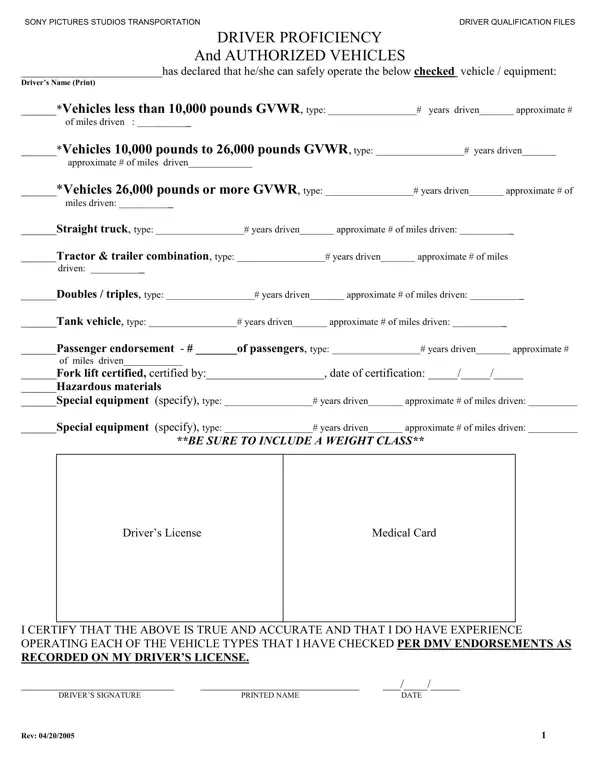
The Authorized Vehicles form is a compliance document used by transportation departments, logistics companies, and film production studios. Drivers complete this form to self-certify their experience and qualifications for operating specific vehicle types. Safety managers and fleet supervisors use the completed form to verify that operators meet regulatory standards before assigning vehicles.
The form covers a wide range of vehicle classes organized by gross vehicle weight rating (GVWR). Light vehicles under 10,000 pounds include standard cars, vans, and light pickups. Medium vehicles between 10,001 and 26,000 pounds cover box trucks and larger delivery vehicles. Heavy vehicles exceeding 26,000 pounds include semi-trucks and large commercial rigs. The form also covers specialized equipment such as forklifts, crane trucks, tank vehicles, and passenger-rated vehicles. For each category, drivers list the vehicle type, years of experience, and approximate miles driven.
Beyond standard vehicle operation, the Authorized Vehicles form documents several key endorsements. Drivers who transport hazardous materials must hold a valid hazmat endorsement from their state DMV. Operators of vehicles designed to carry 16 or more passengers need a passenger endorsement on their commercial driver's license. The form also collects medical card certification details, which are required for commercial vehicle operators under federal DOT regulations. All entries are matched against the driver's DMV record to confirm validity.
Before completing the form, gather a few key items. You will need your driver's license number and license class. The form asks for the number of years you have driven each vehicle type and your estimated total miles for each category. If you operate specialized equipment, note the type of certification you hold and the issuing authority. Commercial drivers should have their medical card expiration date ready. Gathering this information in advance makes the process faster.
This form appears most often in the film and entertainment industry. Production companies such as Sony Pictures Studios keep detailed records of every driver on set. Fleet operators, trucking firms, and logistics companies also require it during driver onboarding. Government agencies and contractors that manage large vehicle pools use it to confirm operator credentials. For complete driver records, a driver qualification form often accompanies this authorized vehicles declaration. Fleet managers may also request a vehicle inspection form before assigning equipment to a driver. Drivers who track ongoing performance can pair this form with a driver performance score sheet for full documentation.
| Question | Answer |
|---|---|
| Form Name | Authorized Vehicles Form |
| Form Length | 1 pages |
| Fillable? | No |
| Fillable fields | 0 |
| Avg. time to fill out | 15 sec |
| Who needs it | Transportation departments, film studios, fleet operators |
| Vehicle classes | Under 10,000 lbs GVWR to over 26,000 lbs plus specialized equipment |
| Endorsements covered | Hazmat, passenger endorsement, commercial driver license, medical card |
| Other names | driver proficiency, california driver proficiency form, driver proficiency authorized vehicles form, commercial driver proficiency form |
Authorized Vehicles Form isn’t the one you’re looking for?