
Bcia 8302 Form PDF Details

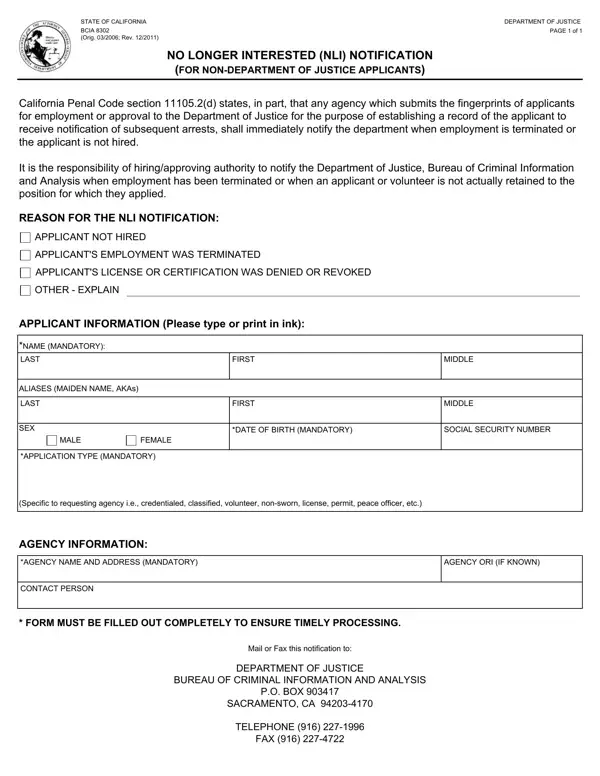
The BCIA 8302 is an official California state form issued by the Bureau of Criminal Information and Analysis to help agencies maintain legal compliance. Under California Penal Code section 11105.2(d), any agency that submits fingerprints to obtain a background security check for a job applicant must file this notification the moment that applicant is no longer considered for the position, license, or approval.

This form applies to four categories of applicants: those not hired following the screening process, those whose employment was terminated after hiring, and those whose license or permit application was denied or revoked. By submitting the BCIA 8302 notification, the agency ensures that the DOJ database reflects accurate, current information about each applicant's status so that future background check queries return correct results. This supports public safety and workplace security across California.

Completing the form requires the agency to supply the applicant's full name, date of birth, and California Identification or Social Security Number, plus the agency's name, ORI number, and contact information. The agency also selects the applicable reason for submission: non-hire, termination, license denial, permit revocation, or approval withdrawal. This gives the Bureau of Criminal Information and Analysis the context needed to update its statewide records. The completed form must be mailed or faxed to the DOJ at the Sacramento address printed on the form.

Agencies that routinely handle California employment screening may also need other related forms. The BCIA 8016RR form is used to request Criminal Record Information from the DOJ, and the BCIA 8374 form covers fingerprint submissions for live scan services. A background check consent form may also be required before fingerprinting begins. FormsPal provides all of these California forms and many more as fillable PDFs so your agency can stay on top of its legal submission and compliance obligations.

QuestionAnswer
Form NameBcia 8302 Form
Form Length1 pages
Fillable?No
Fillable fields0
Avg. time to fill out15 sec
Other names2011, bcia 8302, no longer interested form, submits

How to Edit Bcia 8302 Form Online for Free

The BCIA 8302 NLI form can be filled in online without any problem. Simply try the FormsPal PDF tool to complete the job quickly. The FormsPal expert team is relentlessly working to expand the tool and ensure that it is much better for clients with its extensive functions. Take advantage of the current revolutionary possibilities, and discover a myriad of emerging experiences! With some basic steps, you are able to begin your PDF journey:

Step 1: First of all, open the editor by clicking the "Get Form Button" at the top of this page.

Step 2: The editor gives you the capability to modify most PDF files in a variety of ways. Modify it by adding any text, adjust what is already in the PDF, and put in a signature - all when it's needed!

As a way to fill out this document, make certain you type in the right details in every field:

1. Complete the NLI form with a selection of major blank fields. Consider all the information you need and ensure there's nothing missed!

BCIA 8302 form completion process explained (step 1)

2. Now that the previous array of fields is complete, it's time to add the necessary specifics in AGENCY NAME AND ADDRESS MANDATORY, AGENCY ORI IF KNOWN, CONTACT PERSON, FORM MUST BE FILLED OUT, Mail or Fax this notification to, DEPARTMENT OF JUSTICE, BUREAU OF CRIMINAL INFORMATION AND, PO BOX, SACRAMENTO CA, TELEPHONE, and FAX so you can progress to the third part.

How to prepare the California NLI notification form step 2

Those who use this PDF frequently make some errors when completing AGENCY ORI IF KNOWN in this area. Don't forget to read twice what you enter right here.

Step 3: Once you have reviewed the information you provided, just click "Done" to conclude your form at FormsPal. After registering a free trial account at FormsPal, it will be possible to download the NLI form or email it immediately. The PDF form will also be readily accessible through your personal account with your each and every edit. Whenever you work with FormsPal, it is simple to complete documents without being concerned about data leaks or data entries being shared. Our protected platform ensures that your personal details are kept safely.

Frequently Asked Questions About the BCIA 8302 Form

Who needs to file the BCIA 8302 NLI notification?

Any California agency that submits fingerprints for applicants seeking employment, a license, or a permit approval must file this notification form. This includes law enforcement agencies, licensing boards, educational institutions, and any other body that conducts background security checks on applicants through the DOJ fingerprint system. If your agency participates in the subsequent arrest notification program, the NLI submission is legally required.

When must the BCIA 8302 form be submitted?

The form must be submitted immediately once the agency determines that the applicant is no longer being considered. This applies whether the reason is a non-hire decision, a termination, a permit or license denial, or a voluntary withdrawal of the application. Timely submission is required by California law to keep the state's records current and accurate. Delays in notification can result in outdated information remaining on the applicant's background security record.

How do I submit the completed form?

You can mail or fax the completed form to the California Department of Justice, Bureau of Criminal Information and Analysis, P.O. Box 903417, Sacramento, CA 94203-4170. Use FormsPal to fill out the form online and then print or download it for submission. The agency contact information and ORI number are required for a valid submission, so ensure all fields are completed before mailing or faxing.

What information does the form require?

The BCIA 8302 form asks for the applicant's name, date of birth, and identifying number (Social Security Number or California ID). The agency section requires the agency name, address, ORI number, and a contact person. You also need to select one of the listed reasons for the NLI notification: non-hire, termination, license denial, or permit revocation. Double-check your ORI number before submission, as errors in this field are among the most common mistakes on this form.

Are there other related California DOJ forms I may need?

Yes. Agencies that conduct California background checks often use several related forms. See our background check consent form for obtaining applicant permission before fingerprinting. Our employment forms section also provides additional resources for managing your agency's hiring and screening documentation in a legally compliant way. Having all required forms ready before you begin the employment or license application process saves time and avoids compliance issues down the line.