
Blm Form 3150 4 PDF Details

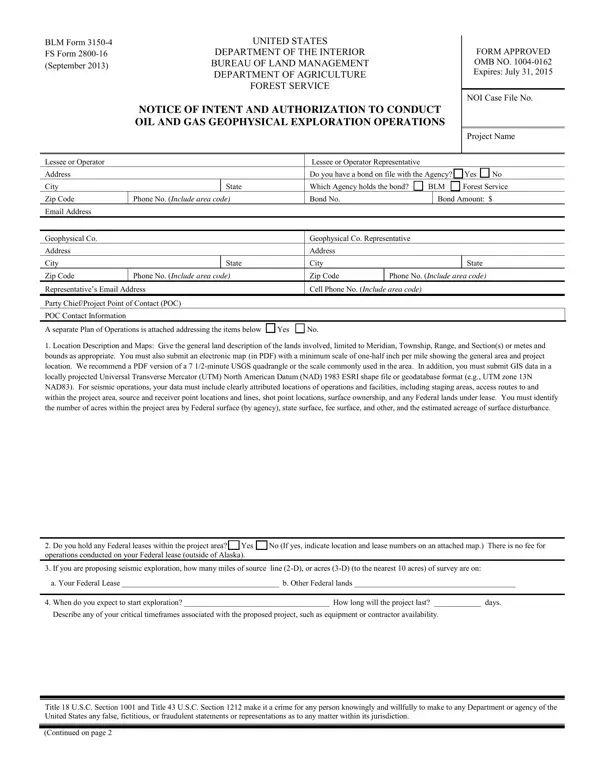
The United States Department of the Interior's Bureau of Land Management (BLM) and the Department of Agriculture's Forest Service have jointly issued the BLM Form 3150-4/FS Form 2800-16, a crucial document for parties interested in conducting oil and gas geophysical exploration operations. This form, approved under OMB No. 1004-0162 and set to expire on July 31, 2015, serves as both a notice of intent and an authorization request. It is meticulously designed to gather comprehensive details about the proposed exploration project, including information about the lessee or operator, the specific bond held with the agency, and a thorough plan of operations encapsulating the geographical and operational scope of the exploration. Essential data such as the project area's location, the estimated duration, and the detailed approach to seismic exploration activities, whether 2-D, 3-D, gravity/magnetic, or other methodologies, are required. The form also mandates the submission of additional information, including GIS data, to help evaluate the potential impact on the environment and existing land use. Furthermore, it outlines the terms and conditions under which exploration activities are permitted, emphasizing the importance of minimizing surface disturbances, managing waste effectively, and ensuring the safety of both the operations and the environment. This detailed procedural framework underscores the government's dual objectives of facilitating resource exploration while preserving public lands and maintaining regulatory oversight. Operators who also need to report ongoing well operations on BLM-managed land may use the BLM Sundry Notice form. Those involved in mineral extraction on federal land should also review the Mining Claim Form.

QuestionAnswer
Form NameBlm Form 3150 4
Form Length3 pages
Fillable?No
Fillable fields0
Avg. time to fill out45 sec
Other namesfalse, 2-D, blm form 2800 16, Shothole

How to Edit Blm Form 3150 4 Online for Free

Using PDF documents online is certainly very simple with our PDF tool. Anyone can fill out Shothole here painlessly. To maintain our tool on the cutting edge of practicality, we strive to implement user-oriented features and enhancements on a regular basis. We're at all times happy to get suggestions - play a pivotal part in remolding PDF editing. This is what you'd want to do to get started:

Step 1: Press the orange "Get Form" button above. It will open up our pdf editor so you can start filling out your form.

Step 2: When you access the PDF editor, you will see the document prepared to be filled out. Other than filling out different blanks, you may also do some other things with the Document, such as writing your own words, modifying the original textual content, adding graphics, affixing your signature to the document, and much more.

For you to complete this PDF form, ensure that you type in the required details in each and every blank:

1. While filling in the Shothole, be certain to complete all important blank fields in their corresponding section. This will help to speed up the work, allowing for your details to be processed swiftly and correctly.

form 2800 16 conclusion process shown (stage 1)

2. Once your current task is complete, take the next step – fill out all of these fields - Location Description and Maps, Do you hold any Federal leases, When do you expect to start, Title USC Section and Title USC, and Continued on page with their corresponding information. Make sure to double check that everything has been entered correctly before continuing!

Stage # 2 in filling in form 2800 16

Concerning When do you expect to start and Do you hold any Federal leases, be sure that you take a second look in this section. These are certainly the most significant ones in this PDF.

3. Completing Description and Type of Operations, Describe the survey type, b Survey Method Shot hole, For shot holes, What type and amount of explosives, What shot point pattern and, What will be the shot hole depth, What type of receivers, and What will be the receiver and is essential for the next step, make sure to fill them out in their entirety. Don't miss any details!

Completing section 3 in form 2800 16

4. It is time to fill out the next part! In this case you'll get these What will be the receiver and, Describe the survey method, c Seismic Source and Transport, Describe your seismic source and, and d Operating Procedures Describe blanks to do.

form 2800 16 completion process clarified (part 4)

5. To conclude your form, the final part includes a few additional blanks. Entering I agree that I and my agents must, Printed Name of Authorized Company, Signature of Authorized Company, Date, Date, Printed Name of Agency Signing, Signature of Agency Signing Officer, Title of Agency Signing Officer, NOTICES, and The Privacy Act and CFR d require will certainly conclude the process and you'll be done in a snap!

NOTICES, Date, and Title of Agency Signing Officer inside form 2800 16

Step 3: After proofreading your entries, press "Done" and you're done and dusted! Go for a free trial plan at FormsPal and acquire direct access to Shothole - download or edit in your FormsPal account page. At FormsPal.com, we do our utmost to be sure that all of your details are stored protected.