
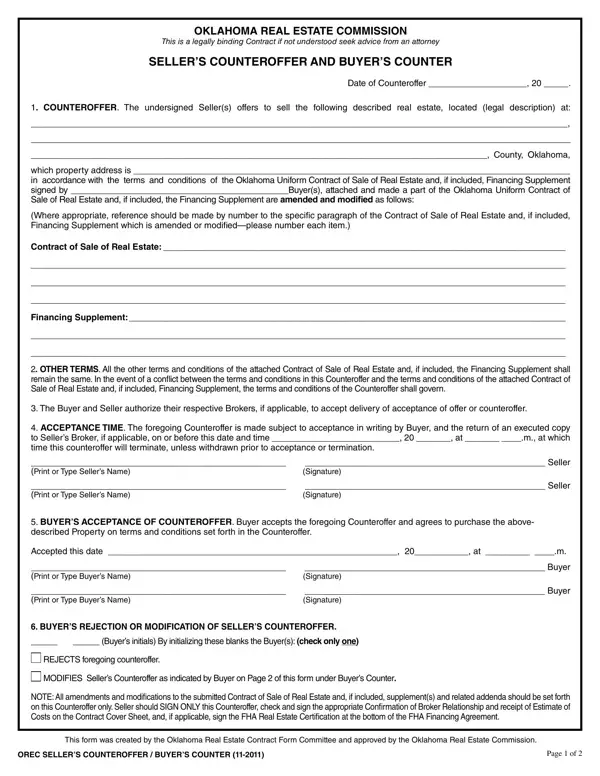
In real estate transactions, clear communication and formal documentation are essential, especially during the counteroffer phase. When a buyer makes an initial offer on a property, the seller may accept, reject, or respond with a counteroffer that modifies one or more terms. The Buyer Counter form captures this response in a legally binding format recognized by the Oklahoma Real Estate Commission (OREC).
The Buyer Counter form is a standardized Oklahoma real estate document that allows a seller to propose alternative terms in response to a buyer's purchase offer. It functions as a formal, written counteroffer that modifies the original contract of sale without voiding it. Both parties must review and sign the form within a stated deadline for it to be legally effective. If the buyer accepts the modified terms, the counteroffer becomes binding. If the buyer rejects or proposes further modifications, the negotiation continues until both parties agree or one side walks away.
Counteroffers arise in most real estate negotiations. Common situations that trigger use of this form include:
In Oklahoma, any modification to an accepted purchase offer must be made in writing using an approved form. Oral agreements are not enforceable under Oklahoma real estate law, which is why using the OREC-approved Buyer Counter form is essential.
The form is organized into several clearly defined sections:
Understanding the typical sequence helps buyers and sellers navigate negotiations more confidently:
When managing a real estate transaction in Oklahoma, you will likely need several additional documents alongside the counteroffer form. A real estate purchase agreement sets out the full terms of the sale. An Oklahoma contract of sale serves as the foundational purchase contract. A closing disclosure form is required near settlement to outline final loan and closing costs. For counteroffer situations in other states, explore our counter offer form collection and our declaration of buyer and seller form for confirming agreed terms.
| Question | Answer |
|---|---|
| Form Name | Oklahoma Buyer's Counteroffer to Seller's Counteroffer |
| Form Length | 1 page |
| Fillable? | Yes |
| Fillable fields | 59 |
| Avg. time to fill out | 30 sec |
| Other names | abovedescribed, real estate counter offer form pdf, COUNTER, OKLAHOMA |
Buyer Counter Form isn’t the one you’re looking for?