
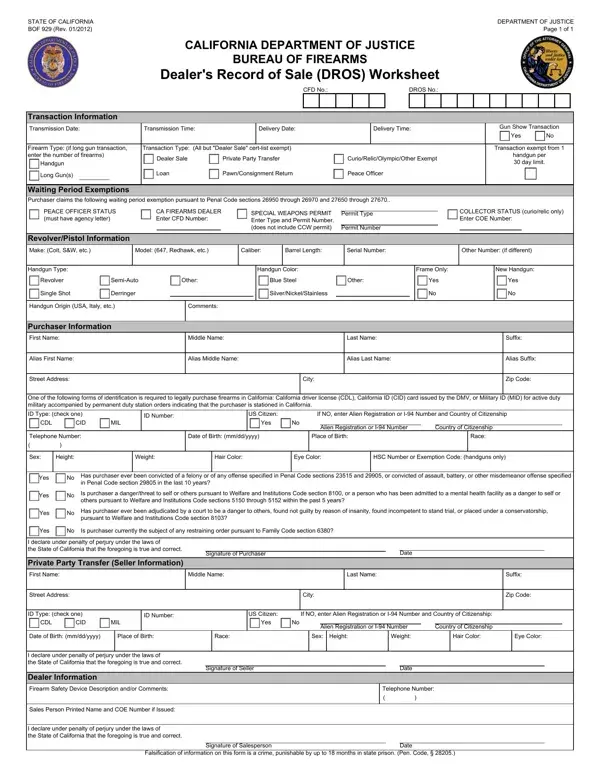

BOF 929 Dealer's Record of Sale (DROS) Worksheet at a glance
What it is: BOF 929 is the California Department of Justice Bureau of Firearms Dealer's Record of Sale (DROS) Worksheet.
Who signs: The purchaser signs under Signature of Purchaser Date; in a Private Party Transfer, the seller signs under Signature of Seller Date; and the salesperson signs under Signature of Salesperson Date.
A filled-in BOF 929 Dealer's Record of Sale (DROS) Worksheet example: a dealer sale to a purchaser
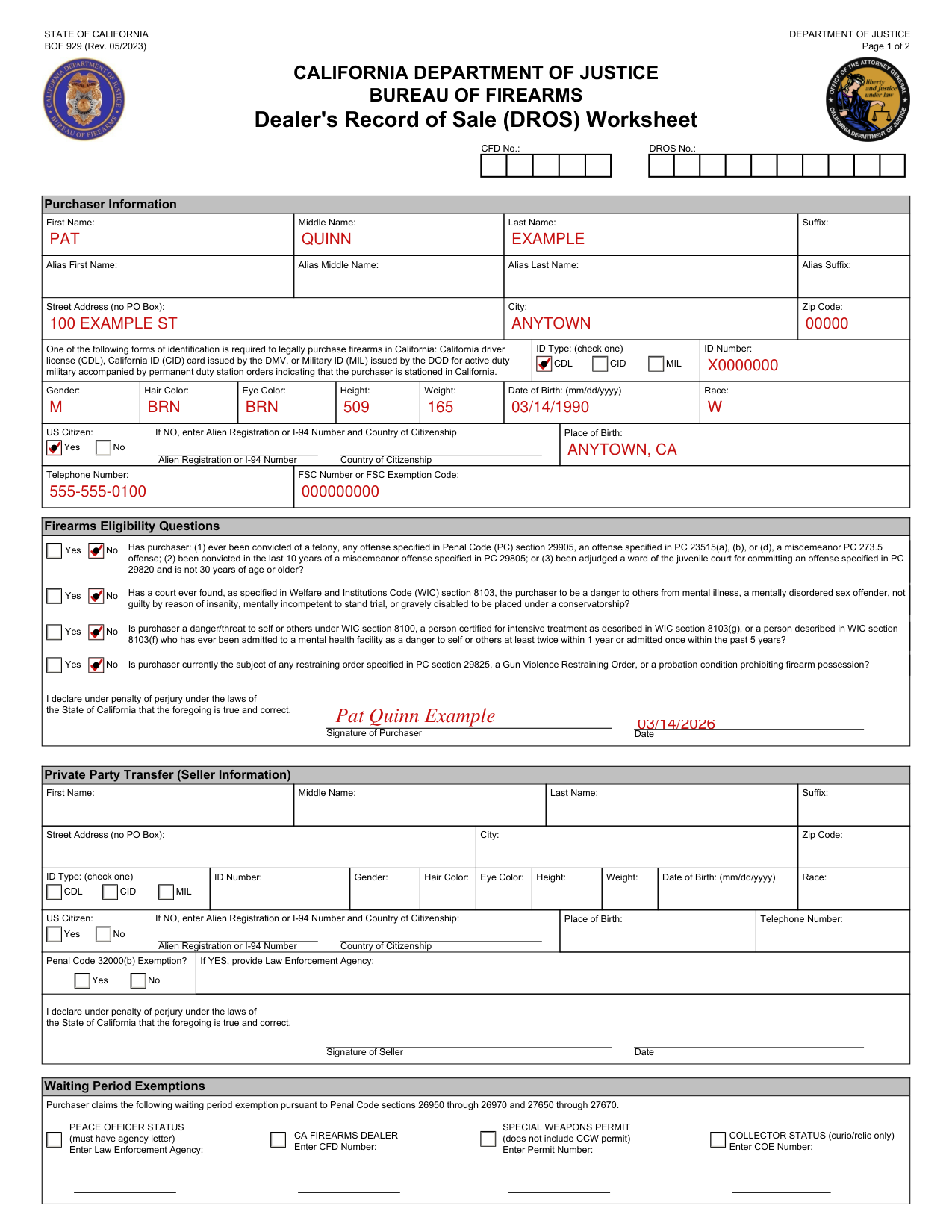
How to fill out BOF 929 Dealer's Record of Sale (DROS) Worksheet, box by box
Purchaser Information: name, alias and address
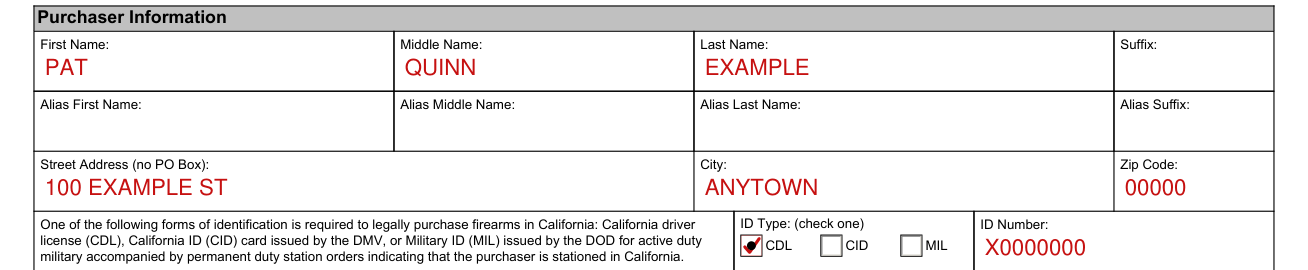
Under Purchaser Information, enter First Name, Middle Name, Last Name and Suffix; Alias First Name, Alias Middle Name, Alias Last Name and Alias Suffix; and Street Address (no PO Box), City and Zip Code.
ID Type and ID Number

One of the following forms of identification is required to legally purchase firearms in California: California driver license (CDL), California ID (CID) card issued by the DMV, or Military ID (MIL) issued by the DOD for active duty military accompanied by permanent duty station orders indicating that the purchaser is stationed in California.
Under ID Type, check one: CDL, CID or MIL, and enter the ID Number.
Gender, Hair Color, Eye Color, Height, Weight, Date of Birth and Race

Enter Gender, Hair Color, Eye Color, Height, Weight, Date of Birth (mm/dd/yyyy) and Race.
US Citizen, Place of Birth, Telephone Number and FSC Number

For Citizen, check Yes or No. If NO, enter Alien Registration or I-94 Number and Country of Citizenship.
Enter Place of Birth, Telephone Number and FSC Number or FSC Exemption Code.
Firearms Eligibility Questions
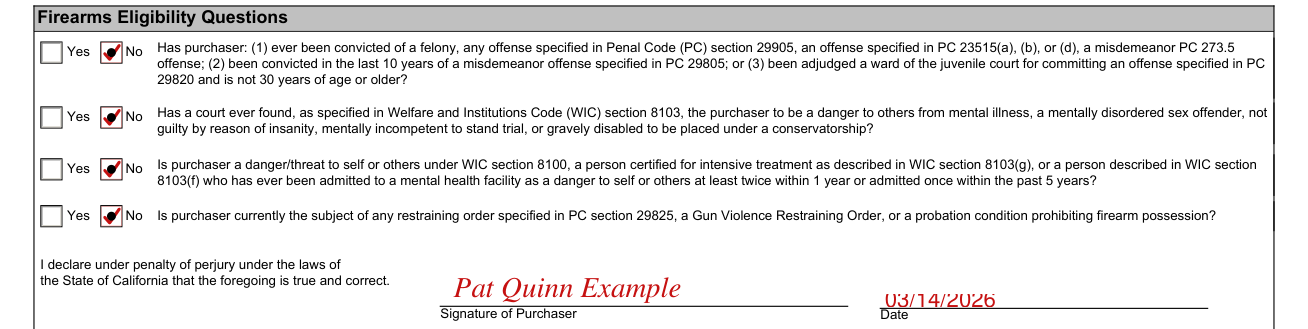
Under Firearms Eligibility Questions, check Yes or No: Has purchaser: (1) ever been convicted of a felony, any offense specified in Penal Code (PC) section 29905, an offense specified in PC 23515(a), (b), or (d), a misdemeanor PC 273.5 offense; (2) been convicted in the last 10 years of a misdemeanor offense specified in PC 29805; or (3) been adjudged a ward of the juvenile court for committing an offense specified in PC 29820 and is not 30 years of age or older?
Check Yes or No: Has a court ever found, as specified in Welfare and Institutions Code (WIC) section 8103, the purchaser to be a danger to others from mental illness, a mentally disordered sex offender, not guilty by reason of insanity, mentally incompetent to stand trial, or gravely disabled to be placed under a conservatorship?
Check Yes or No: Is purchaser a danger/threat to self or others under WIC section 8100, a person described in WIC section 8103(f) who has ever been admitted to a mental health facility as a danger to self or others at least twice within 1 year or admitted once within the past 5 years, or a person certified for intensive treatment as described in WIC section 8103(g)?
Check Yes or No: Is purchaser currently the subject of any restraining order specified in PC section 29825, a Gun Violence Restraining Order, or a probation condition prohibiting firearm possession?
Signature of Purchaser Date: "I declare under penalty of perjury under the laws of the State of California that the foregoing is true and correct."
Private Party Transfer (Seller Information)
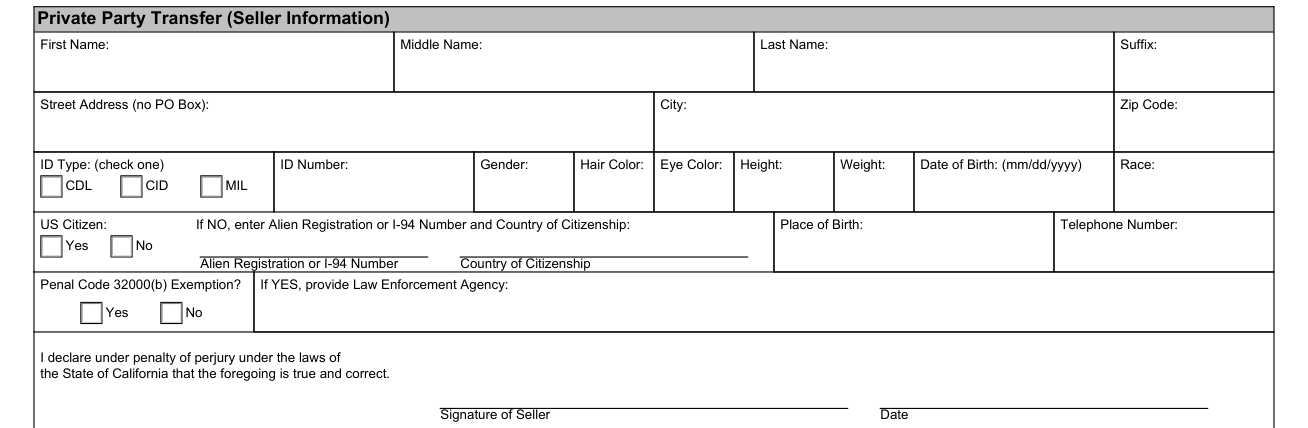
Under Private Party Transfer (Seller Information), enter First Name, Middle Name, Last Name and Suffix; and Street Address (no PO Box), City and Zip Code.
Under Private Party Transfer (Seller Information), check one ID Type: CDL, CID or MIL, and enter the ID Number.
Enter Race, Gender, Height, Weight, Hair Color, Eye Color, Date of Birth (mm/dd/yyyy), Place of Birth and Telephone Number.
Under Private Party Transfer (Seller Information), Citizen: Yes or No; if NO, enter Alien Registration or I-94 Number and Country of Citizenship.
Penal Code 32000(b) Exemption? Check Yes or No. If YES, provide Law Enforcement Agency.
The seller signs and dates under Signature of Seller Date.
Waiting Period Exemptions

Under Waiting Period Exemptions, the purchaser claims the following waiting period exemption pursuant to Penal Code sections 26950 through 26970 and 27650 through 27670.
Check PEACE OFFICER STATUS (must have agency letter) and enter Law Enforcement Agency; CA FIREARMS DEALER and enter CFD Number; SPECIAL WEAPONS PERMIT (does not include CCW permit) and enter Permit Number; or COLLECTOR STATUS (curio/relic only) and enter COE Number.
Firearm Information
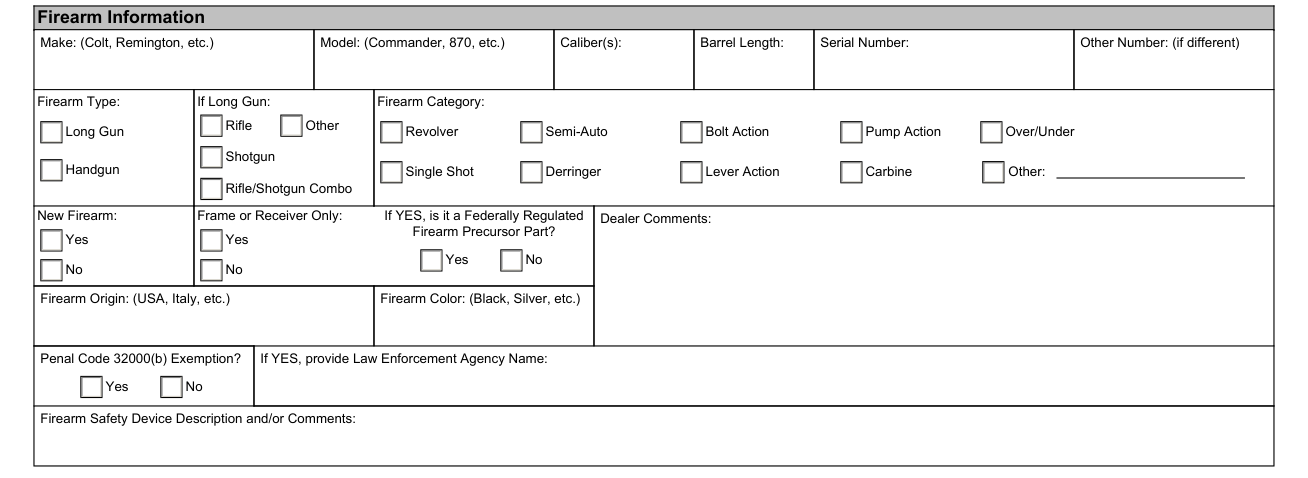
Under Firearm Information, enter Make (Colt, Remington, etc.), Model (Commander, 870, etc.), Caliber(s), Barrel Length, Serial Number and Other Number (if different).
Check Firearm Type: Long Gun or Handgun. If Long Gun: Rifle, Shotgun, Rifle/Shotgun Combo or Other. Firearm Category: Revolver, Semi-Auto, Bolt Action, Pump Action, Over/Under, Single Shot, Derringer, Lever Action, Carbine or Other:
Check New Firearm: No or Yes. Check Frame or Receiver Only: No or Yes. If YES, is it a Federally Regulated Firearm Precursor Part? Yes No.
Enter Firearm Origin (USA, Italy, etc.), Firearm Color (Black, Silver, etc.), Dealer Comments and Firearm Safety Device Description and/or Comments.
Penal Code 32000(b) Exemption? Yes or No; if YES, provide Law Enforcement Agency Name.
Transaction Information
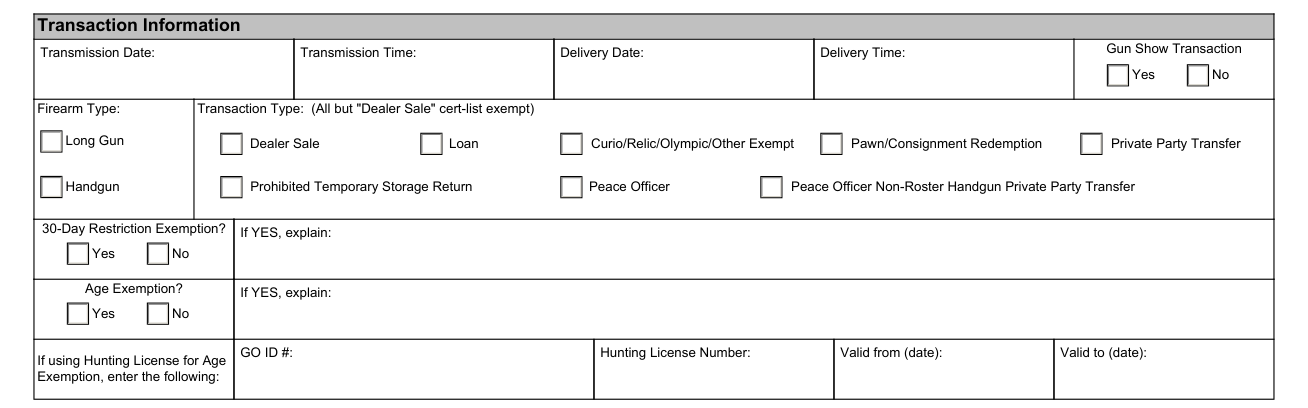
Under Transaction Information, enter Transmission Date, Transmission Time, Delivery Date and Delivery Time, and check Gun Show Transaction Yes or No.
Check Transaction Type: (All but "Dealer Sale" cert-list exempt): Dealer Sale, Loan, Curio/Relic/Olympic/Other Exempt, Pawn/Consignment Redemption, Private Party Transfer, Prohibited, Temporary Storage Return, Peace Officer, or Peace Officer Non-Roster Handgun.
30-Day Restriction Exemption? Check Yes or No. If YES, explain.
Age Exemption? Check Yes or No. If YES, explain.
If using Hunting License for Age Exemption, enter GO ID #, Hunting License Number, Valid from (date) and Valid to (date).
Dealer Information
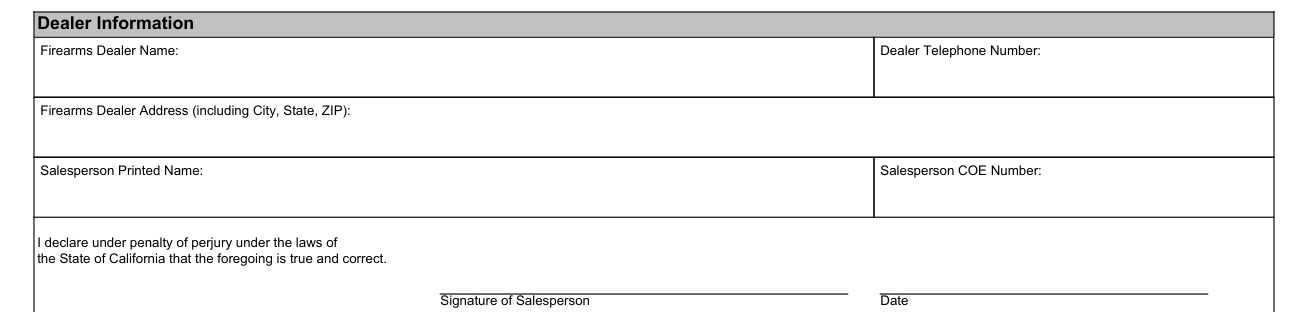
Under Dealer Information, enter Firearms Dealer Name, Dealer Telephone Number, Firearms Dealer Address (including City, State, ZIP), Salesperson Printed Name and Salesperson COE Number.
Signature of Salesperson Date, with the declaration under penalty of perjury.
Falsification of information on this form is a crime, punishable by up to 18 months in state prison. (Pen. Code, § 28250.)
Sources
[1] BOF 929 (Rev. 05/2023), Dealer's Record of Sale (DROS) Worksheet, California Department of Justice (the Official source link on this page).