
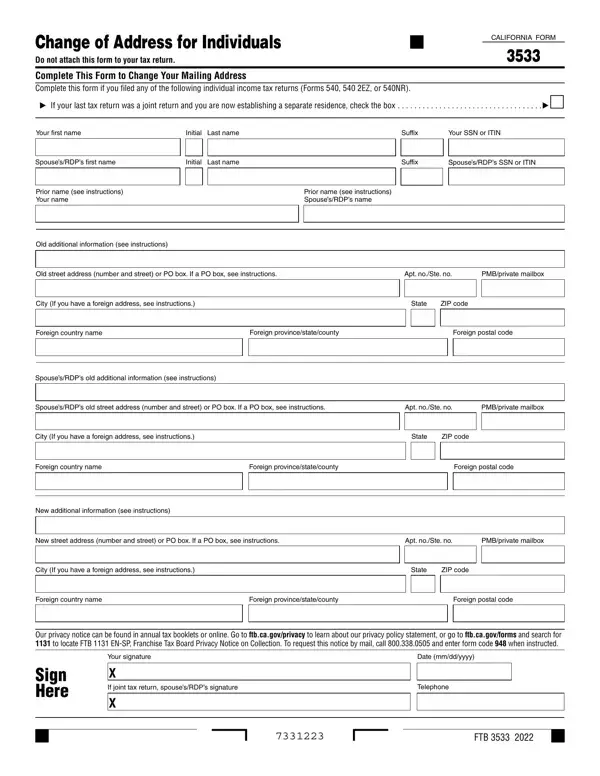
For residents of California, updating personal information with the state's tax agency ensures the efficient handling of tax documents and communications. This change of address form is used by individuals to update their mailing address with the California Franchise Tax Board (FTB). It is designed specifically for filers of individual income tax returns, including Forms 540, 540 2EZ, or 540NR, and ensures that correspondence from the FTB reaches you without delay.
Form 3533 is the official FTB Change of Address for Individuals form. You need to file it if you are a California individual income tax filer who has moved to a new address since your last return. This applies to anyone who filed or will file using California Form 540, Form 540 2EZ, or Form 540NR. The form includes separate sections for the taxpayer and for a spouse or Registered Domestic Partner (RDP), with spaces for both old and new addresses, including provisions for foreign addresses.
File this form as soon as you move to a new address. Waiting can result in missed tax notices, delayed refunds, or audit correspondence reaching your old address. The FTB uses your address on file to send refunds, audit notices, and payment requests, so keeping your address current is your responsibility as a taxpayer. This address change form must be submitted independently and cannot be attached to your tax return. You can also update your address through the FTB's My FTB online account portal or by calling the FTB directly, but filing the paper form provides a written record of the change.
This change of address form applies only to individual taxpayers. Business entities such as partnerships, corporations, or LLCs that need to update a mailing address with the FTB must use California Form 3533-B instead. Filing the wrong form can delay processing of your address change. Choosing the correct form ensures the FTB updates the right account type without additional follow-up from you.
To complete this form, you need your full legal name, Social Security Number or Individual Taxpayer Identification Number (ITIN), your old mailing address, and your new mailing address. For individuals with foreign addresses, the form includes fields for the foreign country name, province or state or county, and foreign postal code. Both the taxpayer and spouse or RDP must sign the form if the address change applies to a joint return. A telephone number is also required so the FTB can contact you if there are questions. The form upholds your right to privacy and information security, with full guidelines available through the FTB's official website.
| Question | Answer |
|---|---|
| Form Name | California Form 3533 |
| Form Length | 1 page |
| Form Purpose | Change of mailing address for individual income tax filers |
| Applies To | CA Forms 540, 540 2EZ, and 540NR filers |
| Filed Separately | Yes, do not attach to your tax return |
| Related Form (Business) | California Form 3533-B |
| Fillable? | Yes |
| Fillable fields | 45 |
| Avg. time to fill out | 15 sec |
| Other names | ca form address, 3533 ca calif form, ca 3533, affects 540ez form |
California Form 3533 isn’t the one you’re looking for?