
Cdph Dsd Application Form PDF Details

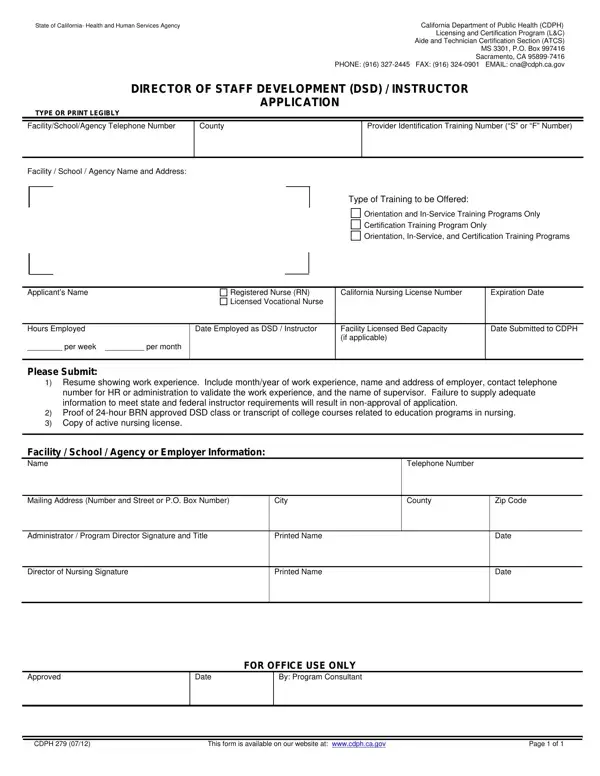
The CDPH 279 DSD/Instructor Application is the required submission for California healthcare professionals applying for certification as a Director of Staff Development (DSD) or Instructor. The California Department of Public Health's Licensing and Certification Program reviews this form to confirm that applicants meet state and federal standards for leading health education and training programs in licensed facilities, including skilled nursing facilities, intermediate care facilities, schools, and agencies.

Who must apply: Any registered nurse (RN) or licensed vocational nurse (LVN) who plans to deliver orientation, in-service training, or certification programs at a licensed California healthcare facility must hold CDPH DSD or Instructor approval. The approval process begins with a complete Form 279 packet submitted to CDPH.

Required credentials and documents: Your packet must include your current RN or LVN nursing license, proof of completing a 24-hour Board of Registered Nursing (BRN) approved DSD course or equivalent college transcripts, personal identification, a full employment history, a description of the training programs you plan to lead, and a comprehensive resume documenting your relevant work experience in healthcare education.

Submission and review: Send your complete packet to the CDPH Licensing and Certification Program office. Incomplete submissions will not be approved. Allow several weeks for review. Once approved, you may begin serving in a DSD or Instructor role at licensed California facilities. Related forms such as the CDPH 278B form and the healthcare practitioner credentialing application may also be required depending on your facility type.

QuestionAnswer
Form NameCdph Dsd Application Form
Form Length1 pages
Fillable?No
Fillable fields0
Avg. time to fill out15 sec
Other namesdsd application form, cdph 279, cdph270, dsd application form 2019

How to Edit Cdph Dsd Application Form Online for Free

To fill out the DSD/Instructor Application online, no additional software is needed. Open the FormsPal PDF editor in your browser, enter your information, and download or print the finished document for submission to the CDPH Licensing and Certification Program.

Steps to complete the form using the FormsPal editor

Step 1: Click the "Get Form" button above to open the PDF editor. The tool loads the form instantly in your browser with the full document visible.

Step 2: Use the editor to type in your information, adjust existing entries, and add your signature. The editor supports all fields in this document.

The DSD form includes the following fields to complete:

1. Begin by filling in all required applicant information in the first section. Review each field carefully before moving to the next.

Completing section 1 fields of the DSD Instructor Application form

2. In the second section, enter details for these fields: Facility, School, or Agency; Telephone Number; Mailing Address, City, County, and Zip Code; Administrator or Program Director name; Director of Nursing Signature; Printed Name; Date; and the FOR OFFICE USE ONLY section.

Completing section 2 of the DSD Instructor Application form

The Printed Name field in section 2 is a common area for errors. Double-check your entry before saving.

Step 3: Click "Done" to finalize the form. Download the completed document as a PDF, then mail your full packet to the CDPH Licensing and Certification Program for review.

Related CDPH forms for DSD and Instructor applicants

Depending on your facility and role, you may also need to submit these related California Department of Public Health forms:

Common questions about the DSD application process

Who needs to submit Form 279? Any RN or LVN in California who wants to provide orientation, in-service training, or certification programs at a licensed healthcare facility must receive DSD or Instructor approval from CDPH before beginning those duties.

What happens if my packet is incomplete? CDPH will not approve incomplete applications. Include all required credentials, employment history, educational background, and signatures before submitting your packet.

Can I complete the form online? Yes. Use the FormsPal editor above to fill in and download the form. Print the finished document and include it in your mailed application packet to CDPH.